#volatility2 #endpoint-forensics #ldrmodules #injected-dll #cyberdefender-medium #reviewed #finished
Scenario
A multinational corporation has suffered a cyber attack, resulting in the theft of sensitive data. The attack employed a previously unseen variant of the BlackEnergy v2 malware. The company’s security team has obtained a memory dump from the infected machine and is seeking your expertise as a SOC analyst to analyze the dump in order to understand the scope and impact of the attack.
Questions
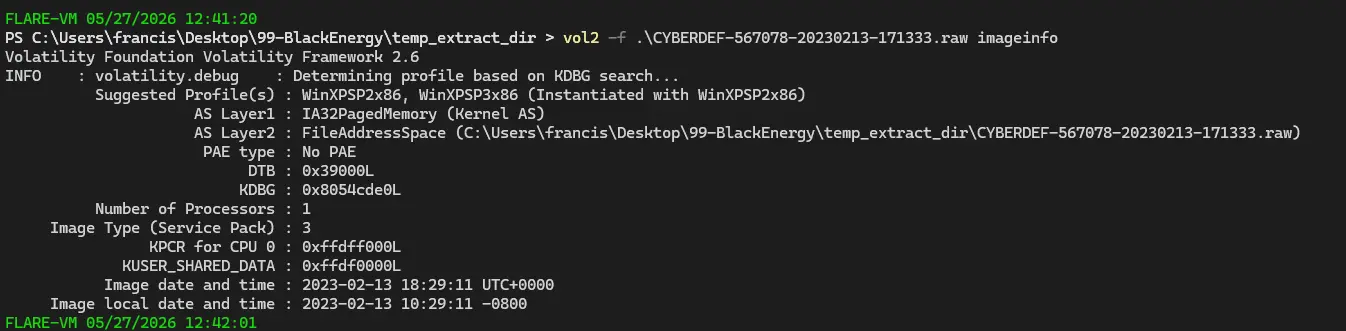
Which volatility profile would be best for this machine?
This is trivially answered by just using imageinfo. This is also the necessary first step as without a profile, volatility cannot properly map the memory locations.
How many processes were running when the image was acquired?
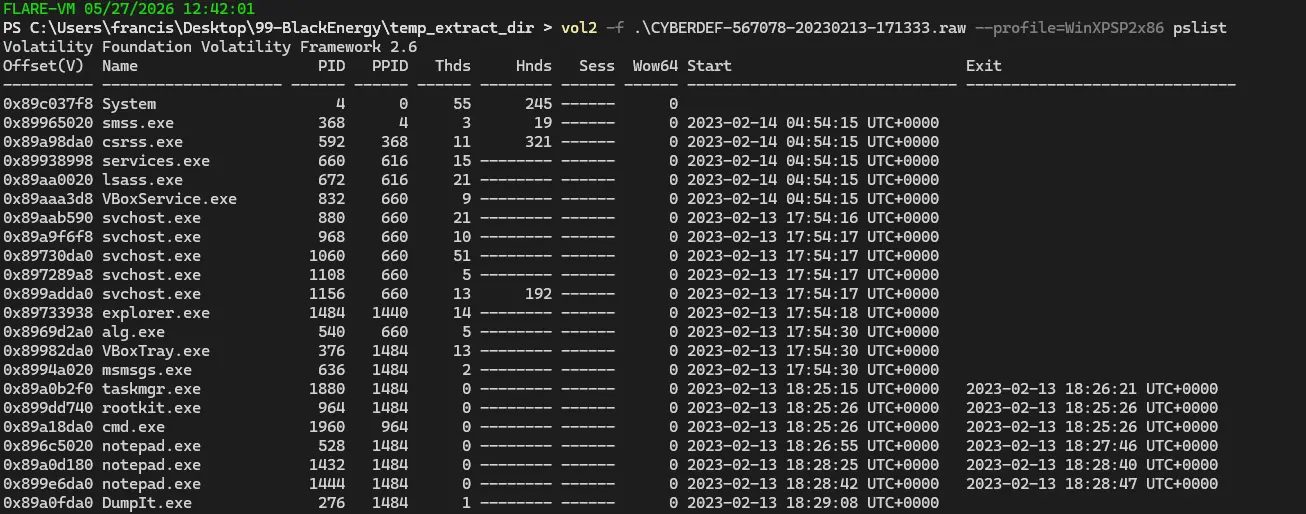
After getting the profile, we run a pslist to see all the processes.
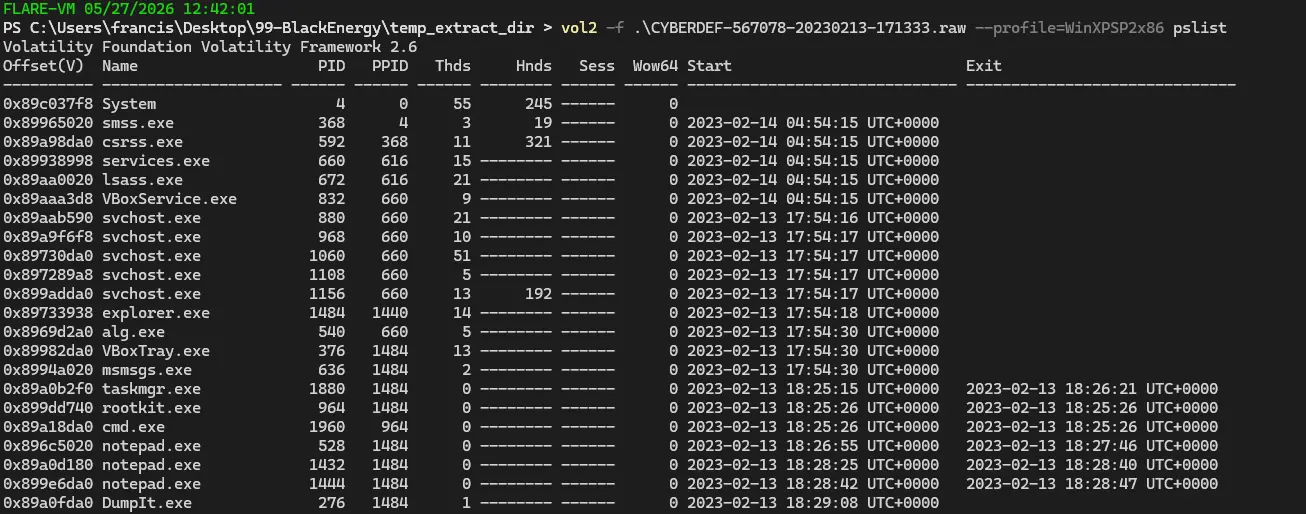
Notice that there are 25 processes but 6 of them were exited as shown by the timestamp on the right side. Therefore, we only have 19 running processes at the time of image dump.
What is the process ID of cmd.exe?
We can see from the pslist output that the PID is 1960.
Which process shows the highest likelihood of code injection?
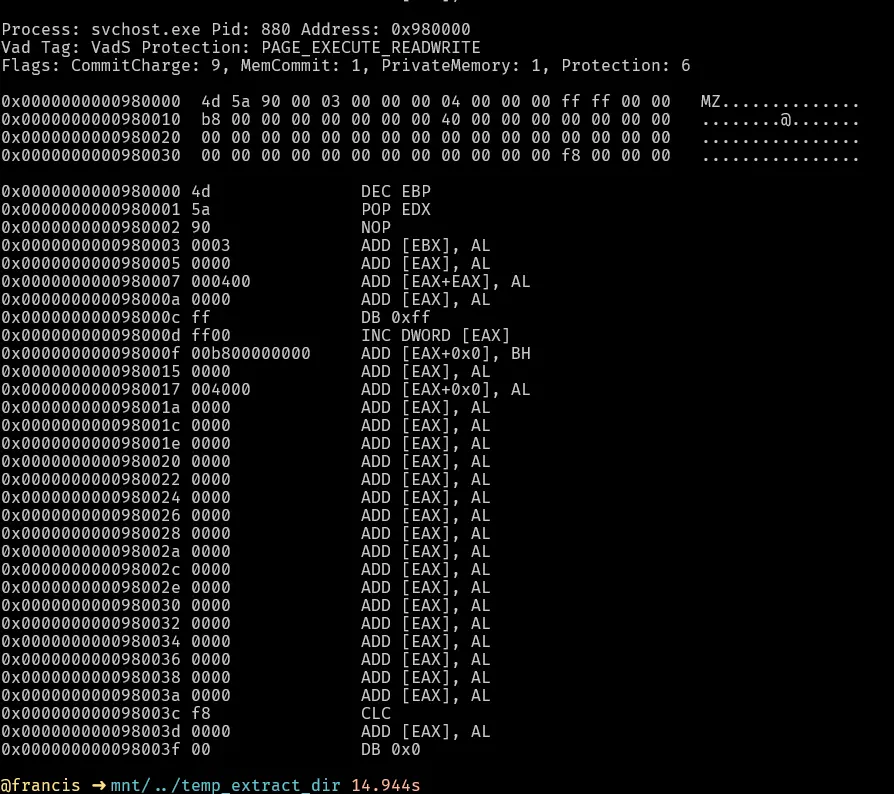
For this, we use a plugin for volatility called malfind that helps us to find potentially injected code or hidden malware in a memory image by scanning process memory.
There will be some processes that are legitimate that get flagged but there will be one that is highly suspect.
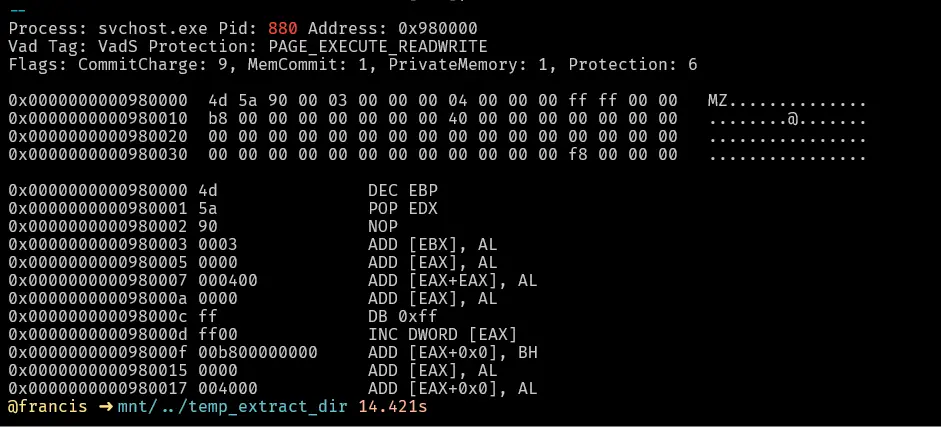
This svchost.exe is highly suspect because of the following:
- The type of memory region is
VadSwhich means it is private/anonymous memory not backed by a file. This means the memory region was allocated privately (e.g. via VirtualAlloc) with no corresponding file on disk. - This region of memory has the magic bytes
MZwhich is the file signature of a Windows executable file. - The area of memory has RWX permissions; legitimate loaded modules will usually only have 2 of the 3. Having all three is highly suspect.
These 3 reasons together heavily imply that there was code injected into
svchost.exe.svchost.exeis an attractive injection target because it runs asSYSTEM, the highest privilege on Windows, and the injected code will inherit those privileges.
There is an odd file referenced in the recent process. Provide the full path of that file.
To see what file is referenced by the above process, we check what handles of type File it was holding.
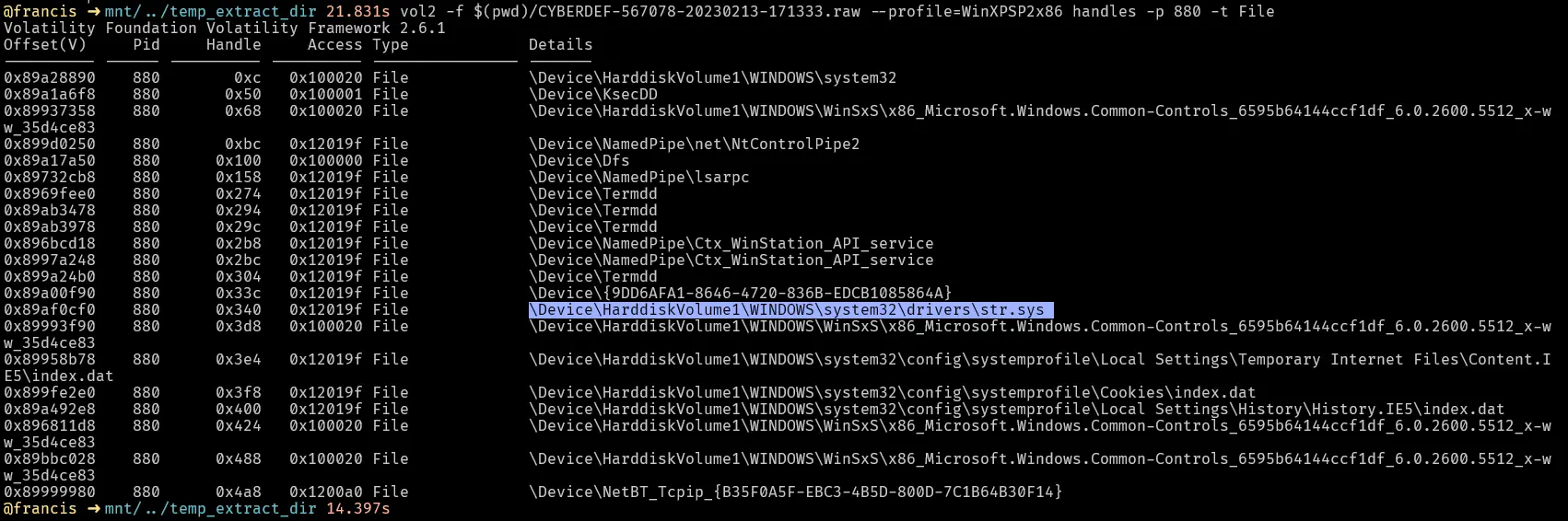
svchost should not be handling any sys files as sys files are kernel-mode device drivers and svchost runs in user-mode.
Therefore, svchost, which operates entirely in user-mode, should not be handling or loading a kernel-mode file.
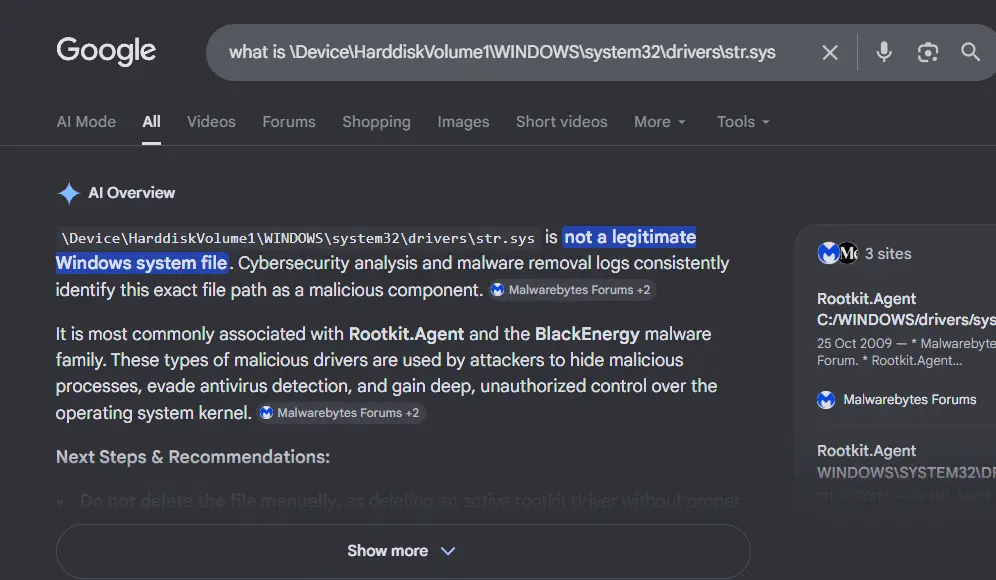
Furthermore, Googling this path quickly tells us that it is malware.
What is the name of the injected DLL file loaded from the recent process?
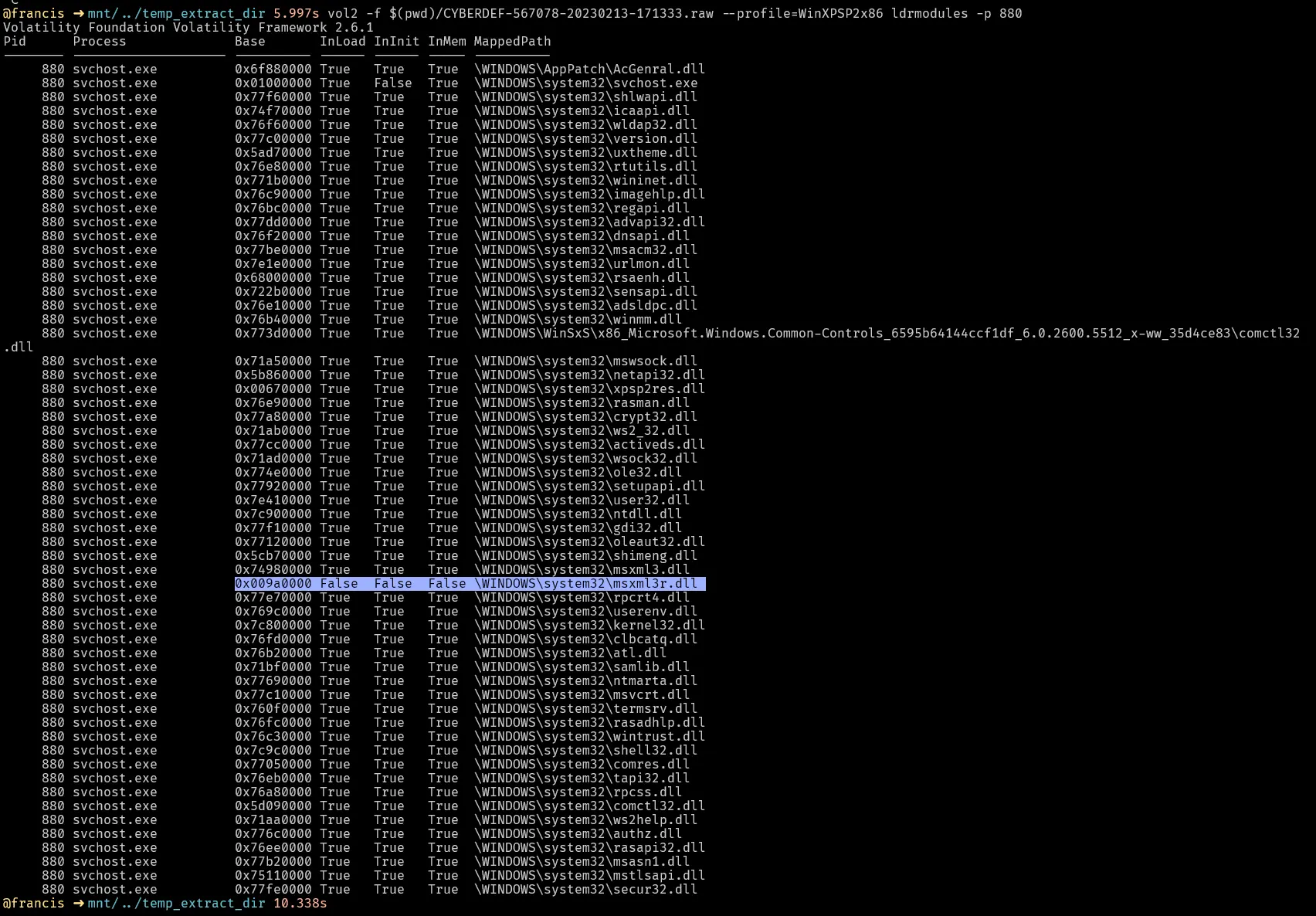
We use ldrmodules here instead of dlllist. DllList basically only reads the InLoadOrder linked list, which means injected DLLs will not show up. ldrmodules actually reads through the raw memory and finds the MZ magic bytes and also reads through all 3 linked lists. It compares the results of both the scan of the memory and reading the linked lists and reports discrepancies.
This DLL stands out because:
- InLoad = False → means that the Windows loader never recorded loading it
- InInit = False → means that this DLL was never properly initialized by Windows
- InMem = False → the DLL is not in the memory order list at all
What is the base address of the injected DLL?
We can find the address by using malfind.

This tells us the address is 0x980000.
Notes
Summary of The 3 PEB Loader Linked Lists
InLoadOrder
- Records DLLs chronologically as the Windows loader loads them
- Built from the Import Table at launch + any
LoadLibrary()calls at runtime - Answers: “What DLLs did Windows loader touch and when?”
ntdll.dll → kernel32.dll → advapi32.dll → ...
(first loaded)              (last loaded)
InMemOrder
- Records DLLs sorted by their base address in memory
- An index/lookup optimization so Windows doesn’t iterate to find where a DLL lives
- Answers: “Where does this DLL live in memory?”
0x5ad70000 → 0x6f880000 → 0x7c800000 → ...
(lowest address)           (highest address)
InInitOrder
- Records DLLs after their DllMain() constructor finishes
- Only DLLs that are fully set up and ready to use
- ntdll.dll is never here (no DllMain)
- Answers: “Which DLLs have finished constructing and are ready?”
kernel32.dll → advapi32.dll → ...
(finished DllMain first)
Together
| List | Analogy | Answers |
|---|---|---|
| InLoadOrder | Chronological arrival log | When did Windows load it? |
| InMemOrder | Desk location directory | Where is it in memory? |
| InInitOrder | “Ready to work” list | Has it finished setting up? |
The Forensics Takeaway
Legitimate DLL = appears in ALL 3 lists
Injected DLL   = missing from ALL 3 lists
                 but EXISTS in raw memory scan
                        ↓
               Bypassed Windows loader completely
                        ↓
                  = Confirmed injection
Completion