#cyberdefender-easy #threat-hunting #splunk #finished #reviewed
Scenario
You are a Threat Hunter working for a cybersecurity consulting firm. One of your clients has been recently affected by a ransomware attack that caused the encryption of multiple of their employees’ machines. The affected users have reported encountering a ransom note on their desktop and a changed desktop background. You are tasked with using Splunk SIEM containing Sysmon event logs of one of the encrypted machines to extract as much information as possible.
Investigation
Before we start querying, let’s check the facts and what possible leads we may have.
| # | Lead / Observation | Reasoning | Investigative Action |
|---|---|---|---|
| 1 | Sysmon is a Windows-only service | Since we were given Sysmon logs, the affected machines are confirmed to be Windows endpoints | Tailor all queries to Windows-specific artifacts (registry paths, .exe processes, Desktop folder structure, etc.) |
| 2 | Users reported a ransom note on the Desktop | The note is a file, and file writes are logged by Sysmon EventCode 11 (FileCreate) | Query EventCode=11 with TargetFilename containing Desktop to find the note’s exact filename and the process (Image) that dropped it |
| 3 | Users reported a changed desktop background | On Windows, wallpaper changes require modifying registry keys, logged by Sysmon EventCode 13 (RegistryEvent) | Query EventCode=13 with TargetObject containing Control Panel\Desktop\Wallpaper to find the process that made the change and the new wallpaper path (Details) |
Let’s start answering the questions.
Questions
Q1 — filename of ransom note
To begin your investigation, can you identify the filename of the note that the ransomware left behind?
We know that event id 11 is FileCreate for sysmon and the ransom note was found on the Desktop.
Using this we can create the following query which performs the following
- Looks for all logs with event id 11 and
TargetFilenamematching the pattern*Desktop*\\*.txt - Isolates the filename using
rex - Performs a
matchretrievingtxtfiles that contain any of the common terms included in a ransom note filename
index=revil sourcetype=REvil winlog.event_id=11 winlog.event_data.TargetFilename="*Desktop*\\*.txt"
| rex field=winlog.event_data.TargetFilename "\\\\(?<filename>[^\\\\]+)$"
| where match(filename, "(?i).*(readme|instruction|decrypt|unlock|recovery).*")
Which gives us the following results
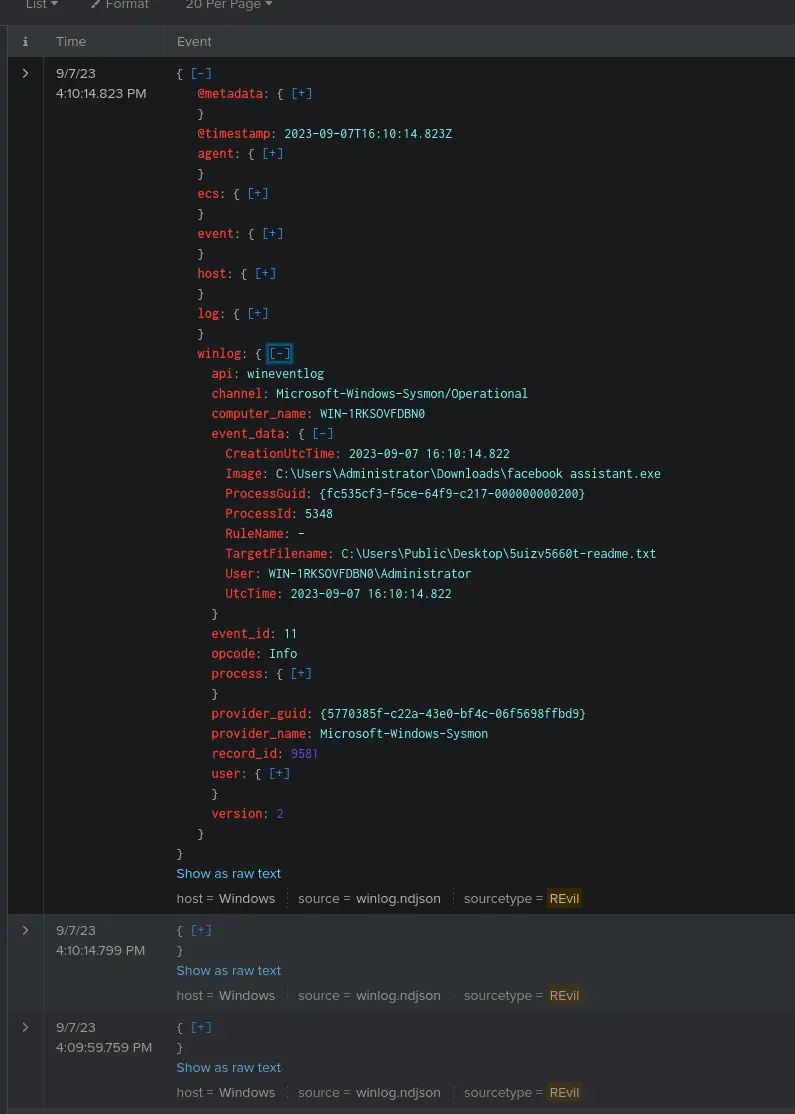
Results of query
3 logs are shown as a result and if we look at the TargetFilename we find that the txt is prefixed by a random short UID.
The file location is also on Desktop and if we aggregate by count on TargetFilename,hostname and @timestamp.
We will see that the same file was actually dropped into every Desktop directory for every user at around the same time on the same endpoint.
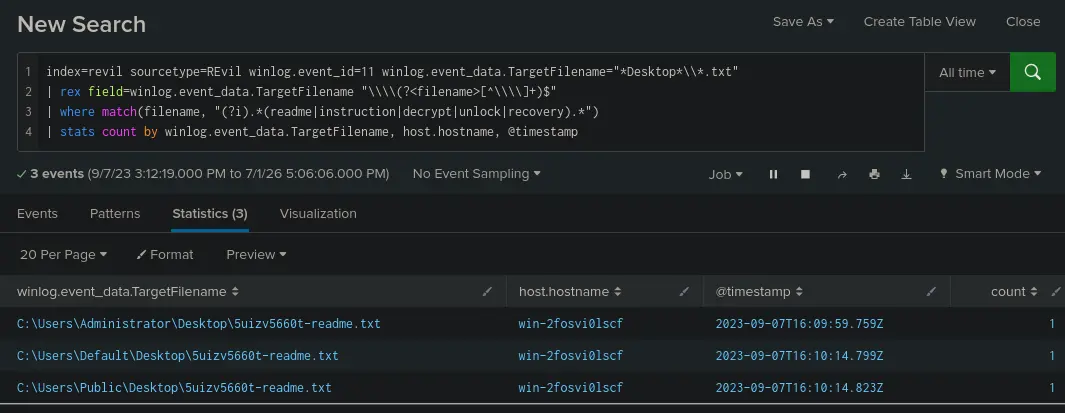
Aggregate result
This fits the description of what was described in our scenario and has characteristics of a typical ransom note.
Therefore, the answer is 5uizv5660t-readme.txt
Answer: 5uizv5660t-readme.txt
Q2 — Process ID
After identifying the ransom note, the next step is to pinpoint the source. What’s the process ID of the ransomware that’s likely involved
We already found the event where the ransom note is dropped.
We can check what process did by just looking under event_data.
Let’s reuse our query from the previous question
index=revil sourcetype=REvil winlog.event_id=11 winlog.event_data.TargetFilename="*Desktop*\\*.txt"
| rex field=winlog.event_data.TargetFilename "\\\\(?<filename>[^\\\\]+)$"
| where match(filename, "(?i).*(readme|instruction|decrypt|unlock|recovery).*")
Which gives us
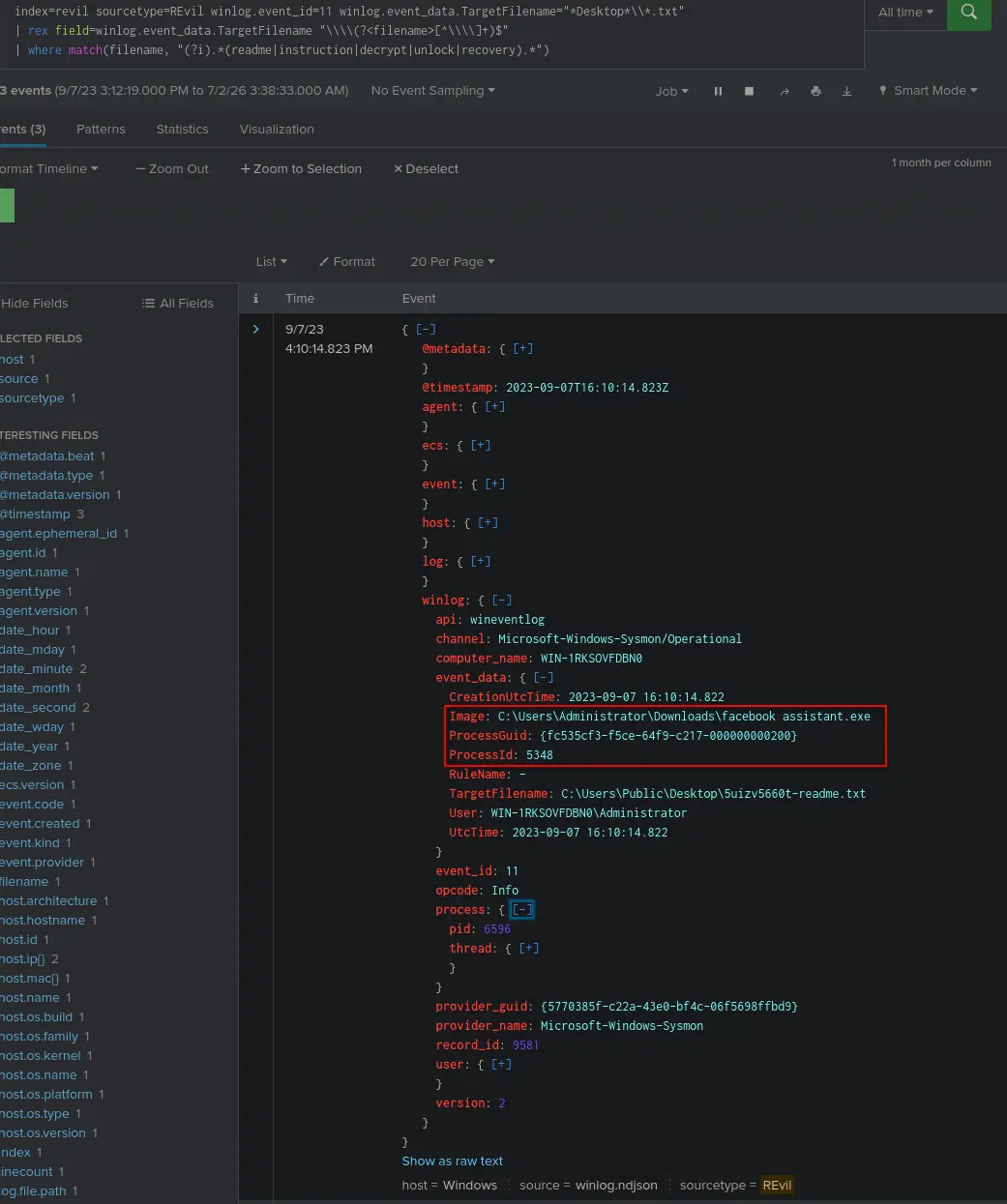
Finding ProcessID
Therefore, our answer is 5348.
Answer: 5348
Q3 — Ransomware’s executable file
Having determined the ransomware’s process ID, the next logical step is to locate its origin. Where can we find the ransomware’s executable file?
The executable file is seen under the Image in the previous question.
Therefore, our answer is C:\Users\Administrator\Downloads\facebook assistant.exe
Answer: C:\Users\Administrator\Downloads\facebook assistant.exe
Q4 — Command used
Now that you’ve pinpointed the ransomware’s executable location, let’s dig deeper. It’s a common tactic for ransomware to disrupt system recovery methods. Can you identify the command that was used for this purpose?
To identify this we need to know what event id to look for.
It is common for malware to spawn powershell.exe or cmd.exe processes during their execution for various objectives.
For ransomware specifically, it is common to utilise living off the land techniques to disable defenses and hinder recovery.
We can expect to find the malware executable spawning children processes that reflect this.
Therefore, we should construct our query such that
- We are looking for event id 1 which is the event for the creation of a process
ParentProcessGUIDas{fc535cf3-f5ce-64f9-c217-000000000200}, which is theProccessGUIDof the identified malware executable
[!NOTE] ProcessId is reused by Windows, so ProcessGuid/ParentProcessGuid should be used instead for reliable correlation in larger datasets.
This gives us the query
index=revil sourcetype=REvil winlog.event_id=1 winlog.event_data.ParentProcessGuid={fc535cf3-f5ce-64f9-c217-000000000200}
This returns a single log in our dataset which is the following,
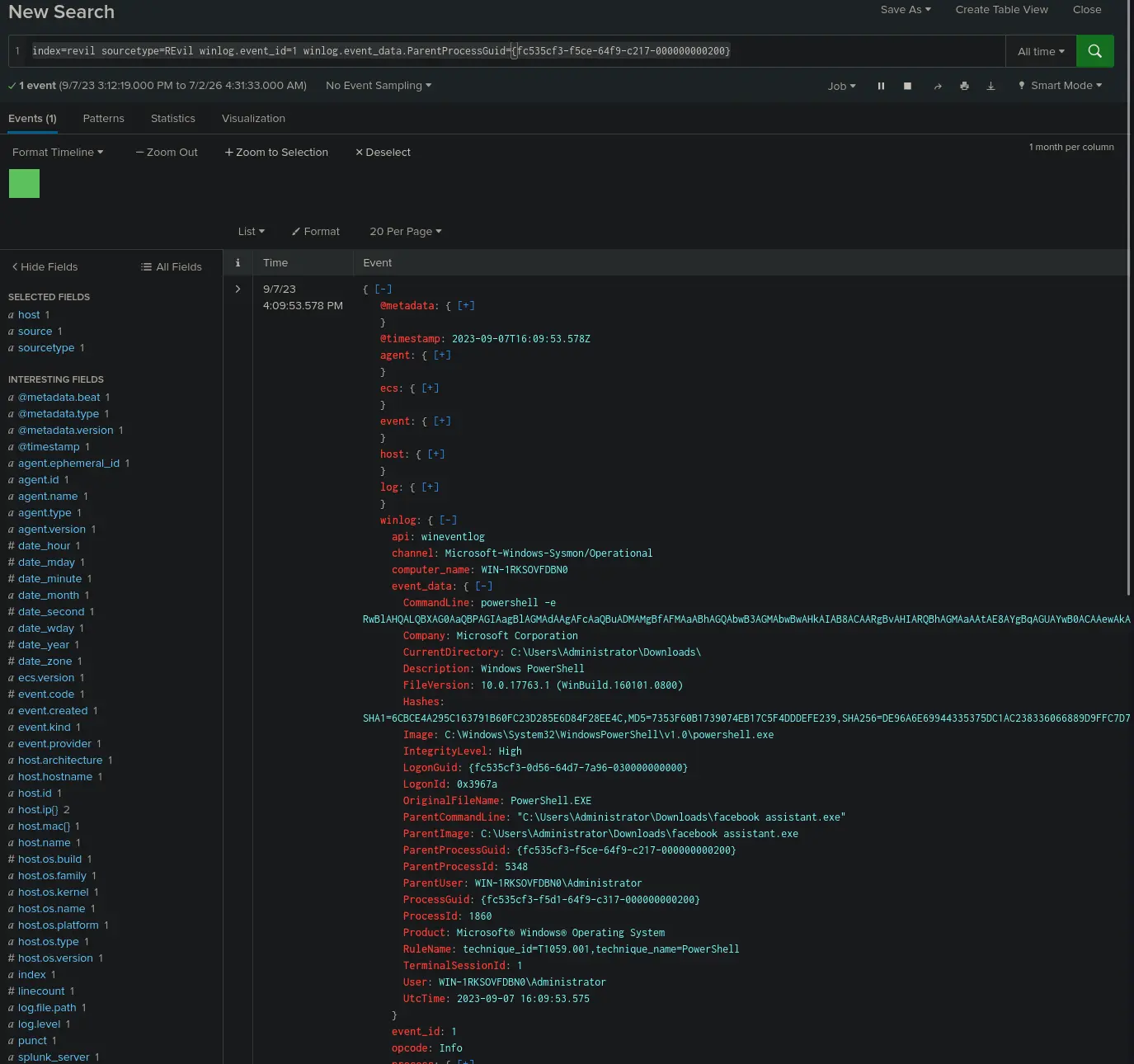
Malicious child process
Looks like the malware spawned a powershell.exe process and invoked it with the following CommandLine.
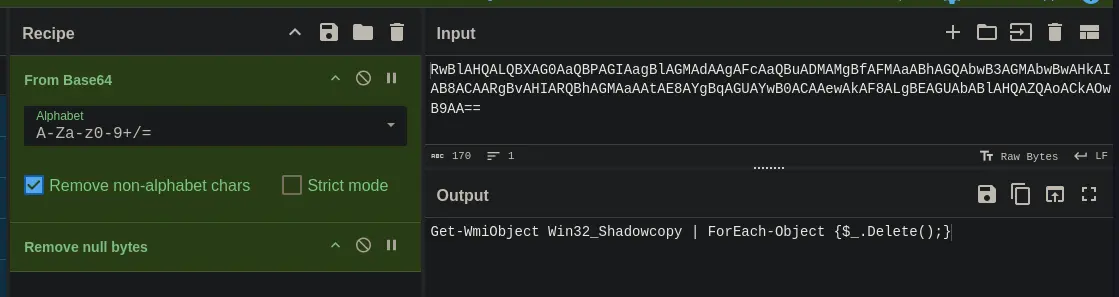
powershell -e RwBlAHQALQBXAG0AaQBPAGIAagBlAGMAdAAgAFcAaQBuADMAMgBfAFMAaABhAGQAbwB3AGMAbwBwAHkAIAB8ACAARgBvAHIARQBhAGMAaAAtAE8AYgBqAGUAYwB0ACAAewAkAF8ALgBEAGUAbABlAHQAZQAoACkAOwB9AA==
powershell was invoked with the -e flag which tells it to take in a Base64-encoded string as a command to execute.
If we decode the string we will get the following,
Decoding base64 string
This command deletes every shadow copy snapshot found on the system. A shadow copy is a point-in-time snapshot of a volume’s data, and by deleting all of them, the ransomware ensures the victim has no built-in means of recovering their data. Thereby, leaving payment of the ransom as the only apparent option.
Answer: Get-WmiObject Win32_Shadowcopy | ForEach-Object {$_.Delete();}
Q5 — SHA256 hash of executable
As we trace the ransomware’s steps, a deeper verification is needed. Can you provide the sha256 hash of the ransomware’s executable to cross-check with known malicious signatures?
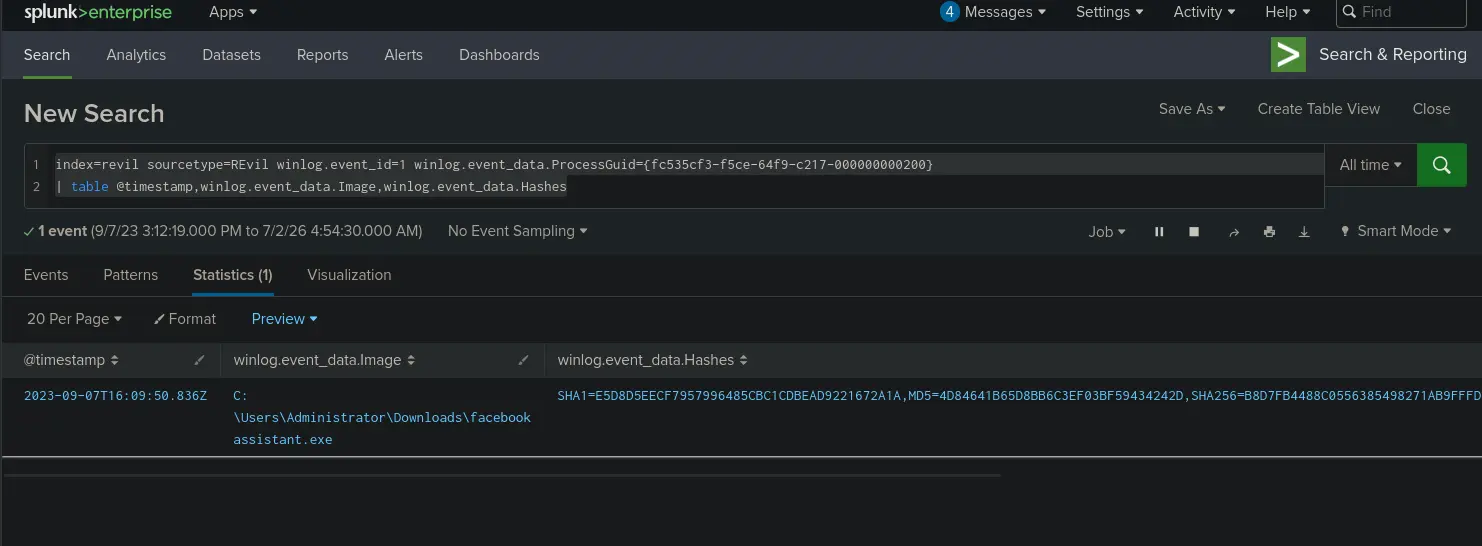
To retrieve the SHA256 hash of the executable we just need to track down the process creation log for the identified malware.
We already have the malware’s ProcessGuid so we can just use the query,
index=revil sourcetype=REvil winlog.event_id=1 winlog.event_data.ProcessGuid={fc535cf3-f5ce-64f9-c217-000000000200}
| table @timestamp,winlog.event_data.Image,winlog.event_data.Hashes
Which gets us,
Returned table
Then under winlog.event_data.Hashes we find
SHA1=E5D8D5EECF7957996485CBC1CDBEAD9221672A1A,
MD5=4D84641B65D8BB6C3EF03BF59434242D,
SHA256=B8D7FB4488C0556385498271AB9FFFDF0EB38BB2A330265D9852E3A6288092AA,
IMPHASH=C686E5B9F7A178EB79F1CF16460B6A18
Therefore, our answer is B8D7FB4488C0556385498271AB9FFFDF0EB38BB2A330265D9852E3A6288092AA
Answer: B8D7FB4488C0556385498271AB9FFFDF0EB38BB2A330265D9852E3A6288092AA
Q6 — Onion domain
One crucial piece remains: identifying the attacker’s communication channel. Can you leverage threat intelligence and known Indicators of Compromise (IoCs) to pinpoint the ransomware author’s onion domain?
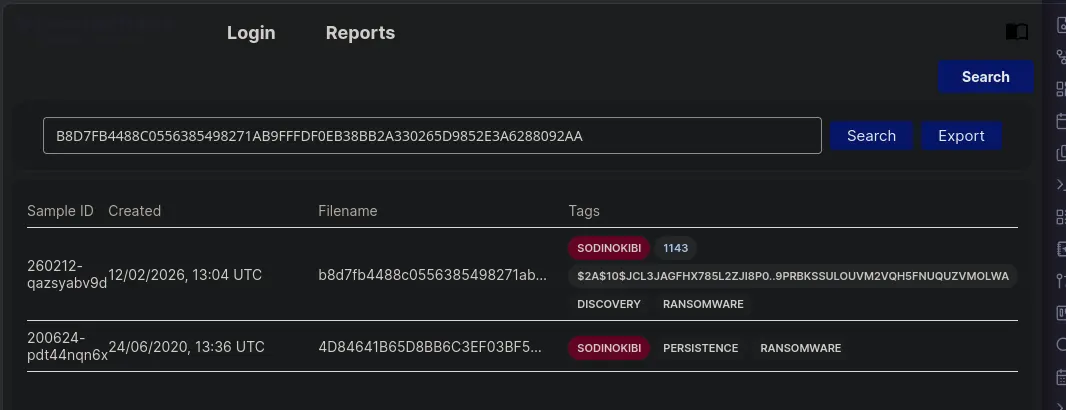
Given the hash of the malware executable, we can try to find reports of this malware through tria.ge and any.run.
Let’s try searching on tria.ge .
Searching malware hash on tria.ge
We have two hits.
Let’s click into the first one and see if we can find any hints on the ransomware author’s onion domain.
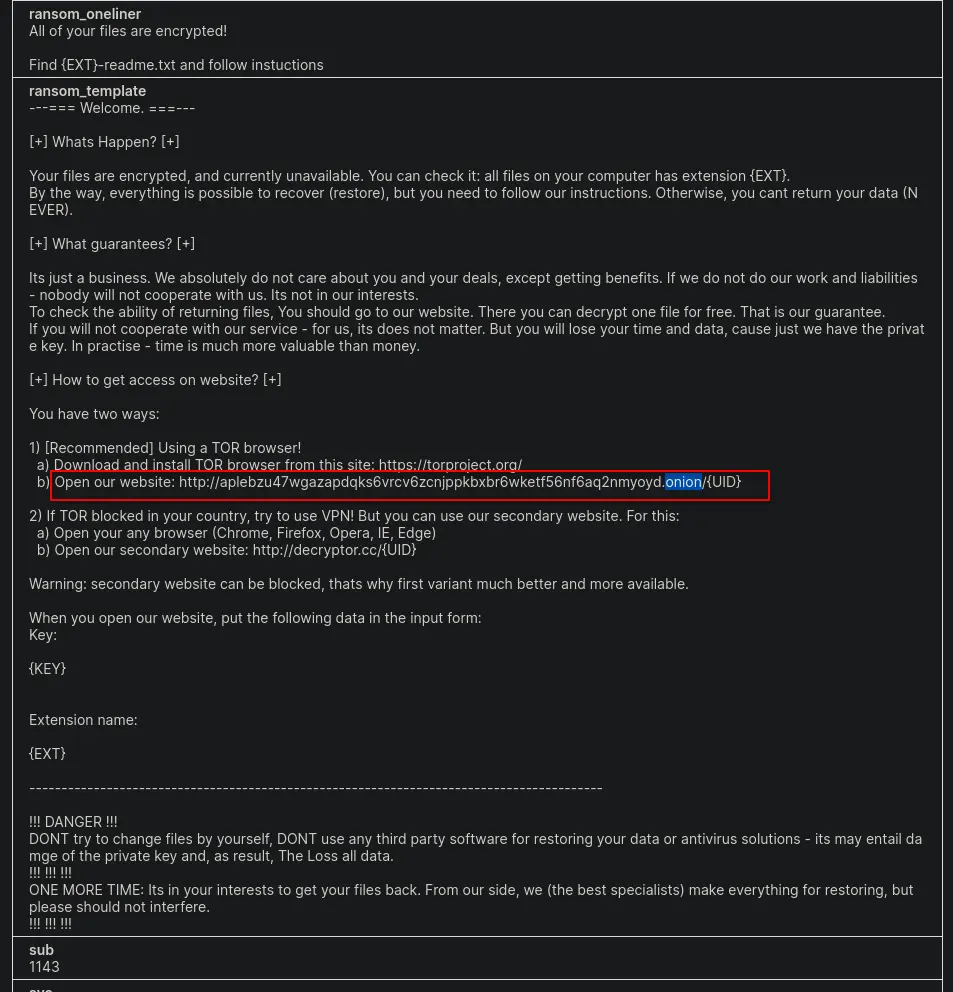
If we Ctrl+F for .onion we will find the ransom template that the threat actors use.
Inside this template are instructions on how to navigate to their onion domain to restore the victim’s data.
Ransom template
Therefore, our answer is aplebzu47wgazapdqks6vrcv6zcnjppkbxbr6wketf56nf6aq2nmyoyd.onion
Answer: aplebzu47wgazapdqks6vrcv6zcnjppkbxbr6wketf56nf6aq2nmyoyd.onion
Completion
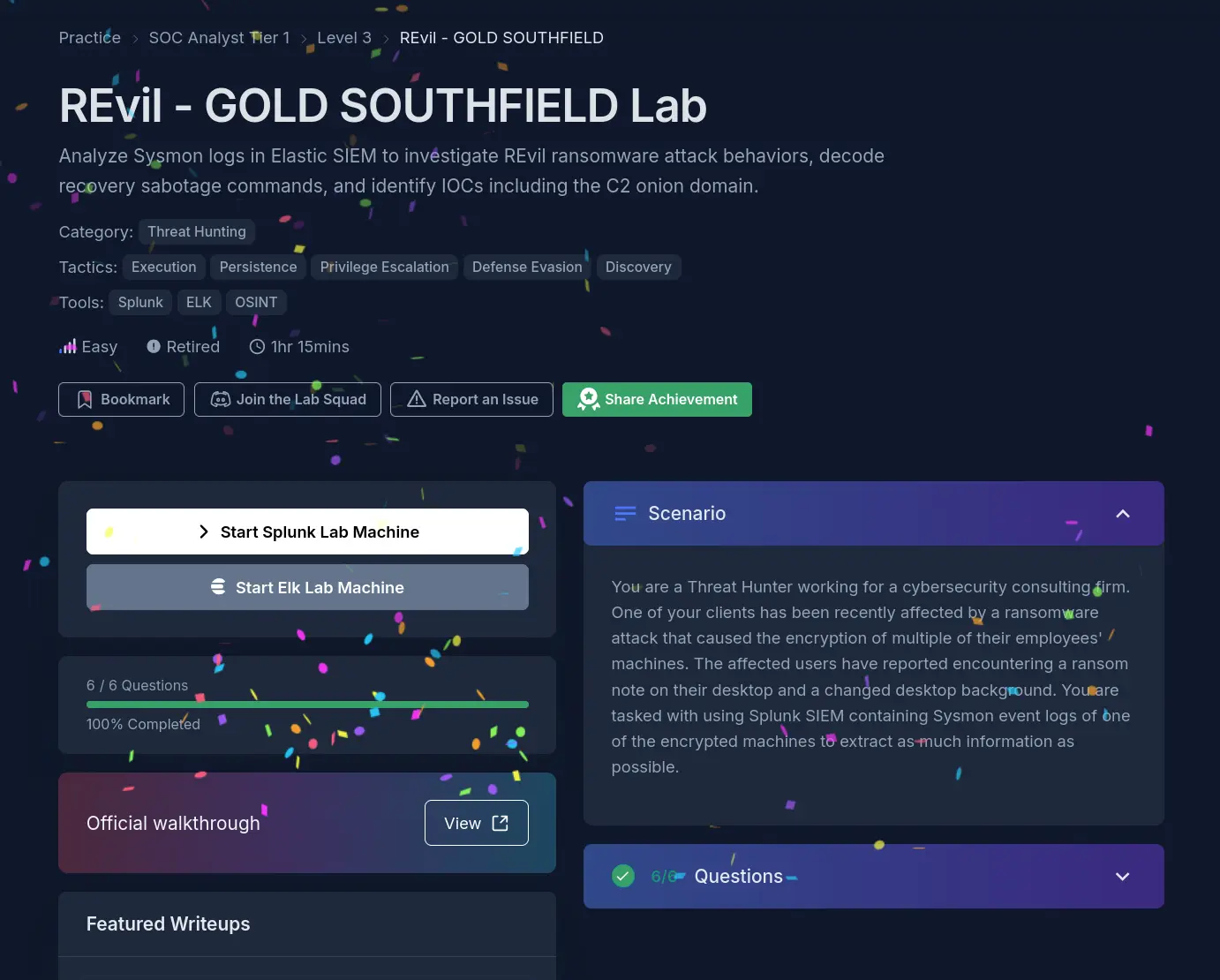
I successfully completed REvil - GOLD SOUTHFIELD Blue Team Lab at @CyberDefenders! https://cyberdefenders.org/blueteam-ctf-challenges/achievements/francisvil3213/revil-gold-southfield/