#network-forensics #wireshark #cyberdefender-easy #finished #reviewed #CyberDefenders #CyberSecurity #BlueYard #BlueTeam #InfoSec #SOC #SOCAnalyst #DFIR #CCD #CyberDefender
Scenario
An alert from the Intrusion Detection System (IDS) flagged suspicious lateral movement activity involving PsExec. This indicates potential unauthorized access and movement across the network. As a SOC Analyst, your task is to investigate the provided PCAP file to trace the attacker’s activities. Identify their entry point, the machines targeted, the extent of the breach, and any critical indicators that reveal their tactics and objectives within the compromised environment.
Questions
Investigation
Let’s first look over some basic statistics to get an overview of the capture.
Let’s start with Statistics > Endpoints.
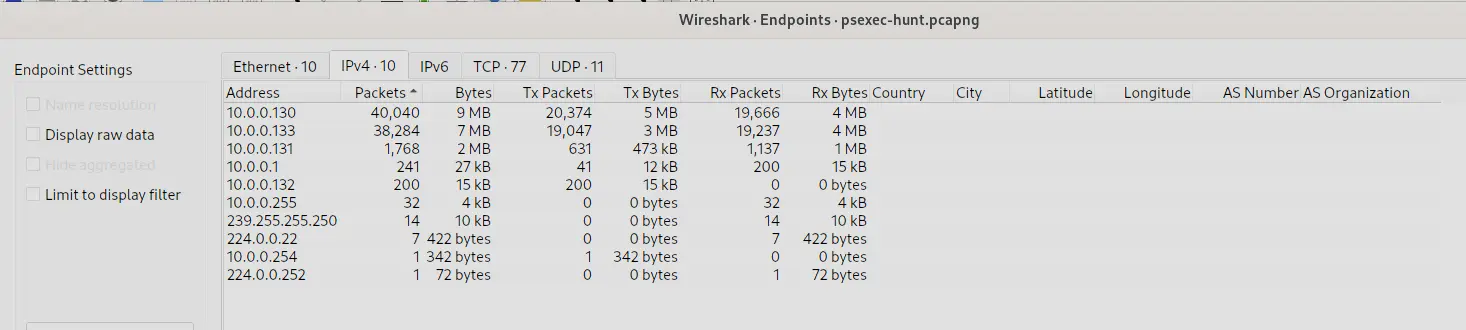
Endpoints statistics sorted by packet count
We can see that majority of the traffic is concentrated around 2 IPs which are
10.0.0.13010.0.0.133
Let’s continue under Statistics > Conversations.
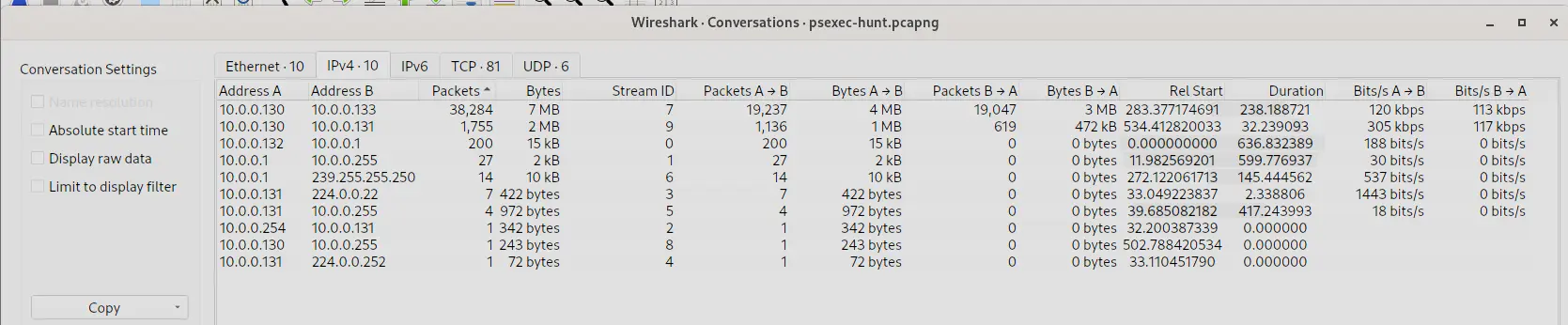
Conversations statistics sorted by packet count
We can also see that most of the traffic is just 10.0.0.130 communicating with 10.0.0.133.
Furthermore, notice how 10.0.0.130 also communicates with 10.0.0.131.
We should probably start our investigation on 10.0.0.130 because this IP shows up multiple times in the conversations with the highest traffic.
Let’s continue in Statistics > I/O Graphs.
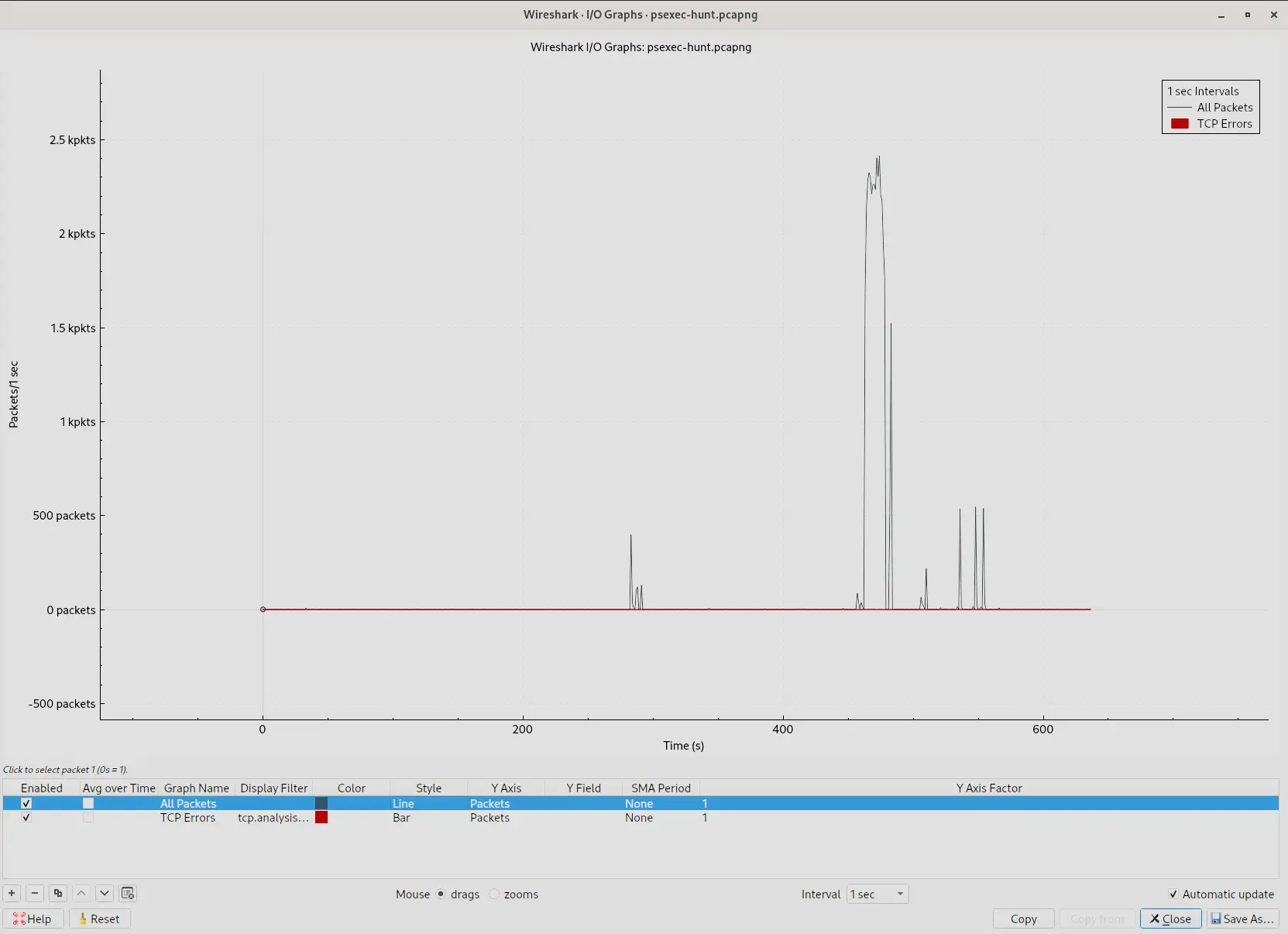
I/O graph of the capture
The captured traffic is mostly flat in the beginning then spikes extremely high. After which it returns to much lower traffic with a few more shorter spikes after. This burst of sudden activity is highly suspicious.
Let’s conclude our initial triage with Statistics > Protocol Hierarchy.
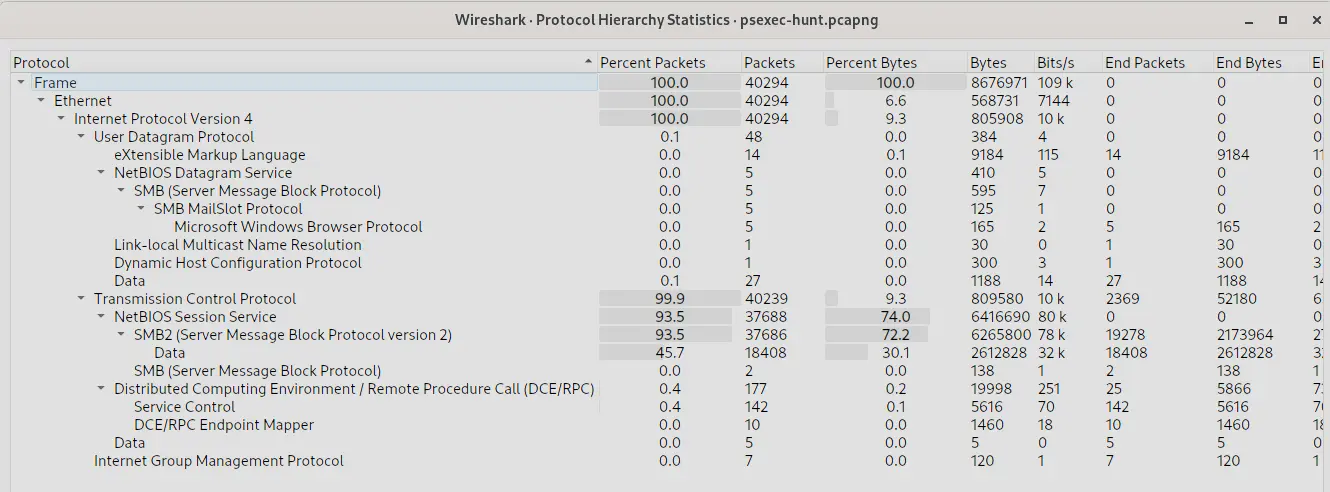
Protocol hierarchy statistics
This tells us the following,
- Almost all packets is TCP
- Almost all packets is SMB2
- SMB2 traffic accounts for ~70% of all bytes
- However, SMB2 traffic that carries actual file read/write payload is only 30% of all bytes.
Given, this information, my initial hypothesis would be that a malicious actor at 10.0.0.130 is enumerating and exploiting SMB2 services.
Let’s investigate and see if what I find confirms this hypothesis or not.
Q1 — Victim IP Address
To effectively trace the attacker’s activities within our network, can you identify the IP address of the machine from which the attacker initially gained access?
From our investigation, we know that majority of the traffic is SMB/SMB2 traffic.
We also know that 10.0.0.130 is involved in the two conversations with the highest traffic.
Let’s start by searching for SMB/SMB2 traffic for the IP 10.0.0.130 using the following filter,
ip.addr == 10.0.0.130 && (smb||smb2)
Which gives us,
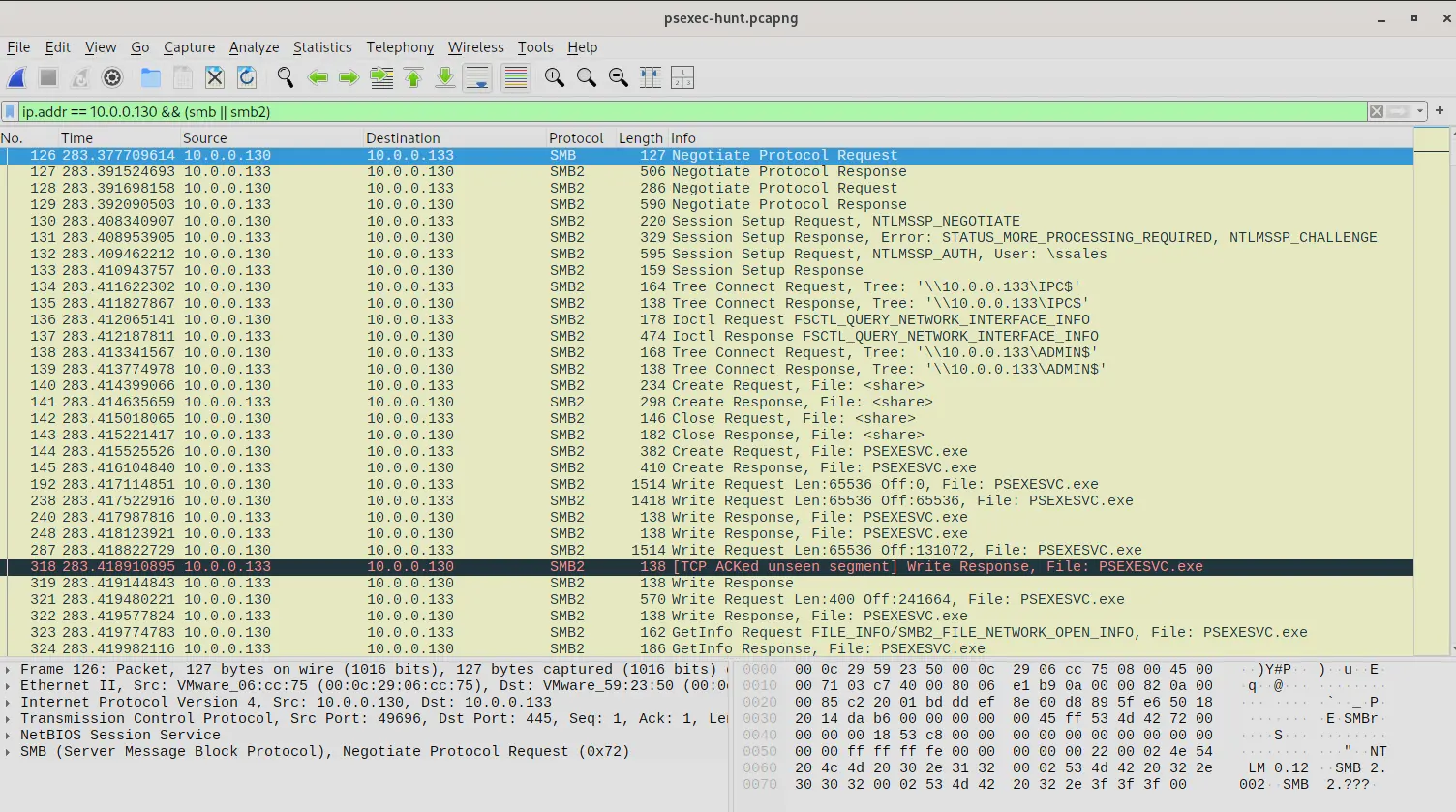
Wireshark output filtered for SMB/SMB2 traffic from 10.0.0.130
If we inspect the output we can tell that 10.0.0.130 is the endpoint and 10.0.0.133 is the SMB server.
This is evident when 10.0.0.133 responds with Session Setup Response and Tree Connect Response to the corresponding requests of 10.0.0.130.
If we inspect frame 132 which is the third step in the setup phase, we can see
- What user
10.0.0.130is authenticating as - What host name is
10.0.0.130 - What host name is
10.0.0.133Which we will see below,
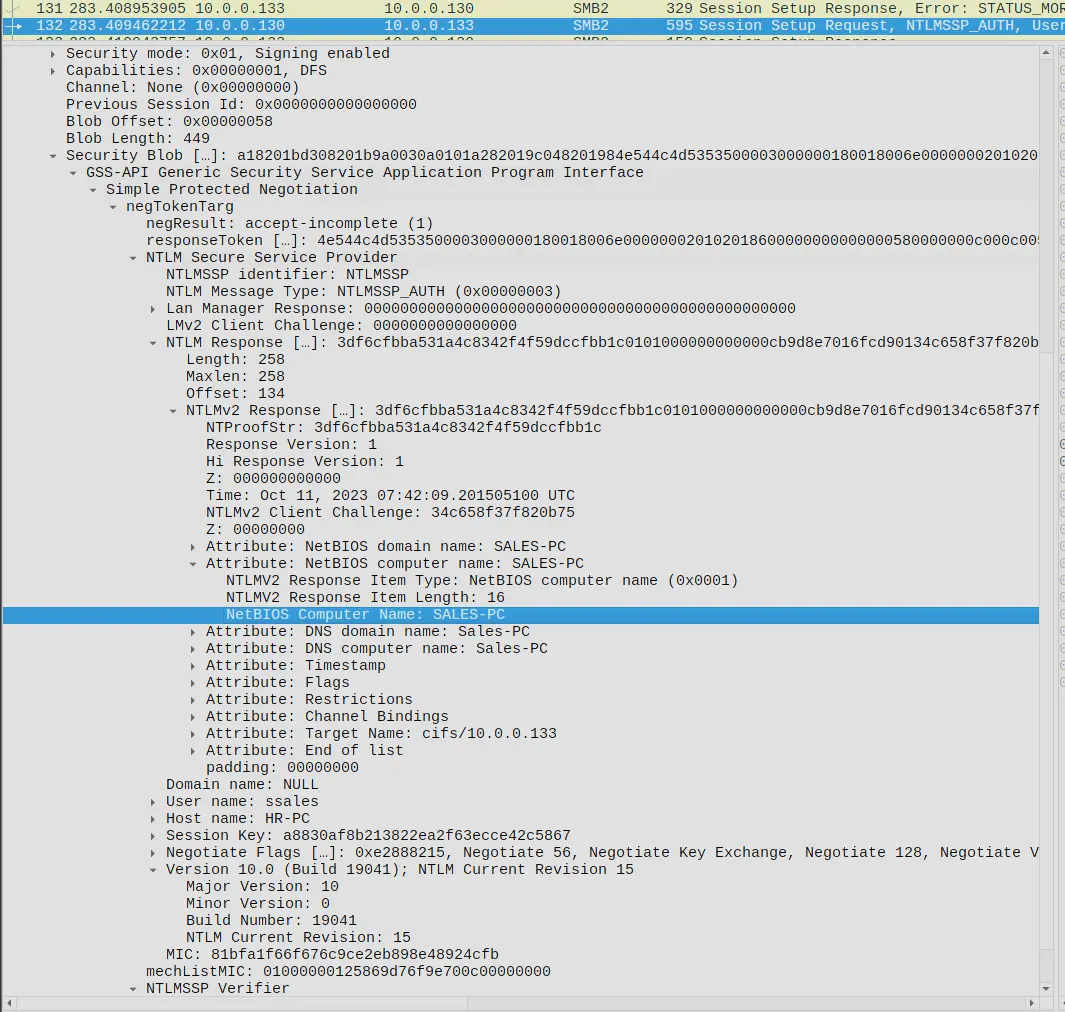
Frame 132 — NTLMv2 response revealing hostnames and the authenticating user
We can see in NTLMv2 response that the NetBIOS computer name of 10.0.0.133 is SALES-PC.
Furthermore, we will see under negTokenTarg that 10.0.0.130 is authenticating as ssales and has host name HR-PC.
However, what is interesting here is the domain name is set to null.
Furthermore, if we inspect the actions the authenticated user does , we will see the following,
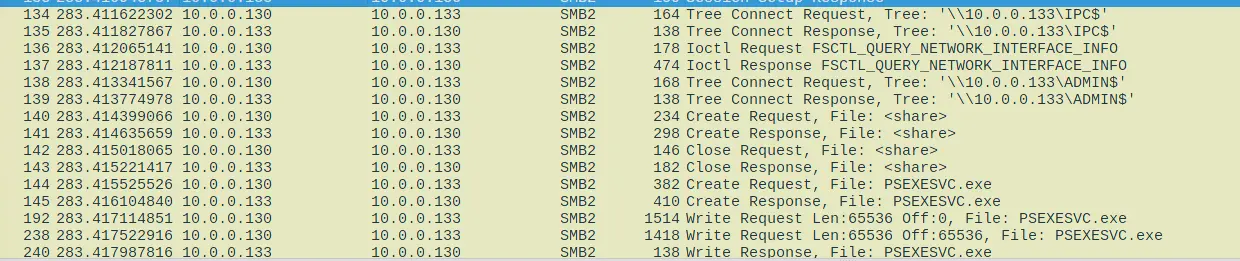
Actions conducted by the authenticated user on the ADMIN$ share
He navigates to the ADMIN$ share then uploads a PSEXECSVC.exe file which is the remote agent component of PsExec.
It is a remote administration tool.
Remember that this user,
- Authenticated with a null domain (Known indicator of suspicious/pass-the-hash authentication)
- Authenticated as user
ssalesonSALE-PCfromHR-PC - Accessed an
ADMIN$only share then uploaded aPSEXECSVC.exeto it This is highly suspicious as it is characteristic of lateral movement using psexec and is consistent with the alert flagged in the IDS in the provided scenario.10.0.0.130is the machine that the attacker first gained access.
Answer: 10.0.0.130
Q2 — Hostname of Machine Attacker Pivoted To
To fully understand the extent of the breach, can you determine the machine’s hostname to which the attacker first pivoted?
We saw this earlier in frame 132 when the attacker was establishing a session with the target machine.
The target machine host name is SALES-PC.
Answer: SALES-PC
Q3 — Username Used for Authentication
Knowing the username of the account the attacker used for authentication will give us insights into the extent of the breach. What is the username utilized by the attacker for authentication?
Similarly, we saw this already in frame 132 where the attacker authenticated with ssales.
Answer: ssales
Q4 — Service Executable
After figuring out how the attacker moved within our network, we need to know what they did on the target machine. What’s the name of the service executable the attacker set up on the target?
We saw this in frames 144 and 145 where after establishing a tree connect, the attacker performs a create request for PSEXESVC.exe.
We can also check this in ZUI using the following filter
_path == "smb_files"
| cut ts,id.orig_h,id.resp_h,action,path,name,size
| sort ts
Which gives us,
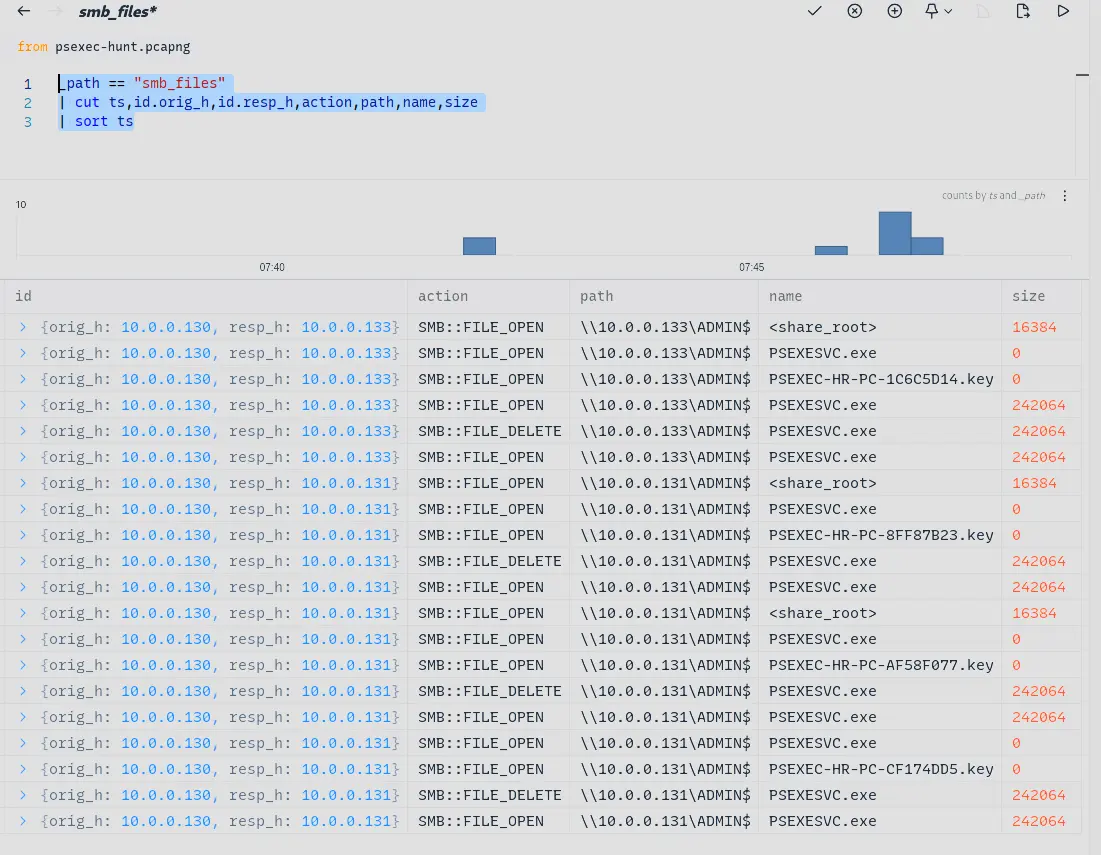
ZUI output showing SMB file creation events across targeted machines
We can see that the attacker creates the file on 10.0.0.133.
Furthermore, we can see the attacker also creates the file on 10.0.0.131.
Also, notice both 10.0.0.131 and 10.0.0.133 has a PSEXEC-HR-PC-*.key file create on their ADMIN$ SMB shares?
That is evidence that the attacker actually managed to open multiple interactive sessions on these machines.
You can also see the self cleaning behavior of PSEXESVC.exe exhibits after a remote session closes.
Answer: PSEXECSVC.exe
Q5 — Target Network Share
We need to know how the attacker installed the service on the compromised machine to understand the attacker’s lateral movement tactics. This can help identify other affected systems. Which network share was used by PsExec to install the service on the target machine?
From both our ZUI output as well as Wireshark output we can see that the attacker is targeting the ADMIN$ share.
Answer: ADMIN$
Q6 — Network Share Used for Communication
We must identify the network share used to communicate between the two machines. Which network share did PsExec use for communication?
Notice how in Wireshark, every time the attacker wants to use the shell and we see the subsequent traffic corresponding to that usage, we will see the attacker complete a Tree Connect request and response to the network share IPC$?
This is a hard requirement for the shell to even work and IPC$ stands for Inter Process Communication.
It is a hidden share that is not mapped to any folder or drive and is instead only used to purely exposed named pipes.
These named pipes are created and used by the shell instantiated by PSEXESVC.exe
Furthermore, the attacker has to renegotiate the Tree Connect to IPC$ each time they invoke the shell.
This is why you see 4 separate session keys being created in our ZUI output which corresponds to the 4 times the attacker had to re-negotiate the Tree Connect to IPC$.
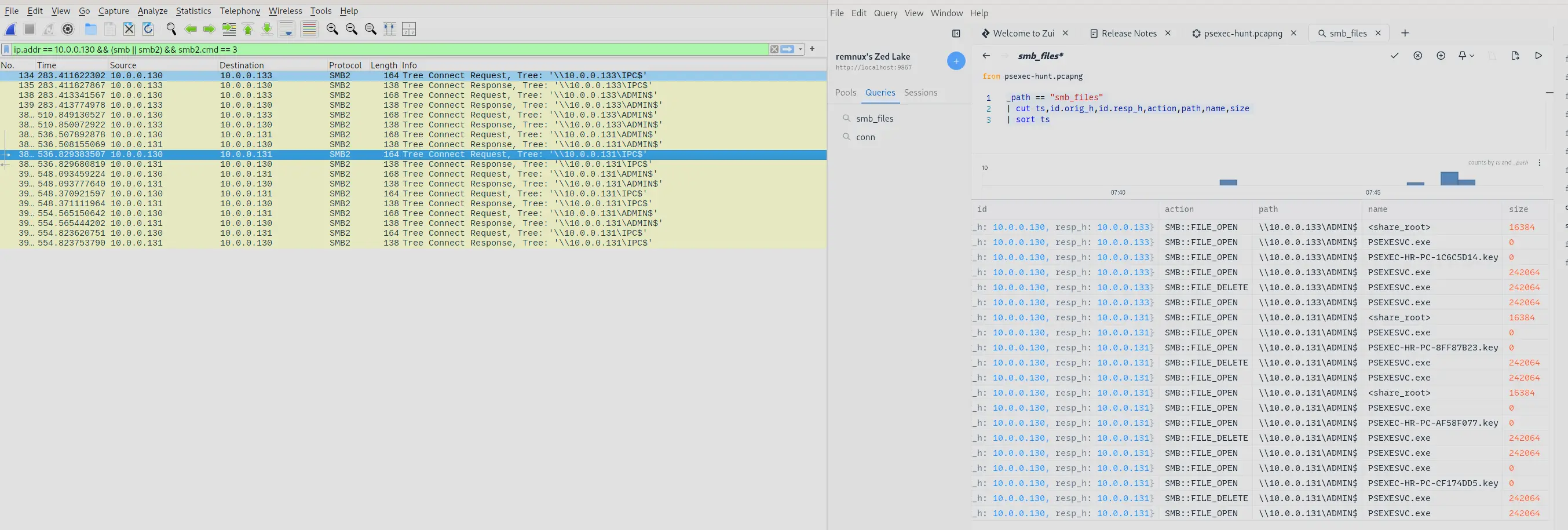
Wireshark and ZUI output side by side showing IPC$ Tree Connect re-negotiations
Answer: IPC$
Q7 — Further Lateral Movement
Now that we have a clearer picture of the attacker’s activities on the compromised machine, it’s important to identify any further lateral movement. What is the hostname of the second machine the attacker targeted to pivot within our network?
All we have to do is filter for the Session Setup Request and Response packets between 10.0.0.130 and 10.0.0.131.
We do this using the filter,
ip.adder == 10.0.0.130 && ip.addr == 10.0.0.131 && smb2.cmd == 1
Giving us the following,
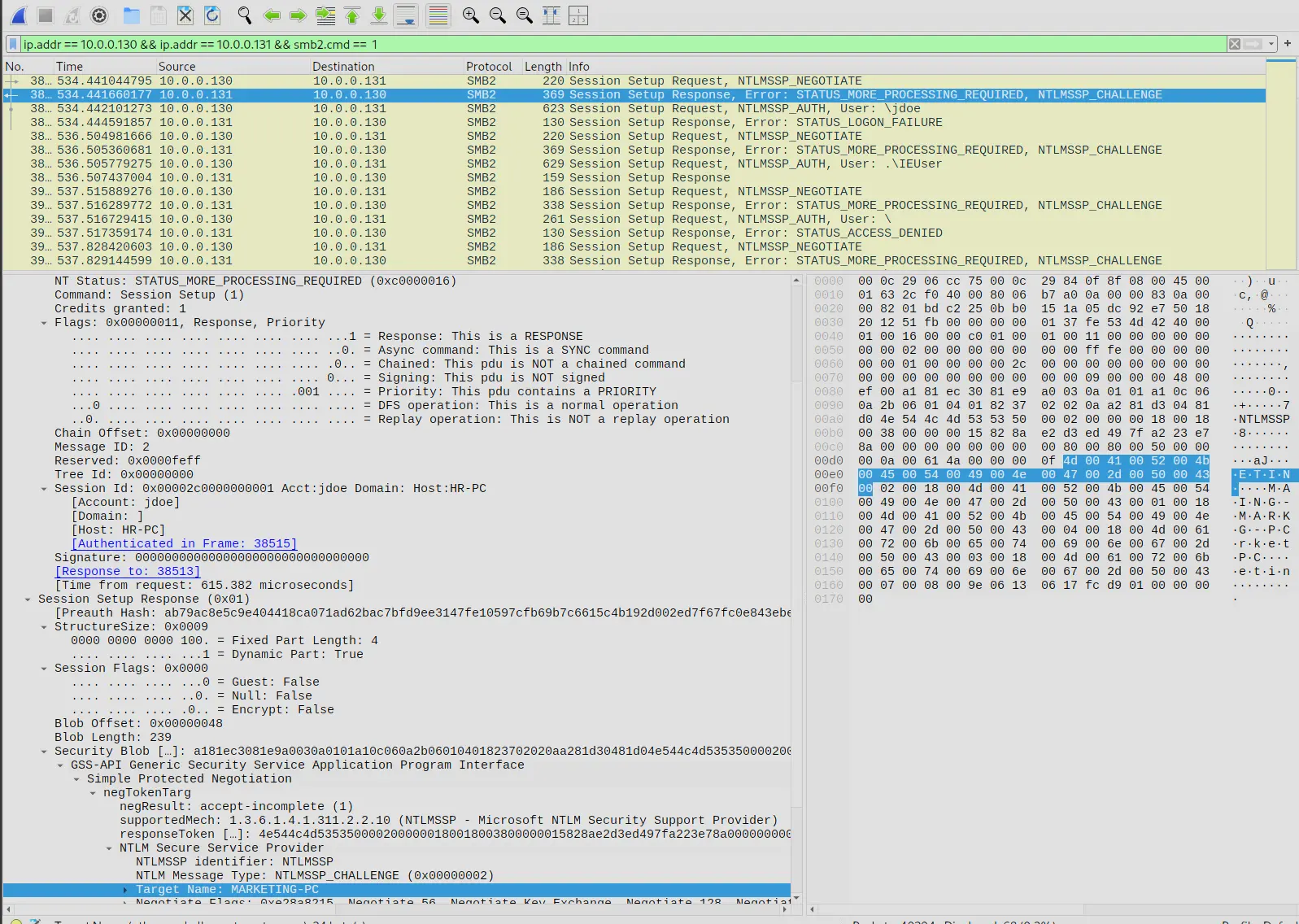
Session Setup response revealing the hostname of the second targeted machine
Which tells us 10.0.0.131 has host name MARKETING-PC.
Answer: MARKETING-PC
Completion
I successfully completed PsExec Hunt Blue Team Lab at @CyberDefenders! https://cyberdefenders.org/blueteam-ctf-challenges/achievements/francisvil3213/psexec-hunt/