#endpoint-forensics #volatility3 #hex-dump #byte-offset #cyberdefender-medium #reviewed #finished
Scenario
Investigate Windows memory images using Volatility3, PowerShell, and a hex editor to extract system artifacts, analyze processes, network connections, and reconstruct user activity.
Questions
Q1 — RAM Image Acquisition Time
What time was the RAM image acquired according to the suspect system?
Approach: Use the windows.info.Info plugin in Volatility 3, which reports basic metadata about the memory image including the acquisition timestamp.
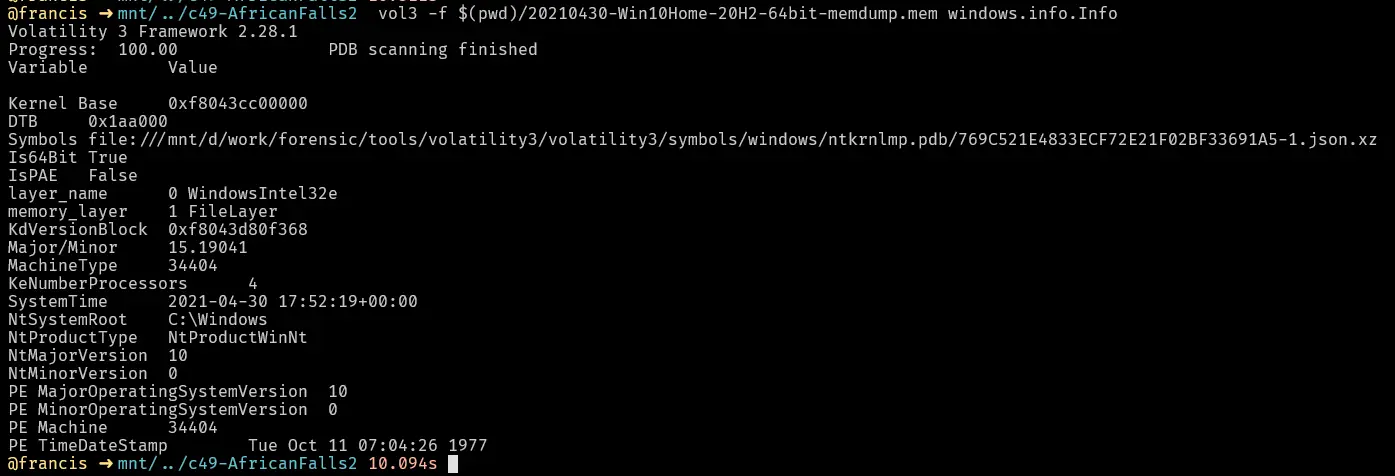
Volatility 3 windows.info output showing the image acquisition time.
Answer: the value shown above
Q2 — SHA256 Hash of RAM Image
What is the SHA256 hash value of the RAM image?
Approach: Hash the memory dump with sha256sum on Linux or Get-FileHash in PowerShell.
sha256sum <memory.dmp>

SHA256 hash of the RAM image.
Answer: the value shown above
Q3 — PID of brave.exe
What is the process ID of brave.exe?
Approach: Use windows.pslist to list all running processes at capture time.

Full windows.pslist output.

brave.exe entry showing its process ID.
Answer: the value shown above
Q4 — Established Network Connections Count
How many established network connections were there at the time of acquisition?
Approach: Run windows.netscan and filter the output with grep -i established.
grep -i established

windows.netscan output filtered to show only established connections.
Answer: the value shown above
Q5 — Chrome’s Connected Domain
Which domain name does Chrome have an established network connection with?
Approach: From the windows.netscan output, identify Chrome’s established connection IP, then perform a whois lookup to resolve it to a domain.

Chrome’s established connection to 185.70.41.130 in netscan output.
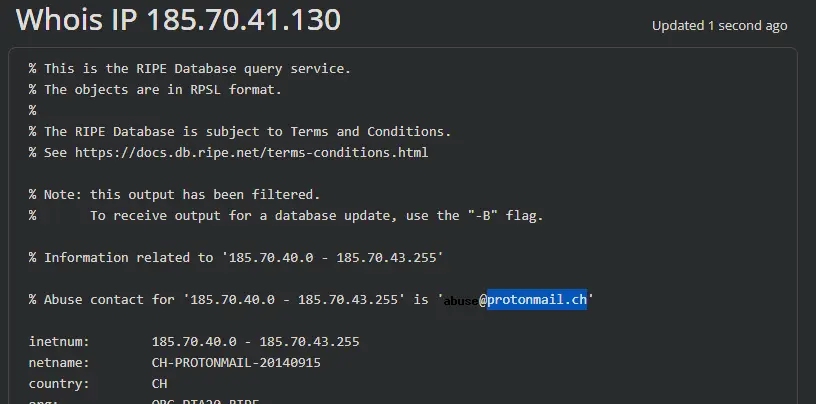
Whois lookup confirming 185.70.41.130 belongs to protonmail.ch.
Answer: protonmail.ch
Q6 — MD5 Hash of PID 6988 Executable
What is the MD5 hash value of the process executable for PID 6988?
Approach: Dump the process executable using windows.pslist with --dump --pid 6988, then hash the output file.

Dumping the PID 6988 process executable with --dump --pid 6988.

MD5 hash of the dumped executable.
Answer: the value shown above
Q7 — Word at Hex Offset 0x45BE876
Can you identify the word that begins at offset 0x45BE876 and is 6 bytes long?
Approach: Use xxd with -s (seek to byte offset) and -l (byte length) to read 6 bytes at the target offset, or navigate to the offset directly in HxD.
xxd -s 0x45BE876 -l 6 <memory.dmp>

xxd output showing the 6-byte value at offset 0x45BE876.
Or using HxD: Ctrl+G → enter the offset → cursor jumps to that byte.

HxD navigated to offset 0x45BE876.
Answer: the value shown above
Q8 — Parent Process Creation Time
What is the creation date and time of the parent process of powershell.exe?
Approach: Use windows.pslist and grep for powershell’s PPID to find the parent process entry with its creation timestamp. (windows.pstree is avoided because the Volatility 3 implementation omits creation times.)

windows.pslist output showing powershell.exe’s parent process and its creation time.
Answer: the value shown above
Q9 — Last File Opened in Notepad
What is the full path and name of the last file opened in notepad?
Approach: Use windows.cmdline filtered for notepad to see what file argument was passed on invocation.

windows.cmdline output for notepad.exe showing the last opened file path.
Answer: the value shown above
Q10 — Brave Browser Usage Duration
How long did the suspect use Brave browser? (In Hours)
Approach: Use windows.registry.userassist, which tracks the total time a window was in focus.

windows.registry.userassist output showing Brave’s total focus time.
Answer: the value shown above
Completion