#x64dbg #cyberdefender-medium #ghidra #IDA #malware-analysis #finished #reviewed #CyberDefenders #CyberSecurity #BlueYard #BlueTeam #InfoSec #SOC #SOCAnalyst #DFIR #CCD #CyberDefender
Scenario
As a malware analyst at CyberResponse Inc., you are presented with a challenging case involving ATM malware named ATMii. The malware has been reported to cause ATMs to dispense cash illicitly. Your mission is to dissect this malware sample, understand its components, and uncover its method of attack. This exercise is crucial in developing countermeasures to protect financial institutions from similar threats.
Investigation
The provided tools in this lab are only Ghidra, x64dbg and IDA.
Let’s skip the triage and just go straight to static analysis of the code to see if we can find anything of use.
We will use IDA here.
When opening the artifacts folder, we will see two files which are
executablelibrary
My first impression of the file is not much apart from that the name library feels like it hints towards a malicious DLL.
Let’s start our investigation with the executable by opening it in IDA.
Executable
Strings
Before we really dive into the execution, let’s just look over the hard coded strings.
We enter the string view for IDA by either navigating through View > Open Subview > Strings or just pressing Shift + F12.
Which gives us the following,
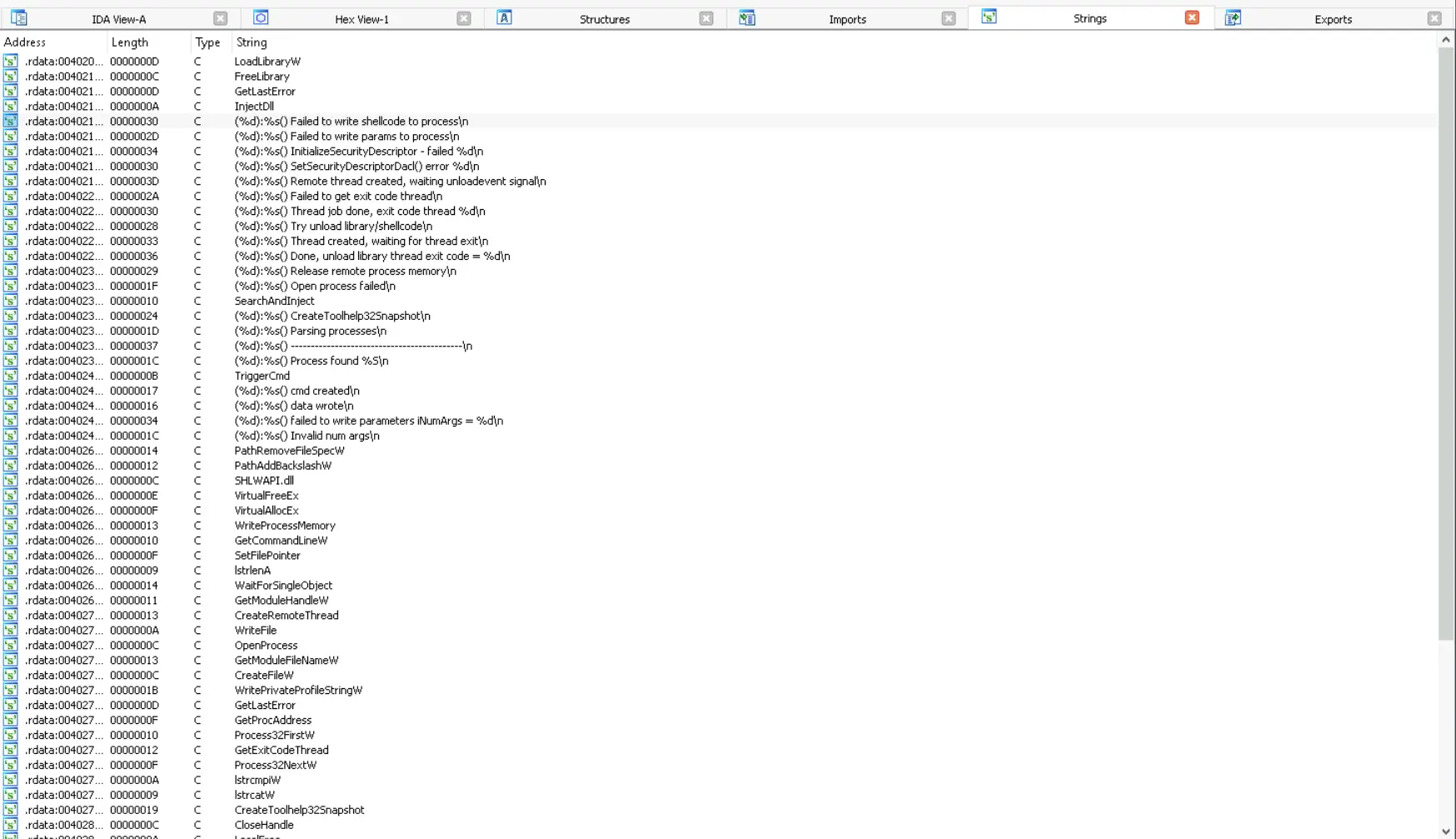
Hard coded strings
Immediately we will see some strings that are suspicious and tell us of the true purpose of the executable.
For instance, .rdata:00402128 00000030 C (%d):%s() Failed to write shellcode to process\n implies the program has logic to write shell code into a process. Furthermore, .rdata:00402368 00000010 C SearchAndInject and strings like .rdata:0040211C 0000000A C InjectDll implies the program has logic to search for something, likely a process, to inject a DLL into.
Let’s now look at some of the code to see what we can find.
Entry
If we look at the entry basic block of executable we will see the following,
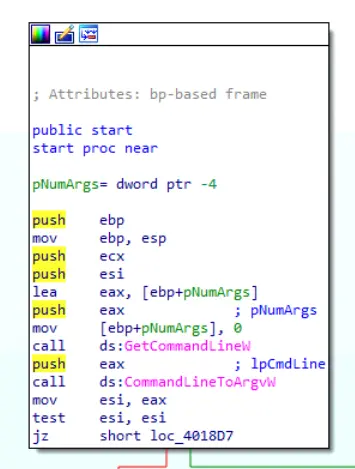
Entry basic block
If we resolve this block this essentially just takes the command line that invoked the process as a string then splits the string by space. This results in an array of arguments which is tested to be empty or not. If it is empty, then terminate. If not then continue to the next blocks.
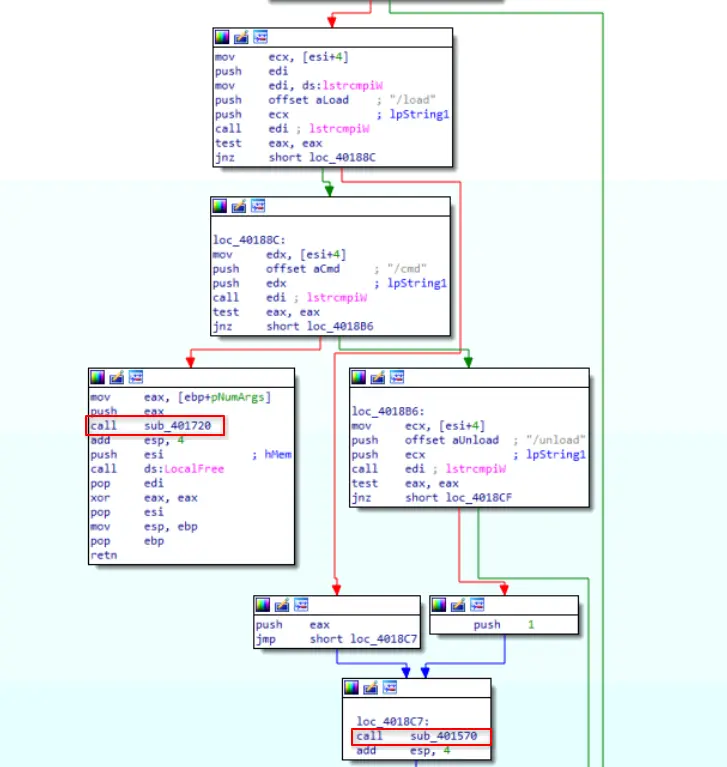
Next blocks
If we look at the next few blocks, it is checking what is the second argument in argv against a hard coded value. Based on the results of the comparison, it will call different functions.
In short,
- It checks if the second argument is
/load!=0: go toloc_40188C0: jump toloc_4018C7and callsub_401570
loc_40188C: Check if second argument is/cmd!=0: go toloc_4018B60: Grab value ofpNumArgs, push on to stack and callsub_401720.
loc_4018B6: Check if second argument is/unload!=0: goloc_4018CF0: callsub_401570
There are two interesting subroutines here and they are triggered based on the following
- Program was invoked with
/loadas argument -> Callsub_401570 - Program was invoked with
/cmdas argument -> Callsub_401720 - Program was invoked with
/unloadas argument -> Callsub_401570butpush 1. Passing1as argument is almost certainly a flag used in the actual load sub routine for something. - Program was invoked with anything else or nothing -> Exit
Let’s analyse these subroutines.
Let’s start with sub_401570 first because it seems to be main load function of the program.
sub_401570
On opening this sub routine we will see that some of the strings we identified are actually referenced in this part of the code.
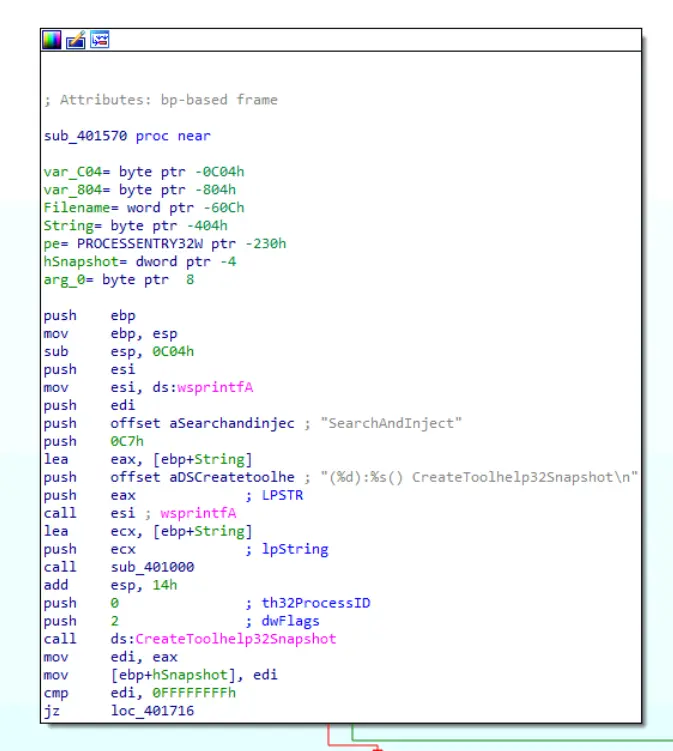
First block in sub_401570
The main thing in this block is the call made to CreateToolhelp32Snapshot which if we check on the MSDN is a call to the Windows API to take a snapshot of the specified processes.
We should also look at the arguments being passed to the call which are dwFlags = 2, th32ProcessID = 0, these configures CreateToolhelp32Snapshot to capture all processes in the system.
Furthermore, if we look at the code before the call to snap shot the processes. We can see what looks like logging with the calls being made to wsprintfA. If we resolve this we will get the line (199): SearchAndInject() CreateToolhelp32Snapshot\n.
It is clear that the malware is enumerating all processes on the system to find a particular process. We should determine what that process is. If we follow the code flow we will find the next block,
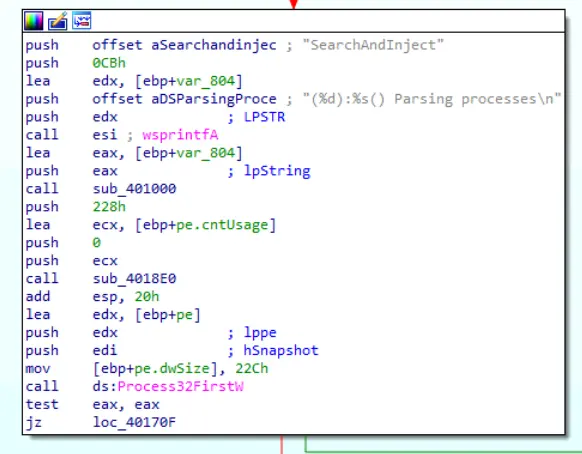
Call made to Process32FirstW
If we read the documentation on CreateToolhelp32Snapshot, we will see that to enumerate the processes, we will need to call Process32FirstW then Process32NextW. We can see the malware author doing that here together with another log message that resolves to (203):SearchAndInject() Parsing processes\n.
The next few blocks is essentially just the process looping through the processes on the system. What is important is that we find what app it was looking for which we will see in the following blocks.
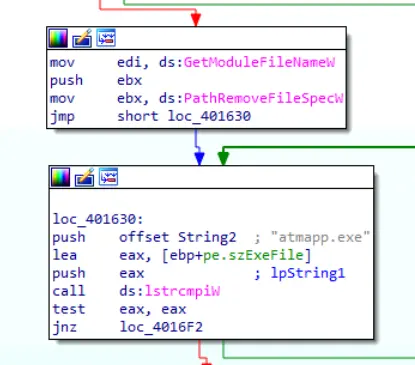
Looking for specific process
The first block in the above screenshot is actually doing a different job. The main outcome of that block is to grab the current working directory of the executable. We will see why the malware does this later on.
The second block is the most interesting here because it checks if the current process being checked has a process name that matches atmapp.exe. Therefore, this is the process that the malware is specifically trying to find.
If we continue to the blocks after the process found atmapp.exe we will see the injection process and also what is being injected.
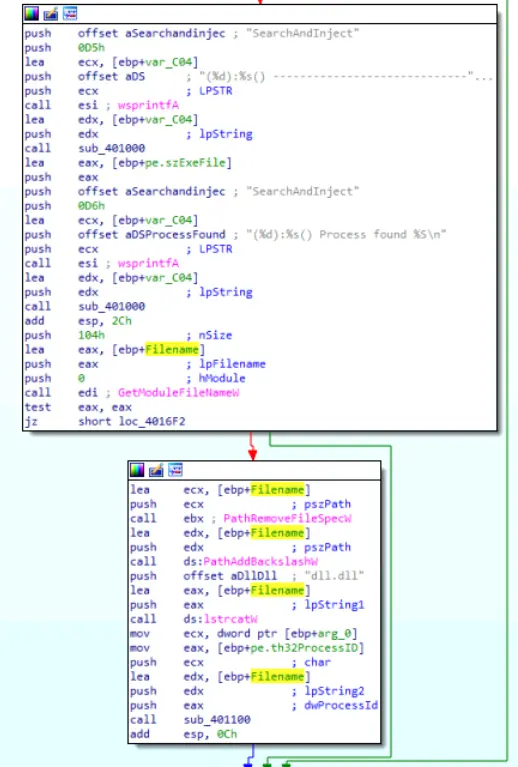
Blocks following process match — log entries and DLL injection call
Looking at these two blocks, we will see that once the process is found. The malware creates a few log entries and more importantly calls the subroutine to inject the DLL. We can see in the second block the DLL being injected is dll.dll as it is defined as a hard coded string and its full path is being passed to the next sub routine as an argument.
Also notice that the way the path is constructed for the dll.dll, implies that it must be in the same directory as the main malware executable.
Let’s analyse subroutine sub_401100 because this is likely the actual injection routine.
sub_401100
This subroutine is characteristic of a DLL injection we can see this in the calls being made.
Firstly, the program gets a handle for the identified process by calling OpenProcess which we know is atmapp.exe. As seen below,
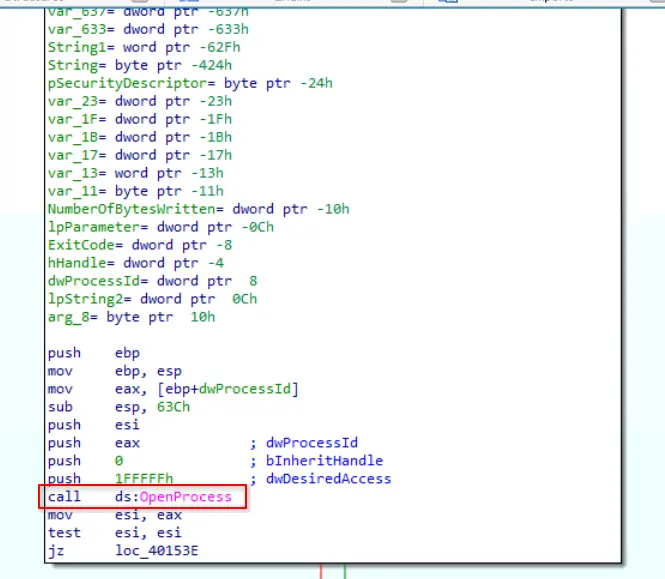
Get handle for atmapp.exe
Then it allocates memory inside the process by calling VirtualAllocEx.
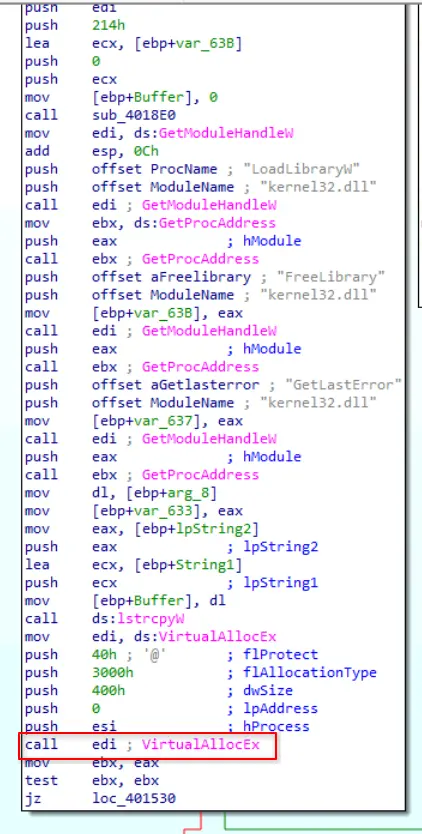
VirtualAllocEx call
Then it writes a subroutine into this allocated memory using WriteProcessMemory. The subroutine being written is sub_401090.
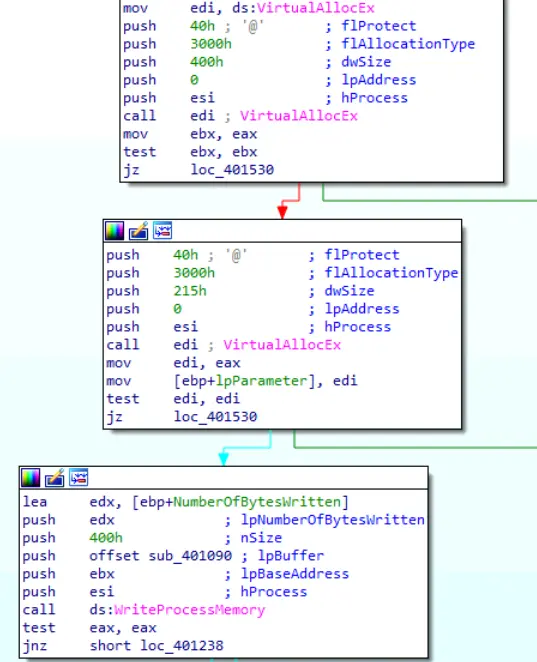
Writing subroutine into atmapp.exe memory
After writing the shell code into the memory, the program then creates a remote thread in atmapp.exe which runs the injected code.
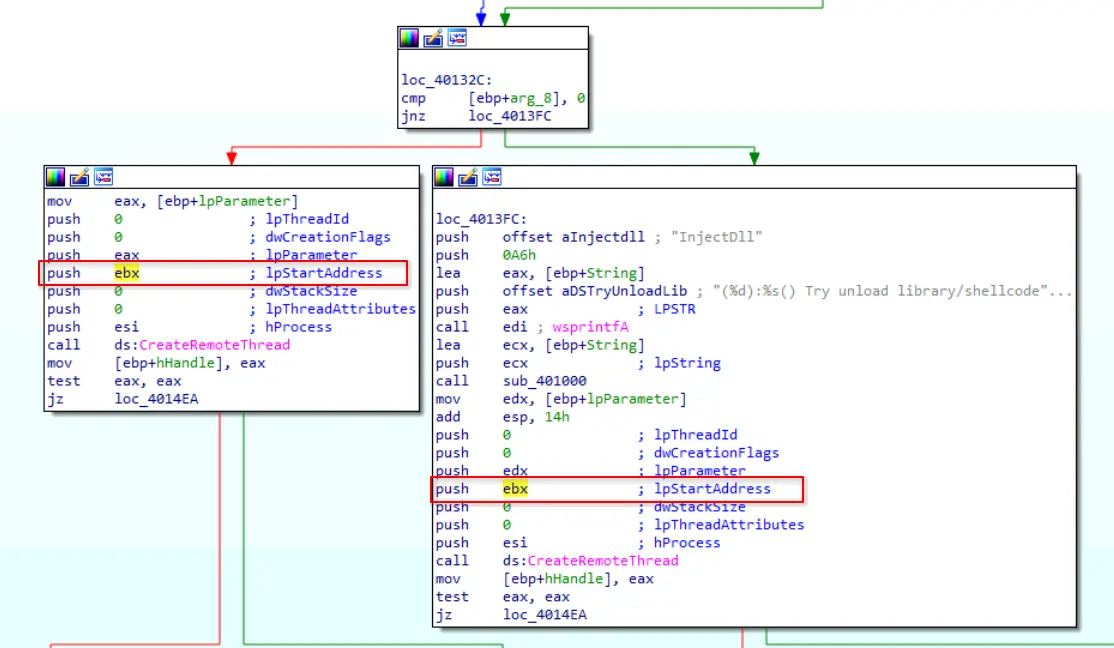
CreateRemoteThread for executing injected code
Interestingly, this is also where the flag passed as an argument is being used. Recall that when this program is invoked with /unload, the program pushes a 1 on the stack then calls sub_401570 which calls sub_401100.
We can see that if [ebp+arg_8] is 0 then it goes the left block, if it is not 0 then it goes to the right block which tries to unload the library/shell code.
The created remote thread then runs to either run the shell code or unload the library. After which, it frees the memory for the shell code and returns to the caller.
Therefore, this process handles the loading or unloading of a malicious DLL, dll.dll, into a process atmapp.exe.
The key details are
- Target process of malware:
atmapp.exe - Malicious DLL:
dll.dll dll.dlland the malicious executable must be in the same directory- The shell code is
sub_401090and is therefore at0x00401090
sub_401720
Having analysed sub_401570, let’s step back a bit and look at the sub being called by the program if it was invoked with /cmd.
Below, is the block that calls sub_401720.
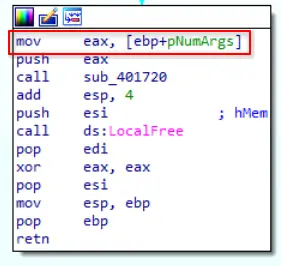
Argument passed to sub_401720
Take note that the pNumArgs which is the number of arguments parsed in the command line of the program is being used by sub_401720 as an argument.
Clicking into the subroutine we will see,
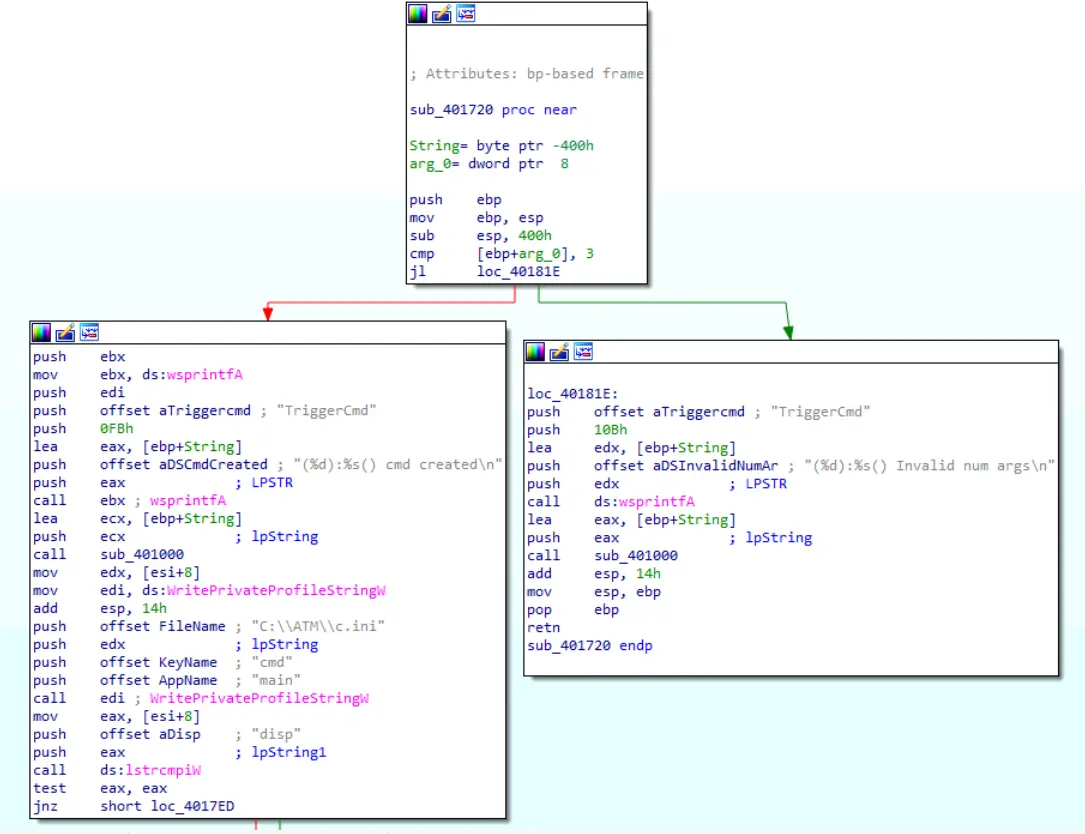
First three blocks of sub_401720
The malware checks if the supplied number of arguments is more than or equal to 3. It does this by performing a cmp operation between [ebp+arg0] and 3. Then it performs a jl operation which applies the actual comparison logic and decides which branch to take.
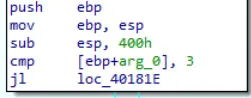
Performing comparison
If less than 3, it logs that the number of arguments is invalid, returns to the caller and exits the program.
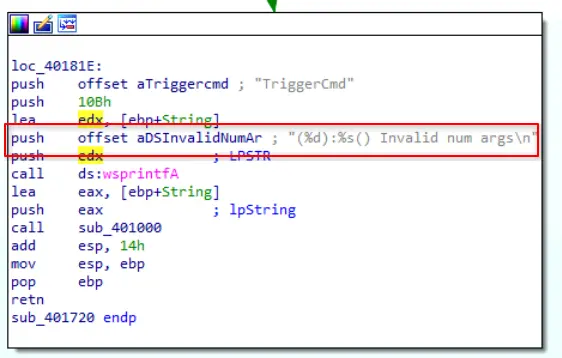
Invalid number of arguments
If it is more than or equal to 3 then it first logs the creation of the cmd then creates a .ini file by calling WritePrivateProfileStringW.
It then creates a section named main and a key with name cmd.
The value of that key is [esi+8] which is the third argument in the command line.
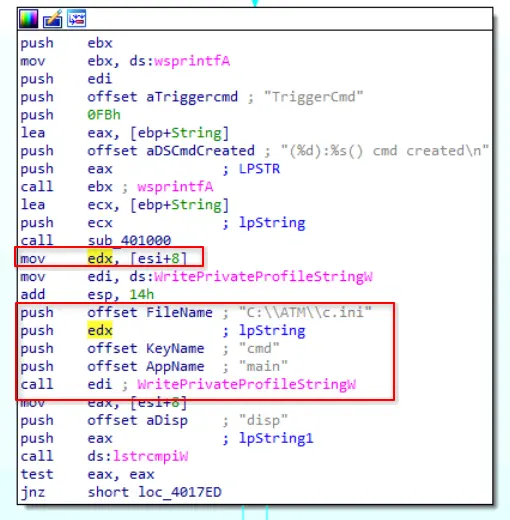
Creating .ini file
Therefore, if the program was called with malware.exe /cmd arg2 then the corresponding content will be created.
[main]
cmd=arg2
It then checks if the third argument is equal to disp or not.
If it is not equal it will log a failure to write parameters and returns to caller.
If it is equal to disp then the program checks if the command line arguments are more than or equal to 5.
If not, it goes to the same block that logs a failure to write the parameters.
Otherwise, it performs the following,
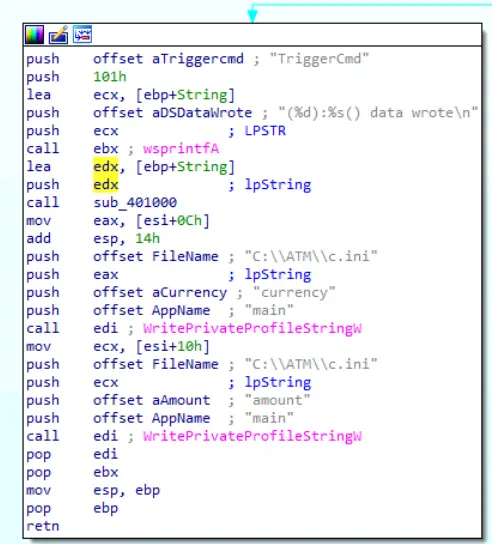
Writing parameters
It grabs the 4th and 5th arguments and use them to populate 2 more key value pairs.
It creates a key named currency under section main and the value is [esi+0Ch].
It creates a key named amount under section main and the value is [esi+10h].
Therefore, if the program was invoked with
malware.exe /cmd disp SGD 100
Then the resulting c.ini will be
[main]
cmd=disp
currency=SGD
amount=100
It is clear that this subroutine is defining a configuration file for the malware.
In particular, it seems to be defining the parameters for disp which is likely a short form of dispense.
Key details are
- Configuration file name:
c.ini - Configuration file hard coded path:
C:\\ATM\\c.ini - Configuration only accepts
dispand related parameters
Summary for executable
This executable file is a command line tool that accomplishes a few things
- Allows threat actor to configure the malware
- Allows threat actor to load or unload the malware’s malicious DLL
It has the following accepted arguments
/cmd: Allows for the configuration of the malwaredispcurrencyamount
/load: Injects shell code into a running processatmapp.exeand uses that to loaddll.dll./unload: Unloads the malicious library
Key details to note
- Target process of malware:
atmapp.exe - Malicious DLL:
dll.dll dll.dlland the malicious executable must be in the same directory- The shell code is
sub_401090 - Configuration file name:
c.ini - Configuration file hard coded path:
C:\\ATM\\c.ini - Configuration only accepts
dispand related parameters
Library
Having investigated executable, let’s now look at library.
This file is very likely the dll.dll we identified earlier.
Strings
Similarly, to our investigation of executable, let’s first look over the defined strings.
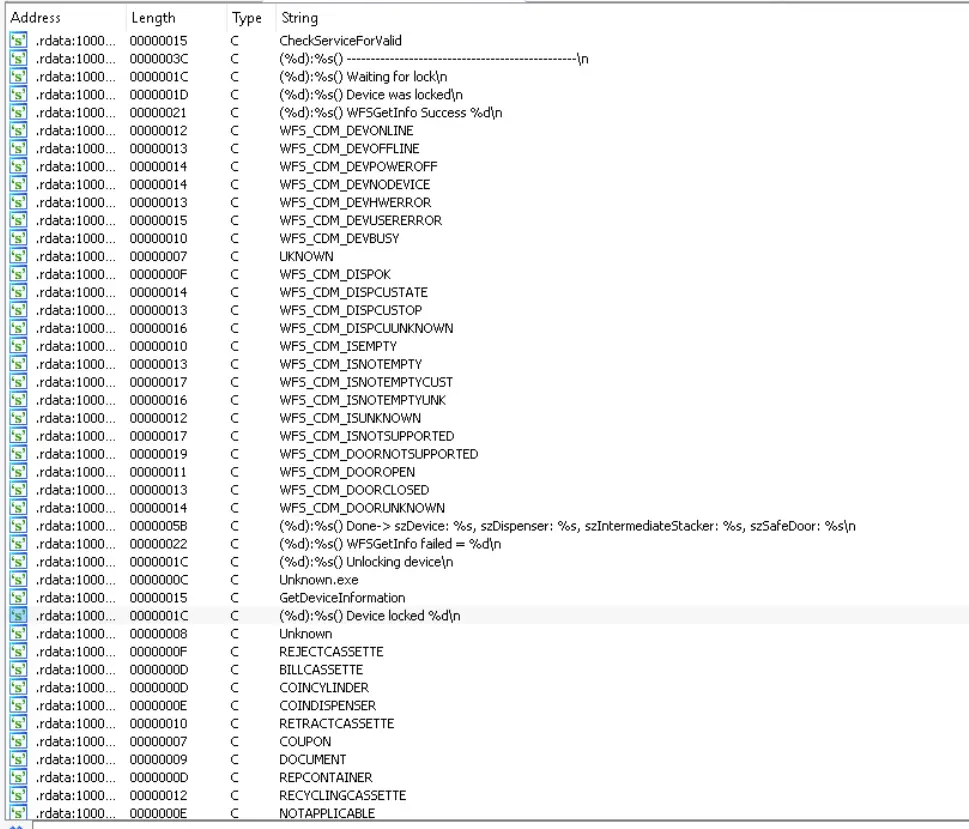
Strings in library
The strings that stand out the most are those prefixed with WFS.
These strings if we google them, we will find this document for Cash Dispenser Device Class Interface. In short, the strings found in the malicious DLL are either event information or commands.
Strings prefixed with WFS_CDM are just event information whereas strings prefixed with WFS_CMD are commands.
In fact, if we filter the defined strings for WFS_CMD.
We will find the following,

Dispense command log
Which looks like a log that states the command failed.
WFS_CMD_CDM_DISPENSE is a command that performs the dispensing of items to the customer. As defined in the documentation,
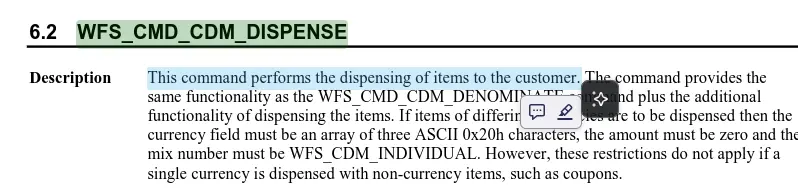
Documentation definition of command
Also note that the function calling this command is WFSExecute.
Therefore, we know that somewhere in this library is code that tries to make the ATM dispense money to the threat actor. This is corroborated by our findings in executable where we found a configuration file detailing the parameters to a disp, likely short form for dispense, function.
DLL Entry
When we click into the DllEntryPoint we will find two branching paths.
One path unloads the malicious library and functions and the other initialises the library and hooks to a valid service.
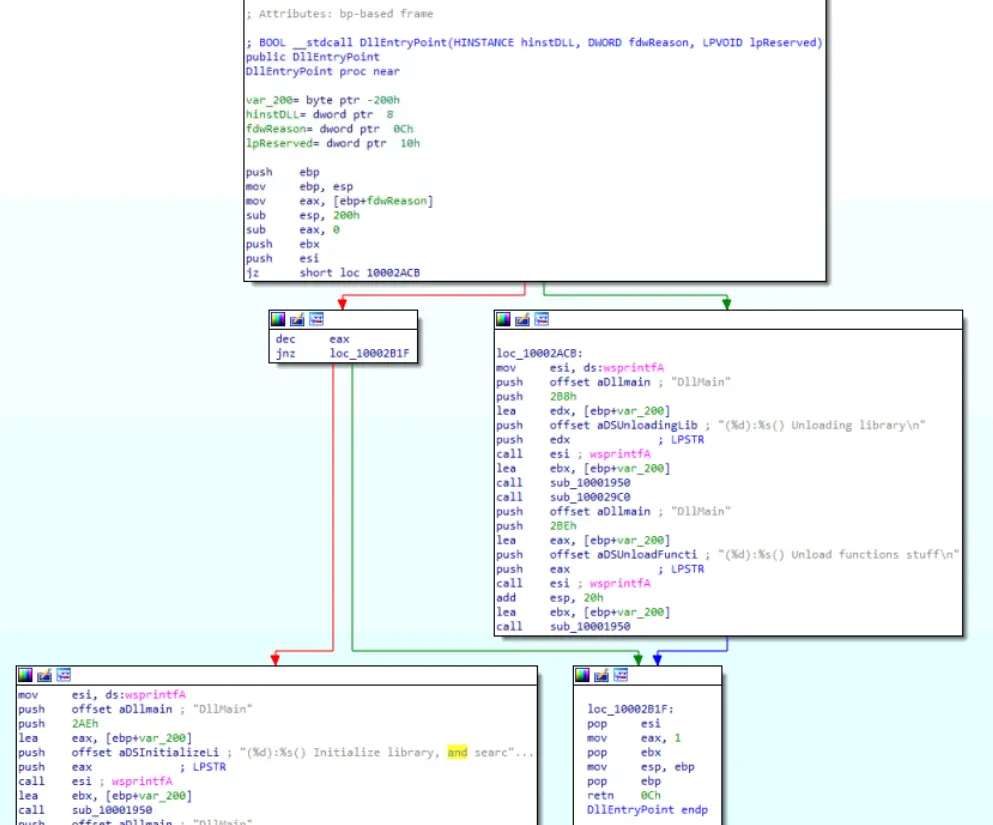
Branching paths in DllEntryPoint
We are primarily concerned with the path that initialises and hooks to a valid service which is the block below.
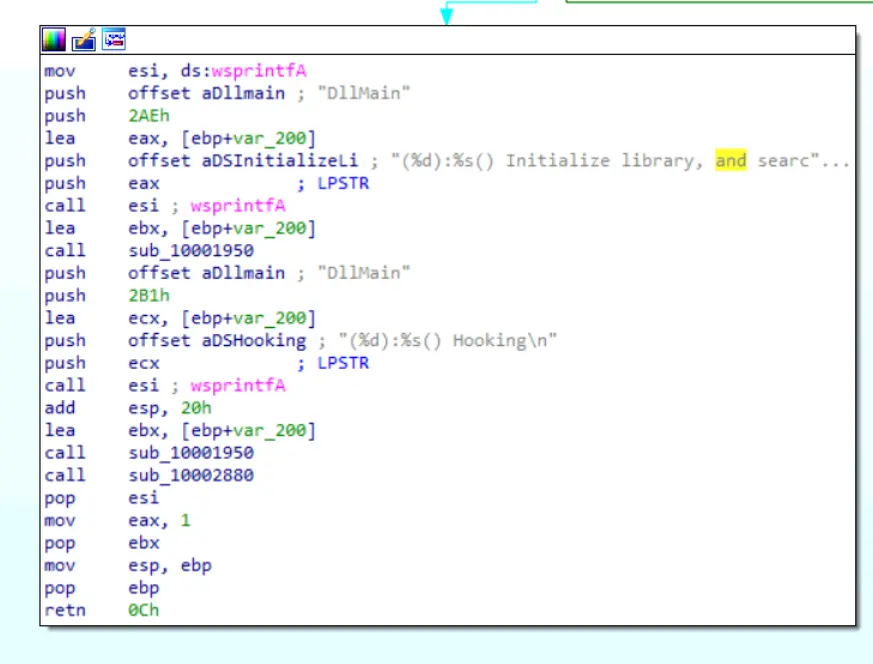
Initialise and hook block
Analysing the instructions this block just creates logs that the initialisation and hooking process is starting. The block makes calls to two subroutines which are
sub_10001950sub_10002880
A brief look at each subroutine reveals that sub_10001950 is just for logging purposes and the actual hooking process is defined in sub_10002880.
Let’s look into that.
sub_10002880
When we click into this subroutine we will see the following,
The process pushes variables ProcName which is WFSGetInfo and ModuleName which is msxfs.dll onto the stack.
A google search will also tell us that msxfs.dll is Microsoft’s implementation/manager of the XFS standard, and it allows Windows-based ATM software to send standardised commands to banking hardware like cash dispensers, card readers, and pinpads, regardless of which vendor made them.
It then calls LoadLibraryW which returns the handle to the loaded library and only takes 1 argument. This step essentially tries to load msxfs.dll and get a handle for it.
It then caches the address of GetProcAddress into edi then makes the call to GetProcAddress with the arguments being the handle of msxfs.dll and ProcName which is WFSGetInfo.
This returns the procedure address of WFSGetInfo into eax which is then later saved into dword_10004218.
The author then gets the module handle to msxfs.dll again as eax was overwritten in the prior call to GetProcAddress.
This time he saves that handle into esi and checks if esi is zero or null.
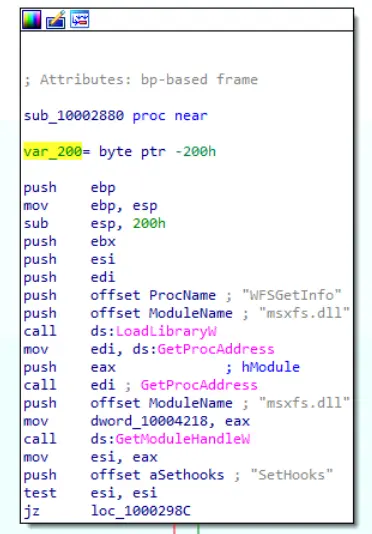
Loading msxfs.dll and getting procedure address of WFSGetInfo
The second block after this if it does not take the jump i.e. it falls through, is another block that
logs that module was found and gets the procedure address of WFSGetInfo again. This time saving that returned procedure address into esi.
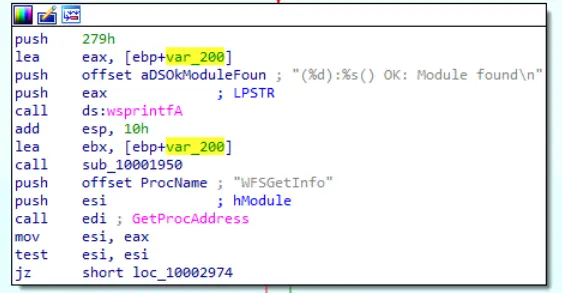
Getting procedure address of WFSGetInfo again
Then if the code falls through again, it tries to obtain the procedure address of CloseHandle in kernel32.dll.
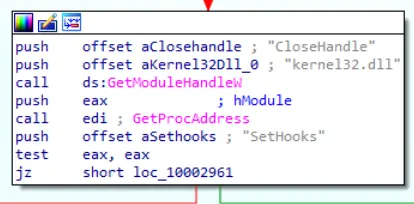
Getting procedure address of CloseHandle
The final block in this chain first logs that WFSGetInfo was found and the current registers are set with the following values
esi: Procedure address ofWFSGetInfoeax: Procedure address ofCloseHandle
It then asks for a handle to the current process running this code. Which in this context and from what we found in the previous investigation of executable, is very likely a handle to the atmapp.exe process. This also overwrites the value in eax to instead be the handle to atmapp.exe.
It then pushes this handle onto the stack which IDA aptly automatically labelled as hProcess.
Then moves the literal address 1000420C into eax.
Finally, it moves the procedure address of WFSGetInfo into ecx from esi.
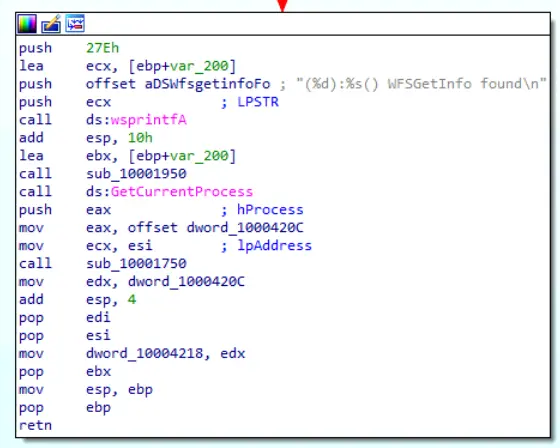
Final block just before calling sub_10001750
Therefore for sub_10001750 following key details are
eax:1000420Cecx: Procedure address ofWFSGetInfodword_10004218: Procedure address ofWFSGetInfo, likely a cache
In summary, this chain of blocks was just to make sure msxfs.dll existed and that the program is able to grab both the handle of atmapp.exe and the procedure address of WFSGetInfo to setup the next stage of the hooking process.
Let’s click into sub_10001750 and analyse it.
sub_10001750
We already know that the threat actor aims to hook into the WFSGetInfo API.
This means that we are likely to see the following calls
1. GetProcAddress -> Retrieved already in caller
2. VirtualAllocEx -> Allocate memory for the malicious patch nearby
3. VirtualProtectEx -> make WFSGetInfo's page writable
4. WriteProcessMemory -> apply the malicious patch
5. VirtualProtectEx -> Restore original page permissions
Our main target here is to identify the malicious code.
Since, the patch happens at the WriteProcessMemory and this only can happen after the WFSGetInfo page is writable.
We are very likely to find the malicious code in the area of code between a successful VirtualProtectEx and the call being made to WriteProcessMemory.
This allows us to skip ahead in this sub routine and just focus on what is important to us which is the code below,
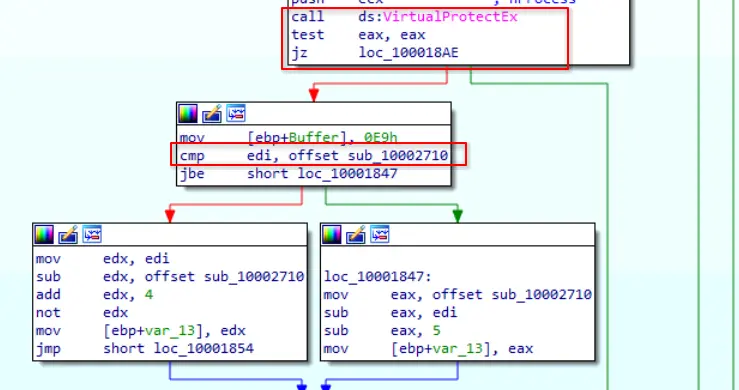
Code of importance
Notice how if the VirtualProtectEx is successful (return value is non-zero), it goes to a block that
- Pushes the opcode for a
JMP rel32into a variable namedBuffer. We can verify this is the opcode by referring to this. - Compares
ediwithoffset sub_10002710, this sets the CPU flags used in the latterjbeoperation
Let’s trace what edi is.
For majority of the code up until this point, edi was not overwritten.
The only time its value was changed was at the very beginning of this subroutine where the value of ecx was moved into edi.
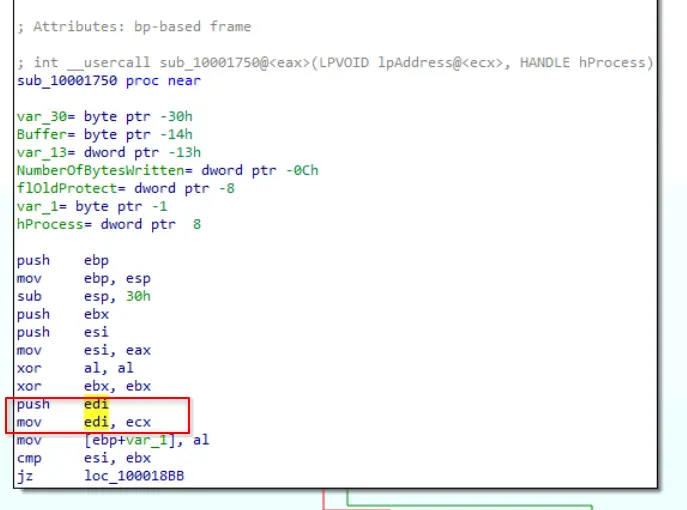
Value of edi
We know from our analysis of the caller that ecx is the procedure address of WFSGetInfo so that means edi will hold the same address.
Also notice how Buffer is a byte ptr and var_13 is a dword ptr.
Furthermore, Buffer and var_13 are arranged contiguously in memory, notice their offsets are -14h and -13h respectively.
Let’s go back to the code constructing the patch.
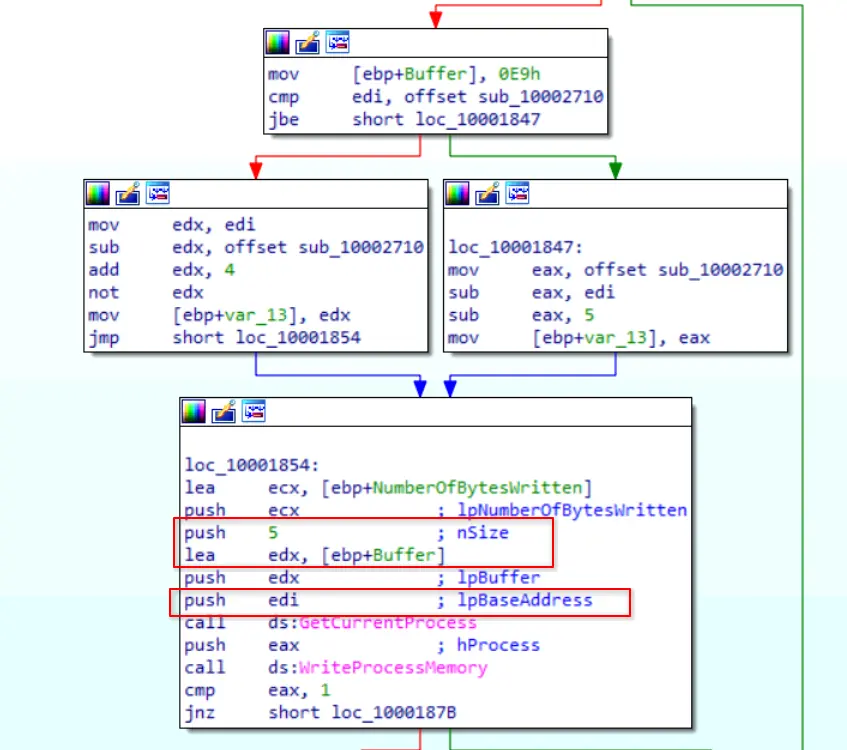
Constructing and applying the patch
After the op code 0xE9 is moved into [epb+Buffer], the code needs to then figure out how much to jump by and in what direction.
It first performs a jbe operation comparing the procedure address of WFSGetInfo and sub_10002710.
This determines if sub_10002710 is ahead or behind.
It then calculates the actual offset needed based on the result of that jbe operation.
The two blocks following it are just calculating the offset needed.
After calculating this offset, it saves the 4 byte offset into var_13.
Therefore, we can conclude
[buffer] 0xE9
[var_13] calculated offset byte 1
[var_13] calculated offset byte 2
[var_13] calculated offset byte 3
[var_13] calculated offset byte 4
It then constructs the arguments and the call to WriteProcessMemory where it sets the following arguments
nSize:5lpBuffer:edx, which is just the effective address ofebp+BufferlpBaseAddress:edi, which we know is the procedure address ofWFSGetInfo
This means that once the call is made, the first 5 bytes starting from lpBaseAddress is replaced by the 5 bytes starting from the effective address of ebp+Buffer.
Since, buffer and var_13 are contiguous in memory, this means the first 5 bytes of WFSGetInfo is instead replaced with a JMP instruction to sub_10002710.
Therefore, the main code we want to analyse is in sub_10002710.
sub_10002710
Upon landing in this subroutine, we will see that the author identifies this as mWFSGetInfo as evident from the logging.
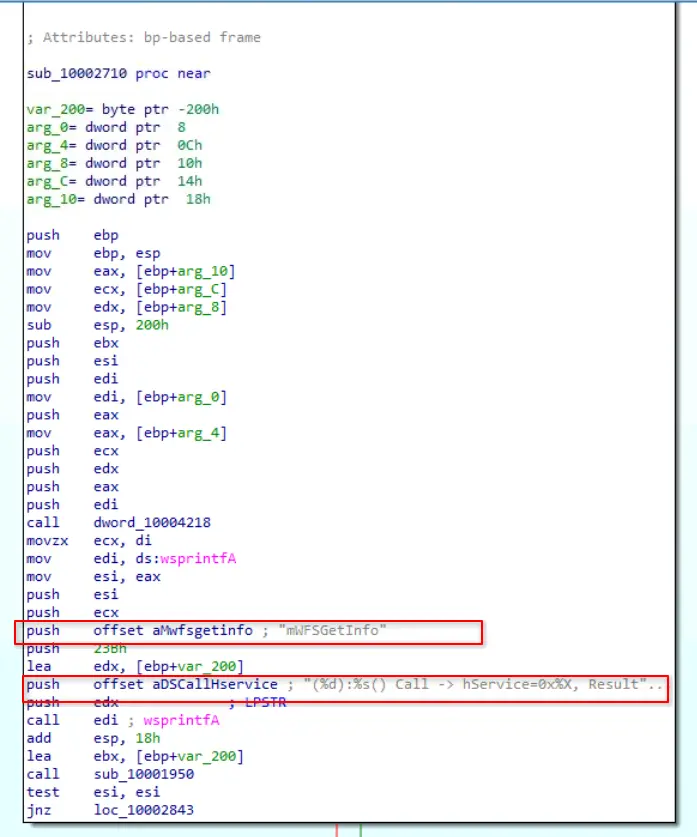
First block in sub_10002710
If we scroll down we will find a branch that checks if c.ini exists.
From our investigation of executable, we know that c.ini is the configuration file for the malware and contains parameters for functions.
Upon verifying c.ini exists, the code makes another call to sub_10002580.
We can also tell from the logs that this subroutine is trying to execute commands based on the c.ini.
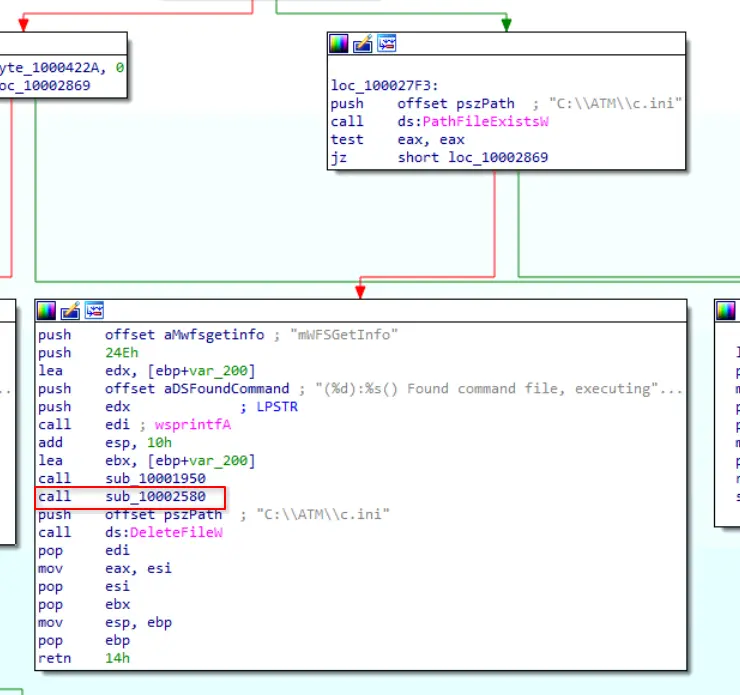
Verify c.ini and execute
sub_10002580
This sub routine on analysing it parses the contents of c.ini and based on the values parsed, will call certain sub routines.
We already know in the analysis of executable that it writes disp and relevant parameters.
Let’s find the particular branch that handles that command execution.
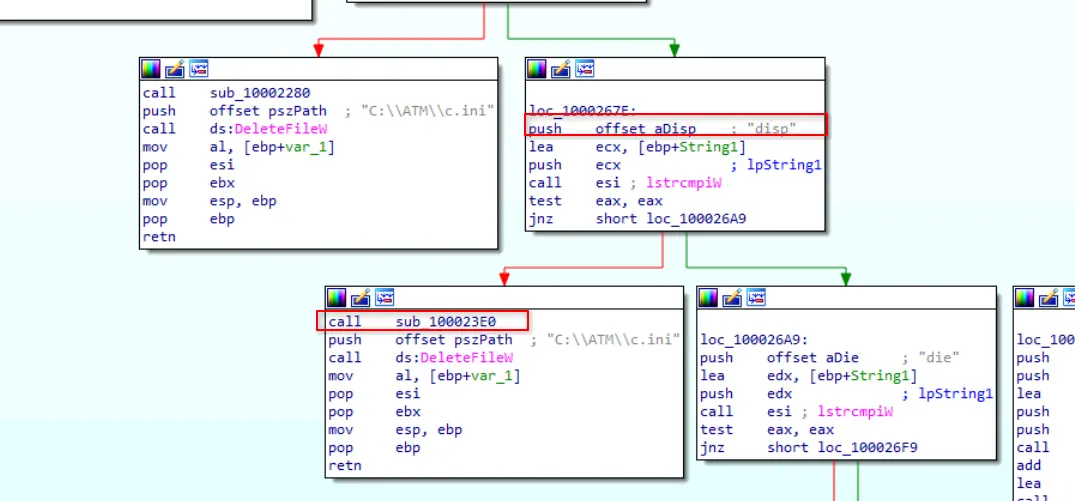
Branch concerned with executing disp command
From the above screenshot, we can see that upon verifying the disp command, it will make a call to sub_100023E0 then delete the c.ini file after it completes.
Let’s look into this sub routine.
sub_100023E0
This sub routine is concerned with parsing the parameters defined for the disp command.
In the first block of the subroutine it retrieves the values of keys currency and amount under the app main.
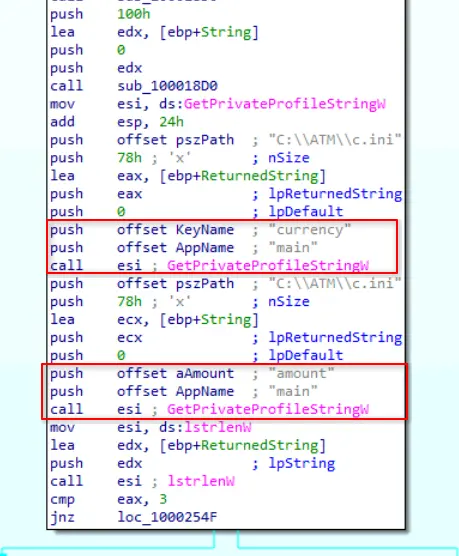
Reading currency and amount
After which it performs some validation checks on the retrieved values and if it passes will then make a call to sub_100022D0 which is likely the actual code that dispenses the requested amount.
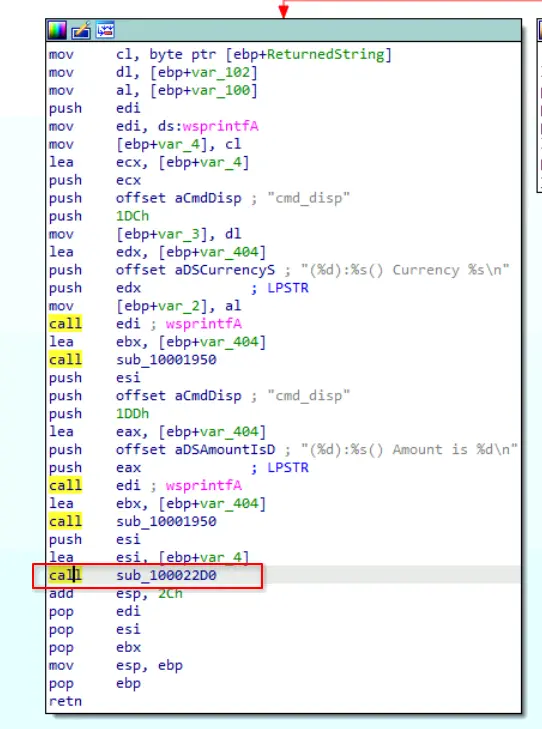
Calling sub_100022D0
sub_100022D0
Finally, after tracing the flow of the program we will see that the process makes a call to WFSExecute.
The results of call then branches into two blocks where one block handles the failure of the dispense command and the other handles the success.
We can quickly determine the purpose of these blocks due to the verbose logging the author left in the code.
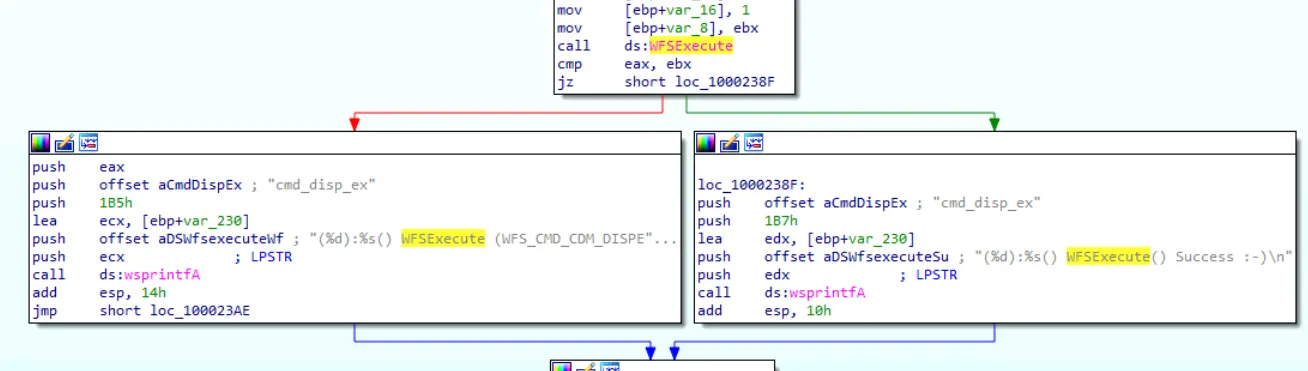
WFSExecute call and branching paths
Furthermore, if we look at the hard coded string for the logging of a failed WFSExecute call.
We can see the exact constant that is being passed for this command.

Constant being passed to WFSExecute
This is also validated by the Cash Dispenser Device Class Interface documentation we found earlier.
Summary for library
This DLL performs a few functions
- It searches for
msxfs.dllandWFSGetInfo - It applies a patch for
WFSGetInfothat causes the program to jump to the code that the malware author wants to run - The code then checks if
c.iniexists and if it does, parses the values inside of it - After it finishes parsing the values, it uses them to decide what command to dispatch to the ATM as well as the relevant parameters
- In this sample specifically, the threat actor was just mainly concerned with the
dispcommand. - The API being accessed to execute the dispense command is
WFSExecute - The constant that gets passed to
WFSExecuteisWFS_CMD_CDM_DISPENSE
Conclusion
To conclude this malware consists of two files: an executable and a malicious dynamically linked library that gets injected into the target process.
Our analysis shows the threat actors used it to query and dispense cash from the ATM by hooking the legitimate WFSGetInfo function and redirecting the calls through a malicious wrapper. The wrapper then reads attacker-supplied commands from a configuration file named c.ini to define its behaviour. Knowing this we can now answer the following questions.
Questions
Q1 — Process Name
Identifying the target process is crucial for understanding the injection vector. What is the name of the process into which the malicious library is injected?
We found this in sub_401570 in executable.
Process name check against atmapp.exe
Answer: atmapp.exe
Q2 — Configuration File Name
Determining the source of configuration commands can reveal the malware’s operational parameters. What is the configuration file name from which the DLL takes commands?
We found this in sub_401720 in executable.
Creating the .ini file — filename visible as hard coded string
Answer: c.ini
Q3 — Injected Library Name
The success of the injection depends on the correct file name. What should be the original name of the injected library to ensure the attack is successful?
We found this in sub_401570 in executable.
Hard coded dll.dll filename used to construct the injection path
Answer: dll.dll
Q4 — Shellcode Function Address
Identifying the function address where the shellcode resides helps track the malware’s execution flow. What is the address within the injector that houses the shellcode responsible for loading and unloading the malicious DLL?
We found this in sub_401100 in executable.
Writing sub_401090 into atmapp.exe memory as shellcode
Answer: 0x00401090
Q5 — ATM Interface Library
Understanding how the malware interfaces with the ATM hardware is key to analyzing its behavior. What is the name of the dynamic library that provides APIs for interacting with the ATM?
We found this in sub_10002880 in library.
Loading msxfs.dll and retrieving the address of WFSGetInfo
Answer: msxfs.dll
Q6 — Hooked API Function
Hooking functions allow malware to manipulate normal operations. What is the name of the original API function that the program hooks and redirects to its wrapper?
We found this as well in sub_10002880 in library.
Final setup block showing WFSGetInfo address loaded into ecx before the hook call
Answer: WFSGetInfo
Q7 — Dispense API Function
Knowing the function the malware utilizes is essential to identifying the malware’s functionality. What API function does the malware call to dispense money?
We found this in sub_100022D0 in library.
WFSExecute call and branching paths for success and failure
Answer: WFSExecute
Q8 — Dispense Command Constant
Recognizing specific constants can help in understanding command execution. What is the name of the constant responsible for the money dispensing command, which is passed as a parameter to the API function?
We also found this in sub_100022D0 in library.
Failure log string revealing the constant WFS_CMD_CDM_DISPENSE
Answer: WFS_CMD_CDM_DISPENSE
Completion
I successfully completed ATMii Blue Team Lab at @CyberDefenders! https://cyberdefenders.org/blueteam-ctf-challenges/achievements/francisvil3213/atmii/